How Ecommerce Platforms Connect Customer Data With ERP and Operational Workflows
Published: November 23, 2026
A person places an order for a pair of running shoes at 10 p.m. from your site and takes 40 seconds to look them over. The work after this is quite lengthy. Stock needs to be checked, a sales order needs to be generated, the pair needs to be reserved, a pick ticket needs to be sent to the warehouse, an invoice needs to be raised and the customer record needs to be updated. The next morning, someone copies data from the storefront and into the ERP.
There are lots of businesses that operate in this way for years. It remains until order volumes increase, a new marketplace is added or someone types “Stret” instead of “Street” and a parcel returns. Let's dive deeper into the ecommerce platform integration with ERP and how some processes work best, and what can you do with the orders that refuse to work with you.
Your ecommerce platform is there to sell. It powers the catalog, cart, checkout, payment and customer login. The ERP is this that drives the business and houses the ledger, stock, purchasing and fulfillment in addition to the customer master file, in most instances.
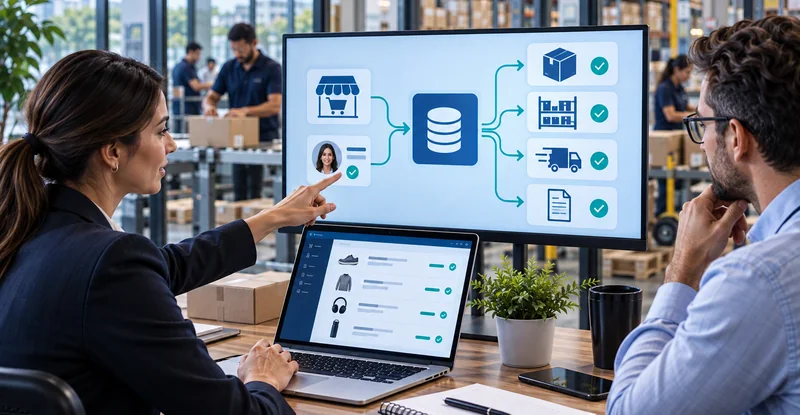
They do not have eyes to see everything. The store is aware of what they ordered and when. The ERP is able to tell you if the item is actually on a shelf, the cost of shipping, and if this customer still owes you money from last quarter. Ecommerce integration with ERP is the link between the two.
When they are divided, symptoms are known. Re-key Orders are pending. The website displays yesterday's sold out stock. The number of customers is 3 and their addresses are 3 different. When an agent asks “where's my order?” he has to open 4 tabs to find out.

Retail checkout and wholesale purchasing are different channels, but both need accurate order records downstream. OrderAction automates processing of emailed and scanned customer purchase orders, including line-item extraction and configurable validation.
Support higher B2B order volumes without multiplying manual order-entry effort.
The integration is referred to as if it were one pipe. In reality it's multiple and each one is traveling at a different speed and in a different direction.
Order is sent from the storefront to ERP. The web order will be accepted as a sales order with all line items, prices, tax, discount, shipping method and payment status. This flow is generally real time or at least every few minutes, depending on the needs downstream.
Data is sent and received between the customer and a computer. If the shopper registers at the checkout, then the store should have an ERP record and, if finance changes the credit terms or corrects an address, it should know.
Typically inventory is divided by warehouse from ERP to storefront. Product and pricing usually follow the same process as product; many companies will store their SKUs and price lists within the ERP system. Once an order is shipped, the store receives tracking and order status and invoices, payments and refunds are posted in the ERP.
There's also the growing list of checkout applications: reviews, loyalty, referrals and subscriptions. An example of this is Yotpo. Retailers who implement it as a points based loyalty program keep track of each customer's points, rewards earned and reviews. When a person uses points at checkout, this should be correctly recorded in the ERP, otherwise the margin reports will not be accurate. It's the same with any tool in your stack. The information needs to be able to flow into the ERP if it changes the contents of an order or the value of the order.
Recommended reading: Learn How to Connect Ecommerce and Operational Data Through ERP Integration
It's not always difficult to integrate two systems with an API. Arranging their records together.
Begin with identifiers. Save Web Order Number on Sales Order ERP. Connect customers using email address or account number. Ensure that the SKUs are the same in both locations and if not, have a mapping table that is kept up to date by someone.
Next, find the owner of each field. Perhaps the store has email and marketing opt-in, and the ERP has payment terms, tax exemptions and credit limits. Write it down before anyone starts to construct anything. Two systems will both believe that they are the owner of the shipping address and will be overwriting each other until someone receives a box at an old address.
Timing comes last. Stock levels and orders need to be synced almost in real-time. It may be delayed to the nightly run to change product description.
Nothing is more frustrating to a customer than paying for something and realizing the next day that it wasn't there. The refund process is quick and easy. It takes a lot longer to regain their trust.
The solution is to report available quantity not on-hand quantity. Available stock excludes units that have been committed to open orders, have been set aside for wholesale accounts or are in inspection. If you have your own website, a couple of marketplaces and a wholesale portal, the ERP can distribute it in one single place and throughout all channels, the number is the same. Many teams also put the last unit or two in a buffer zone to guard against miscounts.

Growing order volumes bring more supporting records, exceptions, and administrative tasks even when checkout is automated. docAlpha captures and validates data from incoming business documents and routes uncertain records for review.
Scale back-office processing with less repetitive entry and clearer exception handling.
Orders and customers are mapped, most orders are taken at the checkout and delivered to the warehouse without any human contact. The customer pays and payment is approved. They are integrated with the ERP system, which either retrieves or creates their ERP record, and then creates a sales order for them, including the correct items, prices, tax and freight. Rules check stock format, address format, credit status and credit flags. The ERP will generate a clean order when picking and again upon confirmation of the shipment is sent to the store, and the tracking will be sent back to the store.
Web orders are not the only orders, especially for B2B merchants. A PDF purchase order, or an EDI or in some industries a fax is sent by many customers. These also are documents and should be part of the same workflow. Intelligent document processing can do this by reading the document, extracting the order fields and verifying them before they arrive at the ERP. Artsyl's OrderAction is created for this – and all orders, whether online, by e-mail or scanned, go through the same pipeline.
Recommended reading: Learn How Sales Order Processing Connects Orders, ERP, and Fulfillment
Manual entry is not typically included in the budget, but it's a cost that you incur every day. It's slow, it doesn't scale with orders, and it's discovered weeks after the fact when it comes time to deal with the wrong shipments or pricing problems and accounts that don't reconcile.
It's a very simple idea. Record each data item once, where it is generated. No one is to be typing the customer address at check out. Tracking numbers were not being sent around the warehouse and it was scanned.
Your order entry team is not lost. Rather, they spend their whole day dealing with difficult orders and customer queries. Artsyl's order-to-cash automation guide delves deeper into the rest of that cycle.
This is the one that customers will see. The ERP/warehouse system can print pick lists, packing slips and labels without contacting the warehouse, can split an order between two warehouses, without taking a phone call, and can pass an order to the nearest warehouse with stock, all with accurate order data. The status updates are sent to the store without anyone hitting the send button, and the shipping e-mail is sent.
The return path is the other way round. If the item is asked to be returned on site, a return authorization is generated in ERP and when the item is received, a refund and re-stocking is done concurrently.
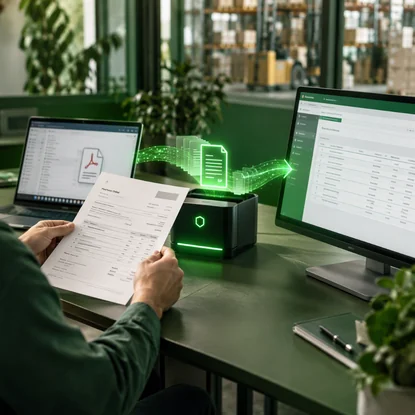
Ecommerce platforms can send checkout transactions to ERP systems, yet wholesale customers may still email purchase orders as PDFs. OrderAction uses intelligent data extraction and validation to convert incoming customer POs into ERP sales orders.
Reduce manual rekeying across the B2B order channel while preserving established ecommerce integrations.
So there will always be some orders that are going to need a human. An address is not valid. A SKU is discontinued during checkout – order creation. A payment is flagged and/or a wholesale customer's credit limit is violated. They can't be taken away, but can be easily located and repaired.
The first step is to define the exception: price mismatch for a specific threshold, missing tax data, unknown SKU, duplicate order or failed payment. Send these to an appropriate work queue, not a log of errors that no one reads, with a description of what they were and why they failed. Assign an owner to each type to support bad addresses, credit holds for finance, and catalog problems for merchandising.
In case of temporary failures, for example when an ERP times out at 2 a.m., they should repeat the activity themselves without involving other people. Count: exceptions, exception time, repeat. If there is a sudden jump, it is likely that something has changed upstream, such as a new product type, checkout app or sales channel not included in the mappings.
Most projects that are successful are alike. Demonstrate the current order flow, customer and stock flow and recognize all manual interactions. Strike a deal on identifiers, field ownership, when to sync etc.
Decide the approach which best suits your ERP, volume and team – native connector, middleware or custom API works. From day one take orders by email, PDF and EDI. Create exception queues prior to go-live. Real orders – even the ones that cause an awkward face – such as discounts, splits, returns, tax exempt buyers. Then, keep on fine-tuning as the business grows.
Recommended reading: Learn How to Automate Order Fulfillment From ERP to Delivery
Your storefront is great at taking orders and your ERP is great at fulfilling them. If they're connected properly, a web order is a sale that's shipped, invoiced, and properly reported, without anyone having to re-type it. The good ones of these companies spend as much time figuring out who owns what data as they do on the actual build, and have a lot less time spending on fixing what they did not get right.
 Why Ecommerce Speed Depends on Order Process Automation
 From Customer Orders to Fulfillment: How Automation Streamlines Ecommerce Workflows
 Intelligent Document Processing in eCommerce: From Orders to Payments
 Top 10 Ways to Use Automation to Improve E-Commerce Fulfillment
 Marketplace or Your Own Checkout? How Your Sales Channel Shapes Order-to-Cash Automation
 How Warehouse Automation Connects Inventory, ERP and Operational Workflows

