From Customer Orders to Fulfillment: How Automation Streamlines Ecommerce Workflows

Published: November 03, 2026
Running an ecommerce business involves more than managing an online store and selling products. Behind every customer order, there is a series of activities that need to work together, including payment processing, inventory updates, product preparation, packaging, and shipping.
When these tasks are handled manually, employees may spend a significant amount of time transferring information between systems and checking order details. As sales grow, this can make daily operations harder to manage.
Automation helps connect different stages of the order process, allowing businesses to organize their workflows and reduce repetitive work. Understanding how these processes function is important for ecommerce companies looking to improve their operations.
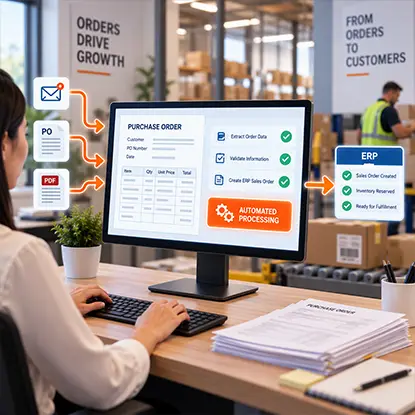
Ecommerce and wholesale businesses that also accept emailed customer purchase orders can lose time rekeying order lines into their ERP. OrderAction uses intelligent extraction, validation and automated processing to turn incoming customer POs into ERP sales orders.
Start downstream fulfillment with more accurate B2B order information and fewer manual handoffs.
An ecommerce workflow describes the sequence of activities that takes place from the moment a customer places an order until the package is delivered.
The process usually starts when a purchase is made through an online store or marketplace. After payment confirmation, the order details are transferred to the system responsible for inventory and fulfillment.
The business then checks product availability, prepares the items, and arranges shipping. Once the order is dispatched, tracking information can be shared with the customer.
Each of these steps depends on accurate information. If the inventory system does not reflect the latest stock levels, an order might be accepted even when the product is unavailable. If shipping details are entered incorrectly, the package may be delayed.
Automation helps connect these activities. For example, a confirmed order can automatically trigger an inventory update and generate instructions for the fulfillment team.
This creates a more organized workflow in which information moves between systems without requiring employees to complete every action manually.
Recommended reading: Learn How Sales Order Workflow Automation Connects Orders to Fulfillment
Some ecommerce businesses sell individual products, while others offer bundles, promotional collections, and gift sets. These packages often contain several items that need to be prepared together before they can be shipped.
Product kitting involves combining separate products into one ready-to-sell package. A skincare gift set, for example, might include a cleanser, moisturizer, and serum. A coffee collection could contain several blends along with a branded mug.
Preparing these packages requires coordination between inventory management, product assembly, and fulfillment operations.
Kitting and fulfillment services can help businesses organize these activities by bringing product preparation and order handling into a structured process.
For example, a company planning to launch a seasonal gift set needs to check whether all the required products are available, prepare suitable packaging, and establish how the finished packages will be stored and shipped.
These activities can also be incorporated into an automated ecommerce workflow. Inventory records can be updated when individual products are allocated to a gift set, while assembly instructions can help ensure that each package contains the correct items.
Once the gift sets are ready, they can be included in the regular order fulfillment process. This allows businesses to manage both individual products and preassembled packages without treating every order as a completely separate operation.

Even with an integrated storefront, ecommerce businesses still receive supplier forms, freight paperwork and operational PDFs that require manual entry. docAlpha classifies incoming documents, extracts relevant information and validates it for configured business workflows.
Reduce administrative friction around fulfillment while keeping storefront transactions in their own systems.
Inventory management is an important part of ecommerce operations, particularly for businesses selling through multiple channels.
When a product is purchased through an online store, its available quantity needs to be updated across the relevant systems. Without synchronized inventory records, businesses may continue accepting orders for products that are no longer in stock.
Inventory management software can help monitor stock levels, record product movements, and notify employees when certain items need replenishment.
Automation is also useful when businesses work with product bundles. A gift set may contain several individual items, meaning the inventory system needs to account for the quantities used during assembly.
For instance, preparing 100 gift boxes containing three products requires 100 units of each product. If one item is available in a smaller quantity, the business needs to identify the shortage before assembly begins.
Keeping inventory records connected to order processing and product preparation makes it easier to plan stock requirements and avoid unnecessary delays.
Recommended reading: Discover How Automated Workflows Improve Inventory Management
Ecommerce businesses often use several software applications to manage their daily operations. These may include online store platforms, inventory management tools, accounting software, shipping applications, and customer relationship management systems.
When these applications operate independently, employees may need to transfer information manually between them.
This creates additional work and increases the risk of inconsistent records.
Integrations and APIs allow different systems to exchange information automatically. A confirmed order can trigger an inventory update, generate fulfillment instructions, and send relevant details to accounting software.
ERP systems can also connect several business functions within a shared environment. Depending on the configuration, an ERP may combine order management, inventory tracking, purchasing, and financial records.
This can provide businesses with a more consistent view of their operations and help employees work with up-to-date information.
The goal is not necessarily to automate every task. Instead, businesses can identify repetitive activities that depend on predictable information and determine which of them can be handled by software.
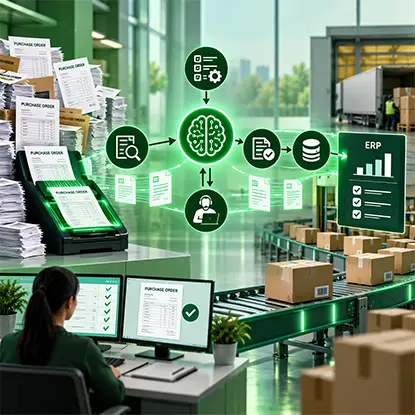
Seasonal demand can overwhelm order teams when business customers submit large purchase orders in inconsistent document formats. OrderAction automates extraction of header and line-item details, applies intelligent rules and routes exceptions for review.
Increase order-processing capacity so approved ERP sales orders can move downstream sooner.
Automation also makes it easier to understand how well ecommerce workflows are performing.
Businesses can monitor indicators such as order processing time, inventory accuracy, fulfillment delays, and the number of orders waiting for preparation.
These measurements help identify where problems occur.
For example, if orders are confirmed quickly but remain in the warehouse for several hours before packing, the issue may be related to product preparation or warehouse capacity rather than the online store itself.
Similarly, frequent inventory discrepancies may indicate that stock updates are not properly synchronized between sales channels and fulfillment systems.
By reviewing workflow data, businesses can identify bottlenecks and make adjustments based on actual operational performance.
This approach can be especially useful during seasonal campaigns, when order volumes increase and even small process delays can affect the overall fulfillment timeline.
Recommended reading: Learn How Data Analytics Helps Improve Automated Business Processes
Ecommerce businesses rely on several connected processes to manage customer orders, inventory, product preparation, and shipping. When these activities depend heavily on manual work, it can become difficult to maintain accurate records and keep orders moving efficiently.
Automation helps connect different stages of the workflow, allowing information to move between systems and reducing the need for repetitive administrative tasks.
For businesses selling gift sets and product bundles, kitting and fulfillment can also become part of a coordinated operational process.
By combining organized workflows, reliable inventory records, and suitable software integrations, ecommerce companies can make their daily operations easier to manage while maintaining a consistent approach to order fulfillment.
 Sales Order Processing: Workflow, Steps, and Automation
 Inventory Management: Harnessing the Power of Automated Workflows
 How E-Commerce Automation Improves Order Fulfillment Operations
 How Ecommerce Order Automation Accelerates Sales and Growth
 AI Order Management: The Complete 2026 Guide to Intelligent Order Processing
 How Sales Channels Impact Order-to-Cash Process Automation

