How Smart Campus Systems Automate Asset Distribution and IT Service Workflows
Published: November 26, 2026
Universities increasingly use smart campus systems to distribute devices, manage equipment handoffs and support self-service access across libraries, residence halls, teaching buildings and other locations. The value is not only in the hardware. It comes from the workflow around each transaction: who can access an asset, how the handoff is recorded, what happens when an item is returned late or damaged, and how IT staff can see activity across locations.
For large-scale deployments, smart lockers can become one part of a broader operational workflow that connects identity, asset records, automated check-in and checkout, exception handling, audit trails and centralized administration. The goal is to reduce repetitive handoffs while keeping clear ownership when a transaction falls outside the normal process.
A campus-wide smart locker rollout involves several teams. IT manages authentication, connectivity and device records. The facilities team evaluates power requirements, physical placement, accessibility, and building access. Procurement establishes responsibilities, renewal costs and warranty coverage.
Those responsibilities have to fit within existing resources. In an EDUCAUSE QuickPoll published in April 2025, 42% of respondents expected IT budget decreases for the 2025–2026 academic year. Among respondents at institutions with at least 10,000 students, the figure was 52%.
Under those conditions, a proposal that covers hardware delivery but leaves onboarding and expansion planning undefined can transfer substantial work to campus staff. The same applies when support arrangements or warranty processes are practical for one building but cumbersome across twenty.
Phased implementation gives institutions time to test a workflow, resolve integration issues and train staff before expanding. The objective is to turn a successful pilot into a repeatable process with clear ownership, consistent data and defined exception handling when something fails.

Campus rollouts generate procurement forms, delivery records and service documentation that still need processing. docAlpha captures and validates document data and routes it through configured workflows.
Reduce manual administration as campus services expand across locations.
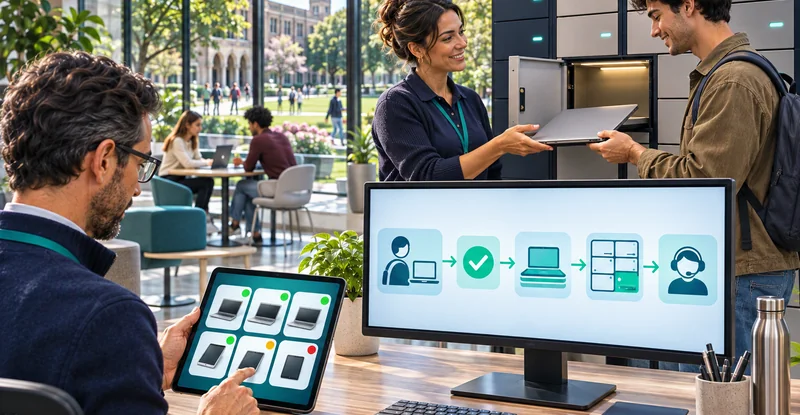
A smart campus workflow should begin with the transaction that happens most often: a student or staff member borrows or returns a device. Instead of relying on a staffed desk, the system can authenticate the user, open the correct compartment, record the asset being issued and update its status automatically. On return, the same workflow can confirm that the device came back and make it available for the next step in the process.
Automation is most useful when routine transactions follow clear rules. The system should record who received the asset, when the transaction occurred, which location handled it and what status the item holds now. That reduces manual sign-out sheets and gives IT a current record without requiring staff to re-enter the same information later.
Recommended reading: Explore How Intelligent Process Automation Supports Education
Self-service does not remove the need for accountability. Every handoff should create a transaction record that can be traced to a user, asset and location. For university-owned laptops, tablets or other equipment, that history helps IT see who had the device, whether it was returned on time and what happened before a repair or loss was reported.
Audit trails also support operational reviews. If a device repeatedly returns with the same issue, staff can look at earlier transactions and service history instead of treating each incident as unrelated. If an item is reported missing, the team has a clear last-known handoff rather than a paper log that may be incomplete.
Campus systems work best when access is tied to the identity tools the institution already uses. A student ID, staff credential or approved account can determine who may borrow a device, which assets they can access and whether additional approval is required. This reduces separate account management and helps keep access rules consistent as users join, change roles or leave the institution.
Permissions should reflect the service being provided. A student borrowing a standard laptop may follow a fully automated path, while access to specialized equipment may require approval from a department or technician. The workflow should apply those differences automatically and record the decision.

Incomplete forms and inconsistent records can create extra work for university IT and administrative teams. docAlpha applies configurable validation and directs uncertain document data to human review.
Keep document-related exceptions visible and reduce repeated data entry.
Automation should handle the normal path and make exceptions visible. A late return, damaged device, failed authentication, uncollected package or locker that does not open should not disappear into a generic error log. Each exception should have a status, an owner and a defined next action.
Human review remains important for cases that involve judgment. Staff may need to decide whether a damaged device can be returned to service, whether a replacement charge should be waived, or whether unusual borrowing activity requires follow-up. A good workflow automates the handoff and notification while leaving those decisions with the appropriate person.
As a program expands from one library to multiple buildings, local workarounds become difficult to maintain. Centralized administration lets IT see devices, lockers, permissions, transaction history and open exceptions across locations from one operating view. That makes it easier to identify overdue assets, recurring faults and locations that need additional capacity or support.
Standardized workflows also make expansion easier. A new building should not require the institution to reinvent the checkout process, approval rules or reporting structure. The same core workflow can be reused while local details such as operating hours, equipment types and responsible staff are configured for each site.
Recommended reading: Discover the Benefits of Document Automation for Educational Institutions
Smart lockers can provide the physical handoff point inside this broader process. For example, ForwardPass combines locker hardware with software for device loans, returns, repairs, deployments and charging. Its guidance on smart lockers for universities describes a focused pilot, campus identity integration, staff preparation and phased expansion across buildings. In this context, the locker is not the workflow by itself; it is the controlled point where an automated asset transaction becomes a physical handoff.
A university evaluating this type of system should therefore look beyond locker capacity and charging features. The more important questions are whether the platform can record asset-level activity, integrate with identity and campus systems, route exceptions, maintain an audit trail and give administrators a consistent view across locations.

Equipment purchases, service contracts and maintenance generate invoices that can be difficult to coordinate across departments. InvoiceAction captures invoice details and supports PO matching and approval routing.
Help university finance teams handle growing AP workloads without multiplying manual tasks.
A phased implementation should produce evidence for the next automation decision. Begin with a defined service in one location, measure demand, transaction volume and exceptions, then establish what must change before adding another building or asset type.
Support capacity matters throughout that process. Inside Higher Ed's 2025 survey reporting, based on responses from 108 campus technology leaders, found that 70% struggled to hire technology employees. The 2026 EDUCAUSE Workforce Report also examines staffing shortages, rising service demands and budget pressures. These findings strengthen the case for documenting the campus work required after installation.
For university procurement and IT teams, the platform should come with a service and workflow plan that covers the intended campus footprint. Ask vendors to specify:
A pilot can establish whether users adopt the service and whether staff can manage exceptions without creating new manual work. Expansion requires a further judgment: whether the same operating model remains practical across the campus. The strongest deployment makes that judgment easier by documenting responsibilities, workflow performance, costs and support commitments for each phase.
Recommended reading: Learn How Educational Institutions Can Streamline Invoice Processing
 Student Information Systems (SIS): Simplifying Academic Administration
 RPA in Education: Where Automation Is Actually Used
 Automating the School Science Lab: How Browser-Based Experiments Cut Admin and Keep Learning Measurable
 Educators Innovate with docAlpha in Support or their Core Mission
 The Power of AI Text-to-Speech: Improving Student Outcomes and Accessibility in Education
 The Future of Education: Transforming Learning with Document Automation

