Passkeys Belong in Your Web App's First Release
Published: November 13, 2026
Passwords cost a web app more than the hosting bill shows: reset emails, locked accounts, support tickets and the steady risk of phishing. Passkeys take away a large part of that. The FIDO Alliance's Passkey Index, published in October 2026 with data from companies including Amazon, Google, Microsoft, PayPal and Shopify, found that passkey sign-ins succeed 93% of the time, against 78% for traditional multi-factor sign-ins, and run nearly three times faster.
For a new product, adding passkeys costs less before the first user signs up than at any point after. When a founder briefs a web application development company, authentication usually gets a single line in the scope: email and password, maybe Google sign-in. Passkeys deserve more space than that, because they touch the sign-up flow, account recovery, the database and the support playbook.

Passkeys can improve how users sign in to a web application, but secure access alone does not eliminate manual work with invoices, forms, and other business documents. docAlpha uses AI-powered classification, extraction, validation, and workflow routing to process incoming records for connected enterprise applications.
Combine a better sign-in experience with more efficient document-driven operations.
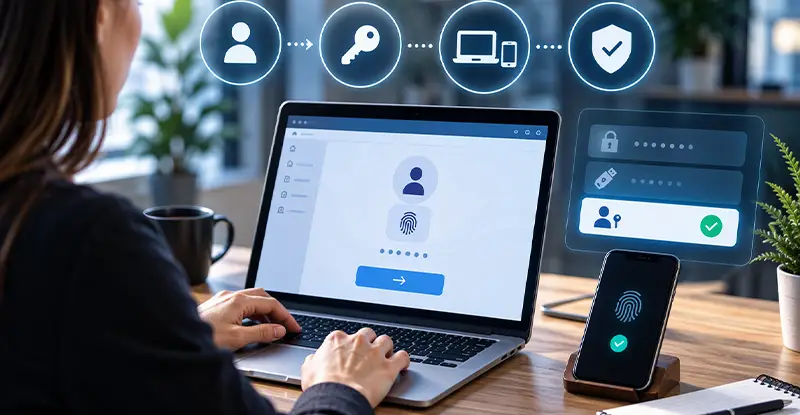
A passkey is a pair of cryptographic keys created by the user's device through the WebAuthn standard, which every major browser supports. The private key stays on the device or in the user's password manager, such as iCloud Keychain or Google Password Manager, and the server stores only the public key. Signing in means confirming with a fingerprint, a face scan or the device PIN.
Each passkey is tied to the domain that created it, and the browser won't use it on any other site, so a look-alike phishing page gets nothing. NIST's digital identity guidelines accept synced passkeys for multi-factor sign-in at its AAL2 level, provided the keys stay encrypted in the sync service and private-key operations happen on the device. That matters to B2B buyers who check their vendors against NIST.
Recommended reading: Discover How Digital Asset Management Improves Security and Control
At launch, keep a familiar option, such as email with a one-time code, alongside passkeys. Prompt users to create a passkey right after a successful sign-in, when the benefit is obvious, and turn on autofill so saved passkeys appear in the username field. Users on someone else's computer can still sign in by scanning a QR code with their phone, which the browser offers on its own. Keep the interface plain: a button that reads "Sign in with passkey" and one line explaining that the phone's screen lock does the work.
In account settings, let users see, name and remove their passkeys, and allow more than one per account, since people move between a laptop and a phone.
Recovery is where passkey projects go wrong. Synced passkeys survive a lost phone, because the password manager restores them on the next device, but some users will still lose access. Decide the recovery path in advance: a verified email plus a second check, backup codes for business accounts, or identity verification for apps that hold money or health data. For B2B products, let workspace admins reset a member's access, which keeps recovery inside the customer's own team. Keep recovery as strong as sign-in, or attackers will skip the passkey and go after the reset flow.
The team building the app should be able to walk through that recovery flow screen by screen before anyone writes the sign-in code.

Well-designed authentication helps people reach the applications they need; the next challenge is making those applications productive. docAlpha brings AI-powered document extraction, Intelligent Rules, and exception handling to document-intensive processes that connect with enterprise systems.
Help users spend less time copying records and more time acting on reliable information.
Store each credential in its own table: credential ID, public key, signature counter, the user's label, and created and last-used dates. Use a maintained library such as SimpleWebAuthn for Node.js or py_webauthn for Python, since WebAuthn verification has edge cases that are easy to get wrong by hand. Log every passkey registration and removal, and email the user when a new one is added, so a hijacked session can't quietly add an attacker's key.
Choose the relying party ID with care. It's the domain each passkey belongs to, and moving the app to a new domain later can strand every passkey users have created. Setting it to the root domain lets passkeys work across subdomains such as app and admin. Some development teams, AppVerticals among them, settle the domain plan in a web app's first architecture review for this reason.
Recommended reading: Learn How SDKs Streamline Secure Application Development
Track a few numbers from the first release: the share of active users with a passkey, sign-in success rate, time to sign in, password reset requests and support tickets about access. Compare them with the month before passkeys went live, and review them with support, since the help desk hears about sign-in problems first. The Passkey Index found that 42% of eligible accounts at its participating companies had a passkey enrolled, which shows that adoption builds over time, even at large consumer brands.
Passwords will stay in many apps for years, and that's fine. Building passkeys in from the start means the login screen, the first thing every user touches, gets faster and safer without a rebuild later.

New web apps often focus on account creation and recovery first, while business-document processing becomes a manual bottleneck later. docAlpha classifies, extracts, and validates information from incoming business documents, with human review for exceptions.
Build more scalable administrative workflows alongside a growing application.
 How SDKs Streamline Development: Tools, Features, and Benefits
 Secure Enterprise Credentials with Digital Management Software
 How to Defend Business Data Against Identity Based Cyber Attacks
 How Access Controls Secure Automated Business Workflows
 7 reasons why enterprises prefer passwork for password management
 Self-Hosted vs SaaS: Which Is More Secure for Business

