Top 8 Enterprise Event Management Software Features Enterprise Teams Need at Scale

Published: September 03, 2026
Enterprise event management software is built for teams running events across regions, brands, or business units. It gives them one place to manage the work without rebuilding the setup for every event.
Enterprise platforms are built for more users, more events, and stricter internal controls. They also give central teams better oversight across regions and business units.
Yeah. Some platforms allow virtual as well as physical participation. If your organization does not frequently hold hybrid events, then focus on in-person registration, check-in, access control, integrations, and reporting.
Focus on systems that are already mission-critical to your organization such as CRM, identity, marketing, and data warehouse tools. When you need custom connections, APIs, and webhooks are important.
It provides teams with shared data, permissions and reporting, and reusable processes across events so less work has to be rebuilt each time.
Look for SSO, role-based access, audit logs, encryption, secure hosting, privacy controls, and suitable data residency options.
Running one event is rarely the challenge for an enterprise team. Problems appear when several regions, brands, or business units run events at the same time.
Registration data gets split between systems. Local teams build their own processes. Branding varies. IT needs tighter control over access and data.
The right enterprise event management software gives teams a common structure without forcing every event into the same setup. For organizations focused mainly on in-person events, on-site operations matter most.
A team in Paris may do events differently than colleagues in New York or Mexico City. There remains a need for visibility for central teams across the program.
Good enterprise event technology allows local teams the flexibility to operate while still maintaining control over permissions, reporting, and data standards.
Events on the ground put the venue under pressure. Within minutes, hundreds of people could appear, the Wi-Fi might struggle, and the attendees still need fast access.
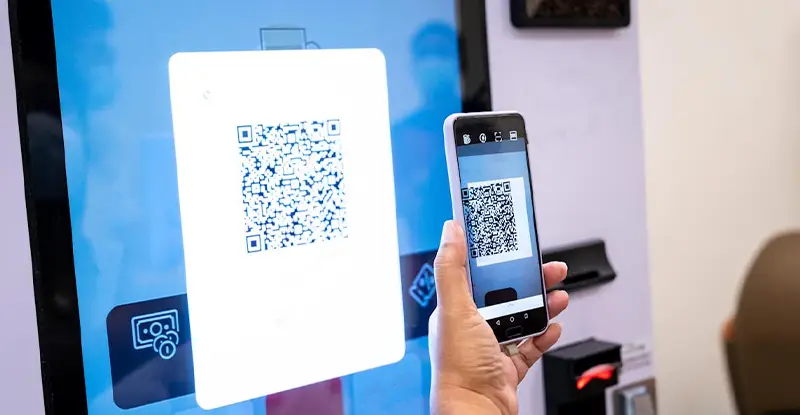
Check-in, badge printing, QR scanning, and attendance data become operational priorities.

Integrations lose their value when employees still have to manually extract information from incoming documents. docAlpha applies AI-driven capture and process automation to transform unstructured documents into validated, system-ready data.
Reduce manual handoffs, improve data accuracy, and keep information moving across enterprise workflows.
Enterprise events are typically different products or markets. White-label pages, branded emails, custom domains, and event apps allow teams to be consistent without having to reinvent the wheel.
One attendee record makes registration, check-in, sessions, networking, and feedback more useful.
A corporate event management platform should decrease the manual work required to reconcile those records later on.
Recommended reading: Learn How Data Management Creates a Single Source of Truth
Feature | Why it matters |
Multi-event management | Central oversight across events |
Advanced registration | Different journeys for different audiences |
In-person operations | Faster check-in and access |
White-label branding | Consistent attendee experience |
Integrations | Event data connected to business systems |
Security controls | Better data governance |
Real-time reporting | Visibility during live events |
Workflow automation | Less repetitive admin work |
A multi-event management expert needs visibility across regions, teams, and recurring event programs, not only a single event.
They can reuse templates, compare results, and apply common data standards with central management while maintaining local control.
Different audiences may need different questions, access rules, prices, or communications.
Event registration software for enterprises should support those differences without duplicating entire registration flows. And keep a lid on attendee types as well. Too many categories make it confusing for registrants and create additional rules for your team.
The entrance is where weak event operations become obvious.
Look for QR access, badge printing, session scanning, capacity tracking, and offline functionality If connectivity fails at the entrance, staff will still have to keep people moving.
Many enterprise brands don’t want a generic registration page.
Look at the level of branding across event pages, emails, domains, badges, and mobile experiences.

Centralized platforms reduce administrative work, but AP can remain highly manual when invoices still require data entry, validation, matching, and routing. InvoiceAction uses AI-powered invoice processing automation to capture invoice data and automate critical AP workflows.
Reduce processing effort, improve accuracy, and give finance teams a more scalable path from invoice receipt to ERP-ready transactions.
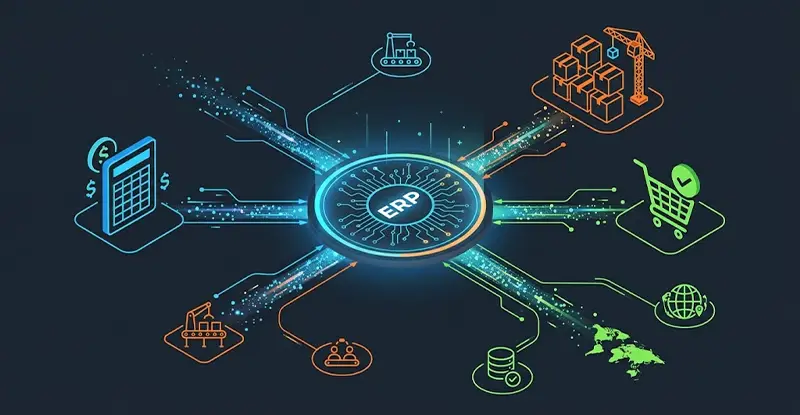
Event data should move into systems your teams already use.
CRM integrations, APIs, webhooks, and data warehouse integrations allow teams to work from the same records and cut out exports.
Procurement may reject a platform before the event team ever uses it if access, hosting, or privacy requirements are not met.
A regional organizer usually needs access to their own events, not every attendee record in the company.
Some decisions will be too late to make after the event is over.
Live reporting enables teams to track arrivals, session attendance, registration progress, and capacity while attendees are on site.
Event workflow automation assists with confirmations, reminders, status changes, and follow-up messages.
Automate with permissions so people can manage their own work without requiring unnecessary admin access.

Enterprise integration should eliminate exports and rekeying, not move manual work from one system to another. OrderAction uses AI-powered capture and process automation to transform incoming purchase orders into structured, validated sales order data.
Accelerate order-to-ERP processing while reducing errors, delays, and repetitive data entry.
Start with events you already run.
The executive dinner series, global roadshow, and annual conference each have different registration, staffing, access, and reporting requirements.
List of systems for which you need event data. Before speaking to vendors, check CRM, identity, marketing, analytics, and data warehouse requirements.
Involve IT early in the process. Before you create a shortlist, review SSO, permissions, audit logs, encryption, hosting locations, and privacy requirements.
Forget where the logo is.
Custom URLs, email domains, registration layouts, badges and apps matter when attendees should see your brand everyplace during the experience.
Enterprise implementation may include integrations, permissions, templates, migration, and training.
Before a live event, ask who does those tasks and what support looks like.
See how pricing scales with events, regions, and users.
Your enterprise event solution should still fit as the event program grows.
Recommended reading: Discover How to Choose the Best Automation Tools for Enterprise Workflows
Separate systems for registration, communications, check-in, and reporting lead to more handoffs and duplicate records.
Good event management software for large organizations should reduce those gaps rather than add another isolated tool.
The same person might show up in multiple events or multiple records.
Keeping activity tied to one attendee profile makes reporting and follow-up more reliable.
Local teams know what their own events did, typically. Central teams need a bigger picture.
Multi-event reporting allows leadership to compare activity without the need to collect spreadsheets from each region.
Event teams usually work together with brand, procurement, IT, legal, and local stakeholders.
Less setup and approvals over and over again because of reusable templates and clear permissions.
Attendance isn’t the full story.
Teams can combine event data with CRM or business systems to see if attendees go on to engage, become opportunities, or contribute to other event goals.

Enterprise automation should not stop when information arrives as a PDF, attachment, form, or other business document. docAlpha combines AI-powered document understanding with workflow automation to turn incoming content into actionable business data.
Accelerate processing and give teams reliable information without adding administrative overhead as operations grow.
Eventtia helps organizations managing events across regions, brands and business units. The enterprise setup offers SSO, role-based permissions, audit logs, data residency options, white-label experiences, APIs, webhooks and multi-entity portals.
For in-person programs, Eventtia provides QR check-in, badge printing, checkpoint and session access and live attendance reports. Check-in also works offline and syncs when connectivity is restored.
Registration, communications, check-in and analytics are still all tied to the same attendee record, so you don’t have to put together separate data sets.
But enterprise teams care about those on-site features too: registration, attendee segmentation, branding, integrations, permissions and reporting. Together, they provide teams with more control over how large physical events are run across regions and business units.
Recommended reading: Learn How Business Process Automation Connects Teams, Data, and Workflows
 Maximizing ROI with Custom Enterprise Software Solutions
 All About Workflow Automation | Artsyl
 How ERP Integration Automates Data Entry Across Business Systems
 QR Codes in Tech: From Convenience to Core Workflow
 Boost Efficiency with Smarter Enterprise Task Management
 Key Features Driving Effective Agency Process Automation
