Ecommerce Automation: What Online Sellers Should Automate First (and What to Keep Manual)
Published: November 24, 2026
It is software doing the repeatable parts of running an online store: moving orders, stock levels, invoices and report data between systems according to rules you set. The goal is not to remove people from the business but to stop them from spending their day copying the same numbers between tabs.
Start with the integrations your sales channel and accounting software already offer, since many order and payout syncs are built in and only need configuration. Add dedicated software only for the process that still costs the most hours after that, which for many small sellers is supplier invoices or the weekly report.
In practice, it changes their work more than it removes it. Someone still has to own the rules, watch the exception queue and decide what to do when the data shows something unexpected, and those tasks require more knowledge of the business than data entry ever did.
What should an online store automate first? Start with the data work that repeats every day and breaks when someone is busy: entering orders, matching invoices and payouts, updating stock, and pulling the same numbers into a weekly report. That is where ecommerce automation saves the most time, because the rules are already known and every manual error has a cost, from a duplicate supplier payment to a stockout on a product that was selling well.
Most guides to the topic stop at abandoned cart emails. This one covers the operations behind the storefront: how to decide which process goes first, six workflows with practical examples, and the tasks that should stay with a person even when software could technically take them over.
We built the list around the workflows online sellers run every week in order management, accounting and marketplace reporting. Platform details, such as what Amazon's own seller tools report, come from the vendors' documentation, checked in November 2026.
Recommended reading: Discover How Automated Order Processing Improves Ecommerce Operations
Ecommerce automation is the use of software rules, integrations and AI to run repeatable store operations without someone copying data from one screen to another. Marketing flows are the visible part, but the larger savings usually sit in the back office, where a growing store collects spreadsheets faster than it hires staff. For an operations or finance manager, it helps to think about automation in six areas:
These areas feed each other, which is why the order you automate them in matters. An order that is captured automatically but still keyed into accounting by hand only moves the bottleneck one step further down the line.

A first automation project should target frequent work with clear inputs and measurable errors. OrderAction turns incoming customer purchase orders into structured, validated sales order data for ERP processing.
Track manual entry time, order corrections, and exception volume as your B2B channel grows.
Not every manual task is worth automating, and the wrong first project can take a whole quarter without saving anyone an hour. Before you compare tools, score each candidate process against four questions:
A process that runs often, costs money when it goes wrong and follows clear rules is your first candidate. The table shows how common ecommerce tasks usually score.
Task | How often it runs | Cost of an error | Rules clear? | Typical priority |
Order entry and confirmation | Daily, high volume | Medium: wrong items, late shipments | Yes | Automate first |
Supplier invoice processing | Daily or weekly | High: duplicate or wrong payments | Mostly | Automate first |
Stock updates across channels | Daily | High: overselling or stockouts | Yes | Automate early |
Marketplace payout reconciliation | Weekly or biweekly | High: unnoticed fees and refunds | Yes | Automate early |
Keyword and demand tracking | Weekly | Medium: missed trends | Yes | Automate early, setup is light |
Weekly management report | Weekly | Medium: decisions on old numbers | Yes | Automate early |
Returns and disputes | Daily | High: lost money and customers | No | Keep a person in the loop |
Recommended reading: Learn How to Automate Inventory Management Workflows
The six workflows below follow the order in which data moves through a store: from what customers search for, to stock, orders, money and the report at the end of the week. Each one explains what to automate and what a working setup looks like.
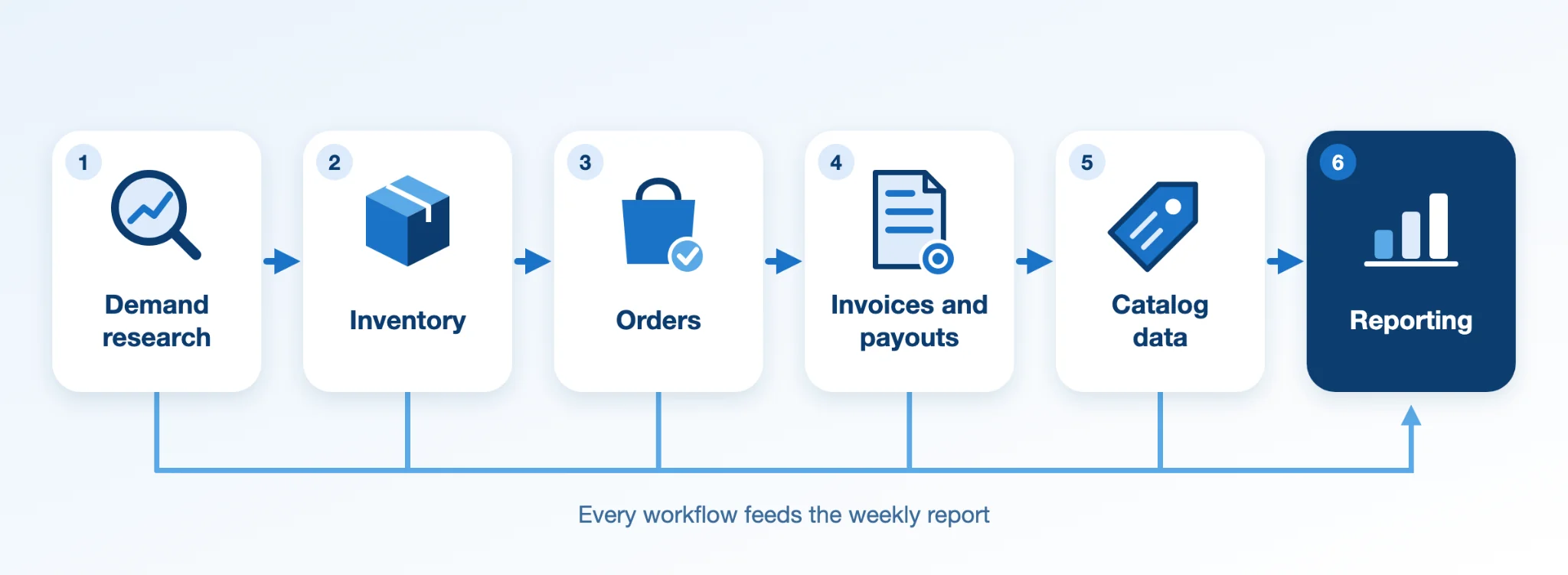
Many marketplace sellers still check demand manually. Someone exports keyword lists, pastes search volumes into a spreadsheet and compares them with last month, which means a rising trend is often noticed only after a competitor has already acted on it. The task repeats every week and follows the same steps each time, so it is a good automation candidate with little setup.
On Amazon, the raw data comes from Brand Analytics, a Seller Central tool for brand owners whose search dashboards include Top Search Terms and Search Query Performance (see Amazon's Brand Analytics overview). Your own reports, however, mostly show the terms tied to your listings and campaigns. An Amazon keyword analytics report, such as the one in My Real Profit, tracks search terms across the whole marketplace, shows which ASINs rank at the top for each term and flags whether demand is trending up, stable or down. Once that check runs on its own, a term that starts rising can prompt a stock review or a listing update, which connects demand research directly to the next workflow.

Storefront integrations move digital orders quickly, but invoices, forms, and supplier documents may still be handled by hand. docAlpha applies AI-powered classification, field extraction, Intelligent Rules, and exception routing to incoming documents.
Extend automation beyond the checkout and reduce operational bottlenecks.
Stock management is where demand data turns into cash decisions. The basic automation is a sync: when an item sells on one channel, the available quantity updates everywhere else, so you never sell the same unit twice. The next level is rule-based reordering, where each SKU has a reorder point based on sales velocity and supplier lead time, and the system drafts a purchase order when stock falls below it.
Keep the approval step human at first. A drafted purchase order that a buyer checks in two minutes is safer than one sent automatically during a promotion spike the forecast has never seen. Artsyl's guide to inventory control procedures covers the counting and audit side of the same process.
Orders from a web store or marketplace usually arrive through an API, which makes them the easiest data to automate. A typical setup captures each order into the order management or ERP system, sends the confirmation, assigns the order to a warehouse or fulfillment partner by rules such as location or product type, and pushes tracking numbers back to the customer and the sales channel.
B2B orders are harder because many of them still arrive as emailed purchase orders in PDF or spreadsheet form. In that case, the first step is capturing the order data from the document and checking it against your price list and customer record before it enters the system. Artsyl's overview of order processing walks through each stage from receipt to delivery, and its sales order processing flow chart is a useful template for mapping your own steps before you automate them.
Recommended reading: Learn How Sales Order Processing Connects Orders, ERP, and Fulfillment
Money workflows have the highest cost of error, which makes them strong candidates as soon as orders run reliably. On the payable side, supplier invoices are captured, matched to the purchase order and goods receipt, and sent for approval only when something does not match. On the receivable side, marketplace payouts bundle sales, fees, refunds and reserves into a single deposit, so reconciliation means breaking each payout back into its parts and matching them to orders.
The rule that works here is to automate the matching and keep the exceptions visible. A system that matches routine invoices and payouts on its own and sends every mismatch to a person gives the finance team fewer documents to read and more time for the ones that actually need judgment.
Price lists, specification sheets and stock notices from suppliers arrive in every format imaginable. Retyping them is slow, and a single wrong cost price can turn a profitable product into a loss without anyone noticing for weeks. Automating this workflow means extracting the fields you need (SKU, cost, dimensions, availability) from each document, validating them against the existing record and flagging the changes for review before they update the listing or the margin calculation.
The last workflow collects the output of all the others. Many sellers still build their weekly report by exporting data from each sales channel, the ad platform, the accounting system and the inventory tool, and then combining it in a spreadsheet. An automated report pulls the same figures on a schedule, so the meeting starts with the numbers rather than with someone fixing a broken formula.
Start with the handful of figures the team actually acts on, such as net sales, margin after fees, ad spend, weeks of stock cover and the share of orders shipped on time. A dashboard with fifty metrics tends to be opened less often than one with ten, because nobody knows which number to look at first.

Reporting and reconciliation depend on the accuracy of supplier transactions already recorded in the ERP. InvoiceAction validates extracted invoices and routes mismatches for human review before downstream AP processing.
Strengthen the source data that finance teams use to understand purchasing costs and margins.
Automation works best when it handles the routine and hands the unusual cases to a person. These five tasks belong with your team, because each one depends on context or accountability that rules cannot capture:
The two risks that break most ecommerce automation projects are poor source data and weak integrations. If product codes differ between your store, your warehouse and your accounting system, automation will move errors faster instead of fixing them, so clean up the master data before you connect anything.
Recommended reading: Learn How Invoice Reconciliation Improves Ecommerce Financial Accuracy
A first project sets the pattern for every one after it, so it pays to run it carefully. This sequence keeps the risk low while you learn how your systems behave:
Running both versions side by side feels slow, but it is the cheapest way to find the rule you forgot before it reaches a customer or a supplier.

Adding marketplaces and wholesale buyers can increase order volume faster than an operations team can expand. OrderAction automates incoming B2B purchase order capture, line-item extraction, and ERP sales order creation.
Support higher order volumes without proportional growth in manual processing.
Automation in ecommerce pays off when it follows the flow of data through the store and leaves judgment to people. Three things you can do this week:
 Why Ecommerce Speed Depends on Order Process Automation
 Top 10 Ways to Use Automation to Improve E-Commerce Fulfillment
 How Ecommerce Platforms Connect Customer Data With ERP and Operational Workflows
 7 Best AI Tools for Ecommerce Businesses - Hidden Treasures
 Why Most Online Stores Struggle and How Smart eCommerce Software Fixes It
 From Customer Orders to Fulfillment: How Automation Streamlines Ecommerce Workflows

