How Digital Business Workflows Are Changing the Way Remodeling Projects Are Managed

Published: November 03, 2026
A remodeling project may happen on a physical jobsite, but a surprising amount of the work behind it happens in documents, emails, approvals, spreadsheets, invoices, permits, and business systems.
Before construction begins, contractors may need to process estimates, contracts, plans, material selections, permits, insurance documents, vendor information, and customer approvals. Once work is underway, purchase orders, invoices, change orders, inspection records, and project updates begin flowing between teams.
When these processes rely heavily on manual data entry and disconnected documents, delays become much easier to create.
That is why digital workflow automation and intelligent document processing are becoming increasingly relevant to construction and remodeling businesses.
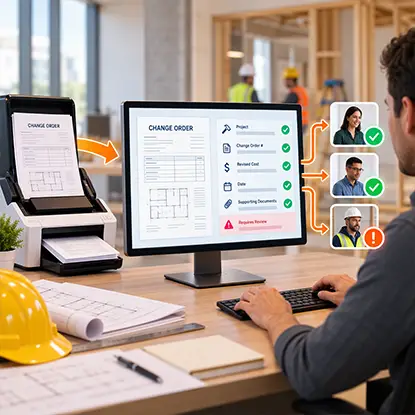
Changes to a remodeling scope create new forms, revised costs and supporting approvals that must stay connected to the project record. docAlpha extracts and validates relevant details from submitted documents and supports configured routing for human review.
Reduce repeated data entry and help project teams process document-based changes more consistently.
A remodeling project often begins with an inquiry.
A potential customer submits contact details, describes the project, provides photos, and may include information about budget, location, or preferred timing.
Instead of allowing that information to remain scattered across emails and attachments, a digital workflow can capture the relevant details and route them to the appropriate team.
A kitchen inquiry could go to one estimator, while an exterior project may require someone with different expertise. Larger projects might trigger additional qualification steps before an appointment is scheduled.
The goal is simple: information entered once should not need to be manually retyped into several different systems.
Preparing a remodeling estimate can require information from several sources.
Labor costs, subcontractor pricing, material quantities, supplier quotes, allowances, taxes, and project-specific conditions may all affect the final proposal.
When supplier documents arrive in different formats, employees can spend considerable time copying values from PDFs or emails into estimating or accounting systems.
Intelligent document processing can help extract structured information from these documents and pass it into downstream workflows.
Instead of simply storing the document, the business can use the information inside it.
This becomes particularly useful when a contractor is managing many projects at the same time.
Recommended reading: Discover How Intelligent Document Processing Turns Project Documents into Usable Data
The larger the renovation, the more information needs to move between people.
A project such as kitchen remodeling can involve cabinetry, countertops, flooring, appliances, plumbing, electrical work, permits, inspections, material deliveries, and several different trades.
Each decision can affect another part of the project.
If the homeowner changes the countertop material, the price may change. If an appliance specification changes, cabinetry or electrical requirements could also need updating. If demolition reveals an unexpected condition, additional approval may be required before work continues.
Digital workflows help connect those events.
Instead of relying on someone to remember who needs to be notified, rules can automatically route updated information to the appropriate people.
Change orders are one of the clearest examples of a document-driven remodeling workflow.
A change may begin with a homeowner request or an unexpected condition discovered during construction.
From there, several steps may be necessary:
If these steps happen across text messages, emails, PDFs, and spreadsheets, it becomes easy for information to become inconsistent.
A structured workflow creates a clear sequence and keeps the approval connected to the change that triggered it.
It also creates a better audit trail if questions arise later.
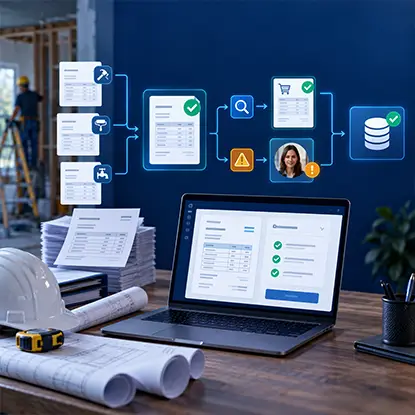
A project can involve dozens of vendor invoices that must be associated with the correct purchasing information before posting. InvoiceAction captures supplier invoice data, applies configured matching and validation checks and routes mismatches to finance reviewers.
Improve AP consistency while reducing manual reconciliation across renovation jobs.
Remodeling companies often depend on subcontractors and suppliers.
That means they may also need to manage documents such as insurance certificates, W-9 forms, licenses, contracts, invoices, purchase orders, and product information.
Manually checking every incoming document can consume significant administrative time.
Document automation can help identify what type of document has been submitted, extract important fields, and validate information against existing records.
For example, a workflow might determine whether:
Routine documents can continue through the workflow while exceptions are routed to the appropriate employee.
Construction projects generate a steady stream of invoices.
Materials may come from several suppliers, while subcontractors submit invoices for completed work. Each invoice may need to be associated with the correct project, cost category, purchase order, and approval.
This is exactly the kind of repetitive document process where automation can reduce manual work.
Invoice data can be captured automatically and validated against business rules before being passed into an ERP or accounting platform.
If the invoice matches the expected information, it can continue through the normal approval process.
If something does not match, the workflow can flag the exception.
That allows employees to focus on the unusual cases instead of manually processing every document in exactly the same way.
Recommended reading: Learn How to Build an Automated Invoice Processing Workflow
A significant remodeling project contains many decisions requiring approval.
Customers approve designs, materials, costs, and change orders.
Project managers approve purchases.
Accounting teams approve invoices.
Managers may approve higher-value expenditures.
When approvals happen through isolated email chains, employees may have difficulty determining which version was approved or whether someone has responded.
Workflow automation can route approvals based on predefined rules.
For example, an invoice below a certain threshold might require one approval, while a larger expense may be routed to an additional manager.
The workflow can also track status automatically instead of requiring employees to repeatedly ask whether someone has reviewed a document.
By the end of a renovation, a project file may contain hundreds of documents.
There can be contracts, drawings, permits, receipts, invoices, product specifications, warranties, inspection documents, photographs, and signed approvals.
Simply storing these files is not the same as managing the information inside them.
Intelligent document processing can make project records more searchable and structured by identifying document types and capturing important data.
That can make it easier to answer questions such as:
Better document organization becomes especially valuable months or years after construction is complete.

Licenses, insurance certificates, vendor forms and purchase records can overwhelm remodeling office staff when every field is checked manually. docAlpha classifies documents, captures key details and applies intelligent rules to identify missing or inconsistent information.
Focus employee attention on records that need investigation rather than routine document entry.
Automation should not mean removing people from every decision.
Remodeling projects contain too many variables for that.
A supplier invoice may not match the purchase order.
A homeowner may request a change outside the normal process.
A permit document might contain incomplete information.
A contractor's insurance certificate may have expired.
Instead of forcing these cases through an automated workflow, the system should recognize the exception and send it to the right person.
This is one of the biggest advantages of well-designed business automation: routine work can move faster while unusual situations still receive human attention.
The biggest efficiency gains often happen when workflows connect with the systems a company already uses.
Customer information might originate in a CRM.
Project information may exist in project management software.
Vendor and financial information could live in an ERP or accounting platform.
Documents may arrive by email or through an online portal.
If these systems do not communicate, employees can end up copying the same information from one place to another.
Integrations allow information captured from a document or workflow to become usable elsewhere in the organization without unnecessary manual entry.
That reduces repetitive work and can also reduce errors caused by copying data between systems.
Recommended reading: Learn How ERP Integration Connects Documents and Business Workflows
Automation should not stop when construction finishes.
Closing a remodeling project may involve confirming final invoices, collecting warranties, storing inspection records, obtaining final approvals, completing punch-list items, and organizing documents for the homeowner.
A digital closeout workflow can verify that required items are present before the project is marked complete.
Missing documents can trigger follow-up tasks rather than being discovered months later.
The result is a more complete project record for both the contractor and customer.

Growing project volume can increase vendor bills faster than a small accounting team can handle. InvoiceAction automates invoice extraction, matching, validation and routing to connected financial systems.
Process more supplier paperwork while limiting the growth of repetitive AP administration.
The actual renovation still depends on skilled people doing physical work.
Automation is not going to install cabinetry, tile a bathroom, or frame a wall.
What it can improve is everything happening around that work.
Documents can be captured more efficiently. Information can move between systems. Approvals can be routed automatically. Exceptions can be identified earlier. Project records can remain organized, and employees can spend less time copying information between documents and applications.
For remodeling and construction businesses, digital transformation does not have to mean replacing the way projects are built.
It can simply mean making the business processes behind those projects work more intelligently.
 Sales and Purchase Orders Processing with Artificial Intelligence
 ERP Integration: Best Practices
 Project Management and Invoicing Software
 Best Capital Project Budget Management Tools and Platforms
 Smarter PO Workflow Automation for Purchasing Teams
 How IDP Converts Business Documents Into Actionable Data

