What Tools Help Control Capital Project Budgets?
7 Platforms That Replace Change-Order Spreadsheets

Published: October 15, 2026
It’s the owner’s nerve center: a single database that holds the approved budget, live commitments, actual spend, pending changes, forecast at completion, and schedule impacts. Accounting looks backward; spreadsheets capture snapshots. Budget-control software looks forward, tying money to time, scope, and risk every day.
P6 excels at critical-path scheduling and resource planning, but it doesn’t govern contracts, change workflows, or multi-funding rules. Most owners pair P6 with Unifier, InEight, Sequence, or another cost layer so financial decisions ride the same rails as the schedule.
Match these strengths to your pain point, then run the same scripted demo with each vendor.
Plan on a custom quote. License fees usually cover only 40–60 percent of first-year spend; migration, training, and integrations make up the rest. Annual escalators of five percent are common, so model renewals through year five.
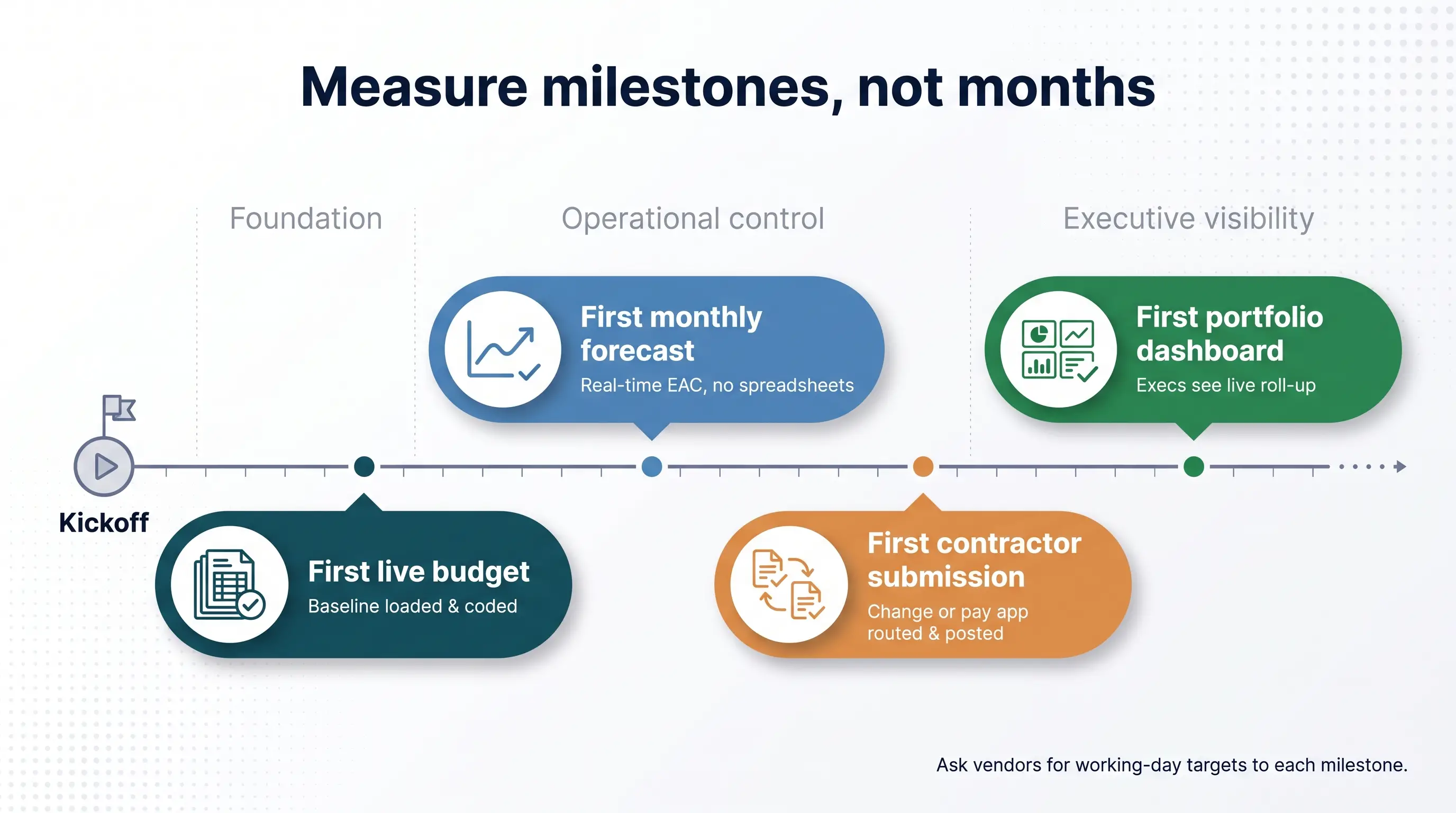
Measure working days to four milestones: first live budget, first monthly forecast, first contractor submission, and first portfolio dashboard. Avoid generic month counts and ask for references that reached those dates.
They should become the system of record for budgets, changes, and forecasts. Excel will still live on for ad-hoc analysis, but exporting data just to build the official report should disappear.
Load the active baseline, open commitments, current actuals, pending changes, and the latest forecast. Bring historical detail later, once cost codes are mapped.
Use one ten-step script for every demo: import a budget, link a schedule task, log a contractor change, apply cost and time impact, route approvals, update the forecast, and roll the result into a portfolio dashboard. Side-by-side viewing exposes strengths and shortcuts fast.
Big capital projects keep blowing budgets. A McKinsey review cited by ENR found 79 percent of 500-plus builds ran over cost and 52 percent missed schedule. When budgets sit in ERP, schedules in Primavera, and change orders in spreadsheets, forecasts reach the C-suite too late.
Project-controls platforms fix that. They pull cost, schedule, scope, contracts, risk, and field data into a single hub so trouble surfaces early and contractors stay accountable.
This guide ranks seven capital-project budget tools for utility, energy, mining, transportation, and heavy-infrastructure owners - showing where each shines and what you should probe further.
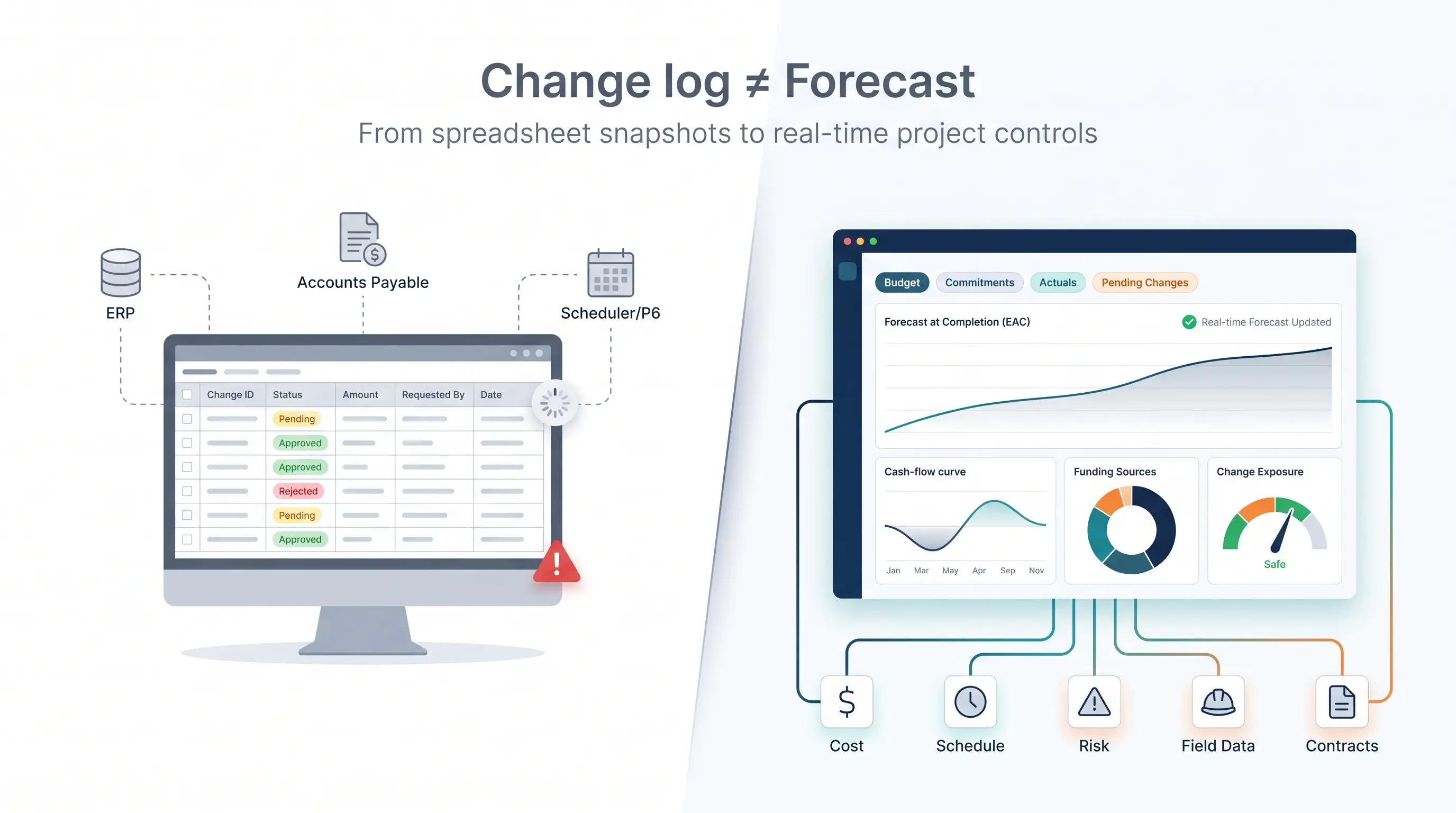
Most owners keep a spreadsheet that lists pending, approved, and rejected change orders. It records requests, not outcomes. A single row never shows how the request shifts the estimate at completion, pulls the cash-flow curve forward, or taps a specific funding source.
To build a fresh forecast, someone still hunts for commitments in ERP, actuals in accounts payable, and dates in Primavera P6. By the time those numbers reach your inbox, the project has already moved on.
The gap is clear. A 2026 Dodge Construction Network survey found that only six percent of respondents had fully connected project-controls data; 41 percent could spot overruns early, and just 22 percent had real-time cost exposure.
Disconnected sheets let overruns grow unnoticed. Every manual copy-paste widens the delay between field reality and executive insight. Owners approve change orders without seeing their compound effect, and leadership discovers the shortfall only after contingency is gone.
Integrated project-controls software flips that script. The moment a change is logged, it updates contracts, budgets, forecasts, and schedules: no macros, no midnight spreadsheet surgery.

Capital projects generate invoices from contractors, equipment suppliers, engineering firms, and service providers. InvoiceAction automates invoice processing, validates financial information, and matches invoices against purchase orders and supporting records where available.
Reduce manual reconciliation and improve the quality of expense data used in project financial reporting.
Selecting software for a billion-dollar program takes more than star ratings. We mapped common owner pain points into one scoring model and ran every product through the same rubric.
To make the shortlist, a platform had to manage the full cost picture: budget, commitments, actuals, pending changes, and forecasts. It also needed to roll that data up across multiple projects for real owners, not just contractors. Pure schedulers, point estimators, and generic task apps did not qualify.
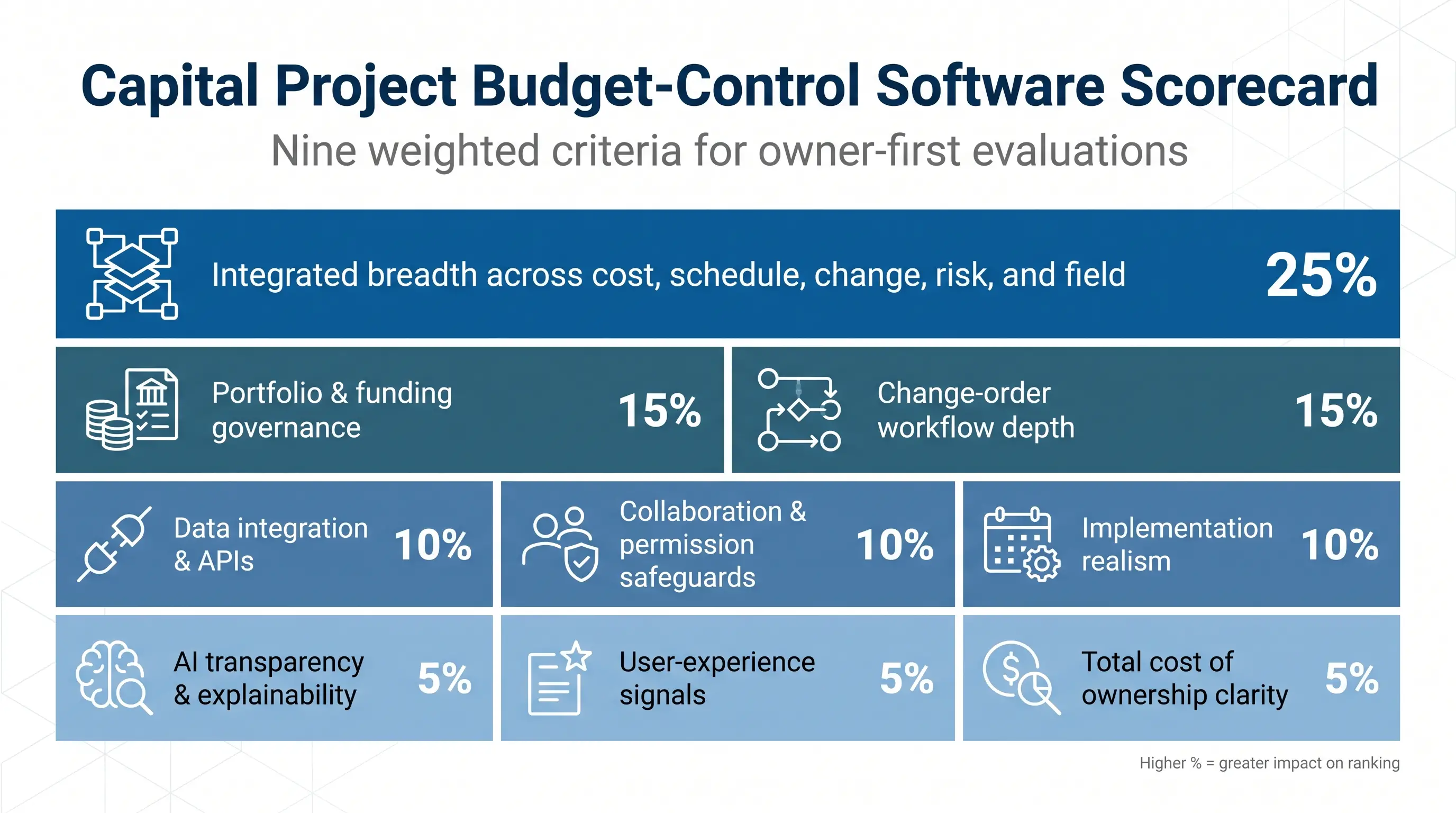
We scored nine criteria, each with a set weight:
A glossy dashboard could not outrank a platform that updates the forecast the moment a change earns approval.
Recommended reading: Learn How Strategic Financial Management Strengthens Budget Control
Every claim had to link to a primary source: release notes, product documentation, or public case studies. We used marketplace ratings only when the sample size was meaningful and flagged any vendor-funded ROI study so you can judge its weight.
This is an owner-first view. A tool that finishes mid-table here can still be the right choice if your ERP is set or if field adoption matters more than enterprise governance. Use the ranking as a map, then pressure-test fit with a scripted demo: import a budget, log a change, watch the forecast move, and see which platform keeps pace.
We’ve applied the weighted scorecard (25 percent integrated breadth, 15 percent governance, 15 percent change-workflow depth, and so on) to every product. The seven listed below earned the highest composite scores.
Rank | Platform | Best for | Stand-out strength | Key trade-off |
1 | InEight | Large owner portfolios | Estimate-to-field integration across cost, schedule, risk, and documents | Enterprise setup effort and quote-only pricing |
2 | Octave Sequence Enterprise | Enterprise portfolio governance | Low-code configurability and what-if funding scenarios | Small public-review sample |
3 | Oracle Primavera suite | Organizations already on Oracle | Deep cost-schedule governance with Unifier + P6 | Multi-product licensing and admin complexity |
4 | Kahua | Owner–contractor workflows | Flexible approvals and document traceability | Validate CPM and quantitative-risk depth |
5 | Procore | Fast field adoption | Mobile change capture tied to budget lines | Contractor-centric DNA; advanced funding controls need add-ons |
6 | Contruent | Lifecycle cost control | Time-phased forecasting and earned value | Narrower document and field ecosystem |
7 | Aurigo Masterworks | Public capital programs | Funding governance and long-range planning | Limited industrial use cases |
Scores range from 86 / 100 for InEight to 68 / 100 for Aurigo; the full breakdown appears in the appendix.
Use this table to align your top need (portfolio governance, field collaboration, or forecast accuracy) with each platform’s leading strength, then confirm trade-offs during a scripted demo.

Capital projects generate contracts, purchase orders, supplier invoices, and supporting documentation that often arrive in different formats. docAlpha automates document classification, data extraction, validation, and downstream workflows.
Reduce manual document handling and make project-related business information easier to process across connected systems.
InEight tops the list because it treats estimate, schedule, cost, risk, documents, and field progress as one data set. A 2026 buyer’s guide, The Best Change Order Management Software for Capital Construction, even named it “best overall” for capital projects after scoring how tightly its change orders sync with budgets, contracts, and forecasts. Import an authorized budget once, and every approved change updates the forecast, contract value, and cash-flow curve in real time - no spreadsheet reconciliation required to answer “Where will we finish?”
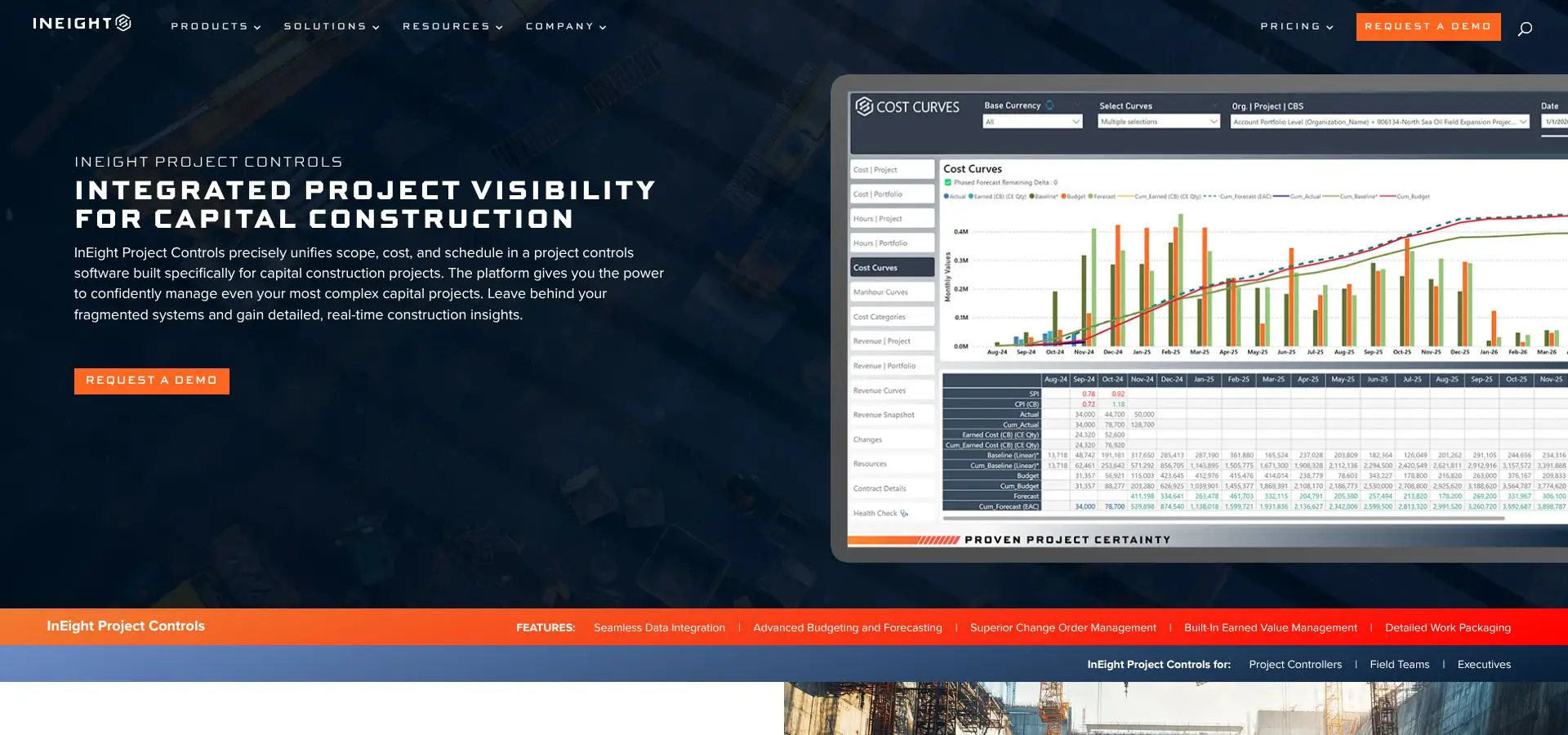
A live example: CS Energy uses eight InEight modules across four utility-scale projects, giving executives a single portfolio dashboard instead of week-old spreadsheets. CS Energy case study
Strengths
Trade-offs
Best fit
Multi-contractor programs that need an auditable source of truth from estimate through field execution and are ready to invest in upfront data discipline.
Boards that want one financial language across every capital project choose Octave Sequence Enterprise. Hexagon announced the EcoSys → Octave rebrand on June 17, 2025, ahead of the business’s May 2026 spin-off (Octave press release).
Since then, Octave has focused on cloud architecture, mobile access, and AI-assisted insights; the upcoming Sequence Enterprise 10 release adds built-in document management and deeper analytics (Octave product blog).
Where it shines
You allocate funds, targets, and contingency at portfolio level, then drill into budgets, commitments, change orders, and earned value on each site. A what-if engine shows how shifting a finish date or escalation rate ripples through a five-year cash plan, which is vital for utilities juggling multiple funding sources.
Trade-offs
Best fit
Owners who need multi-currency, multi-funding governance and are willing to invest in data standards up front so that low-code flexibility pays off later.
Recommended reading: Discover Best Practices for Financial Forecasting and Budgeting
Oracle delivers portfolio-level control through a connected trio: Primavera P6 or Primavera Cloud for schedules, Unifier for cost, contracts, changes, and funding, and Aconex for documents and collaboration. Together they give you an audit-ready command center, especially when your ERP already carries the Oracle badge.
Why owners shortlist Oracle
Unifier’s cost sheet acts as a living ledger. Approve a change request and the system posts new values to budget, contract, forecast, and cash flow right away. Because that sheet links to P6 activities, time-and-cost impacts surface before month-end. Regulated sectors such as nuclear, rail, and airports value the traceable audit trail.
Strength matched by scope
Market signal
Trade-offs
Best fit
Pick Oracle when P6 schedules already drive your projects and finance wants to stay inside the existing Oracle ecosystem rather than add a new vendor stack.

When invoice information is entered manually, finance teams spend valuable time correcting errors and reconciling expenses across systems. InvoiceAction automates invoice capture, validation, matching, and exception handling to streamline accounts payable workflows.
Reduce repetitive financial processing and help project cost teams work with more consistent, timely expense information.
Kahua shines on programs where each project brings a new funding rule or approval path. Its low-code environment lets owners design cost, change, pay-app, and document workflows without waiting for vendor change orders.
Where it shines
A published case shows a capital project owner using Kahua to manage post-award contract information and enforce audit-proof approvals across more than 150 business processes (Kahua customer story, 2026).
Trade-offs
Best fit
Pick Kahua when contractor collaboration and flexible, audit-ready approvals matter more than deep schedule analytics.
Recommended reading: How to Use SharePoint to Replace Manual Budgeting Spreadsheets
Procore dominates the jobsite. More than 4,300 G2 reviews give the core platform an average 4.6 / 5 rating. When owners use the same system, change events travel from a superintendent’s tablet to the cost engineer’s dashboard in minutes, with no email detours.
A May 1, 2026 update added a flexible Forecast-to-Complete panel to the modernized Budget table, letting teams adjust quantities or production rates and watch the cost curve shift in real time (Procore release notes).
Four quick wins
Why it ranks lower for owners
Best fit
Choose Procore when real-time collaboration and fast field adoption outweigh multi-funding governance. The platform excels on data-center builds, manufacturing fit-outs, and renewables projects where speed wins.
Contruent is built by cost engineers for cost engineers. Its single mission is to keep budgets, forecasts, and change logs in lock-step from design through hand-over.
What sets Contruent apart
Contruent focuses on time-phased cost control. Load the baseline, map work- and cost-breakdown structures, then track earned value against schedule progress in real time. Forecasts update automatically as quantities shift, so finance never waits for a manual roll-up (Contruent product page).
A published case study shows an Australian water utility replacing spreadsheets with Contruent and unifying SAP and P6 data in one control tower. Analysts now spend their time on risk analysis instead of reconciliation (Contruent case study).
Strengths
Limitations
Best fit
Choose Contruent when your ERP, scheduling, and document systems are already in place, but the missing layer is an earned-value cost-control engine that delivers precise, time-phased forecasts.

Capital project documentation often requires validation and review before financial information can move into downstream systems. docAlpha combines intelligent document processing, intelligent rules, automated routing, and human exception review.
Reduce repetitive administrative work while maintaining appropriate oversight of information that requires verification.
Cities, counties, and transit agencies juggle bond calendars, grant rules, and public scrutiny. Aurigo Masterworks links long-range capital planning with day-to-day project controls, keeping all obligations in view inside one system.
Where Aurigo stands out
A published case notes a capital project owner choosing Masterworks to run its capital improvement program, joining a platform that oversees more than $300 billion across 40,000 projects (Aurigo press release, September 2024).
Limits to note
Ideal use
Pick Aurigo Masterworks when transparent stewardship of taxpayer funds and multi-year funding control matter more than heavy field execution features.
The matrix below shows how each platform handles the capabilities owners care about most. Ratings come from published product documentation as of July 2026 and our weighted scorecard (25 percent integrated breadth, 15 percent governance, and so on).
Legend: Strong = native module, Suite = companion product in the vendor ecosystem, Integration = third-party link, Verify = depth varies; confirm in a demo.
Budget + EAC | Change & Audit | Portfolio & Funding | Cost-schedule Link | Estimate → Control | Docs / Field / Risk |
Strong | Strong | Strong | Strong | Strong | Strong |
Strong | Strong | Strong | Strong | Strong | Suite (docs), Verify (field) |
Strong (Unifier) | Strong | Strong | Strong | Suite | Suite (Aconex) |
Strong | Strong | Strong | Verify | Verify | Strong (docs), Verify (risk) |
Strong | Strong | Suite (Portfolio Financials) | Integration | Strong | Strong |
Strong | Strong | Strong | Integration | Strong | Integration |
Strong | Strong | Strong | Verify | Verify | Suite (admin), Verify (field) |
Pattern: InEight packs every control into one platform, Oracle reaches parity through a three-product suite, Kahua and Procore focus on collaboration, Contruent doubles down on forecast integrity, and Aurigo owns the funding-governance niche. Use the “Verify” and “Integration” flags to script demo questions that test latency, extra license cost, and data depth.
Recommended reading: Learn How Audit Trails Improve Financial Accountability
Every platform can manage budgets and changes, but each one was built to solve a different first-order problem. Decide which scenario matches your reality before you book another demo:
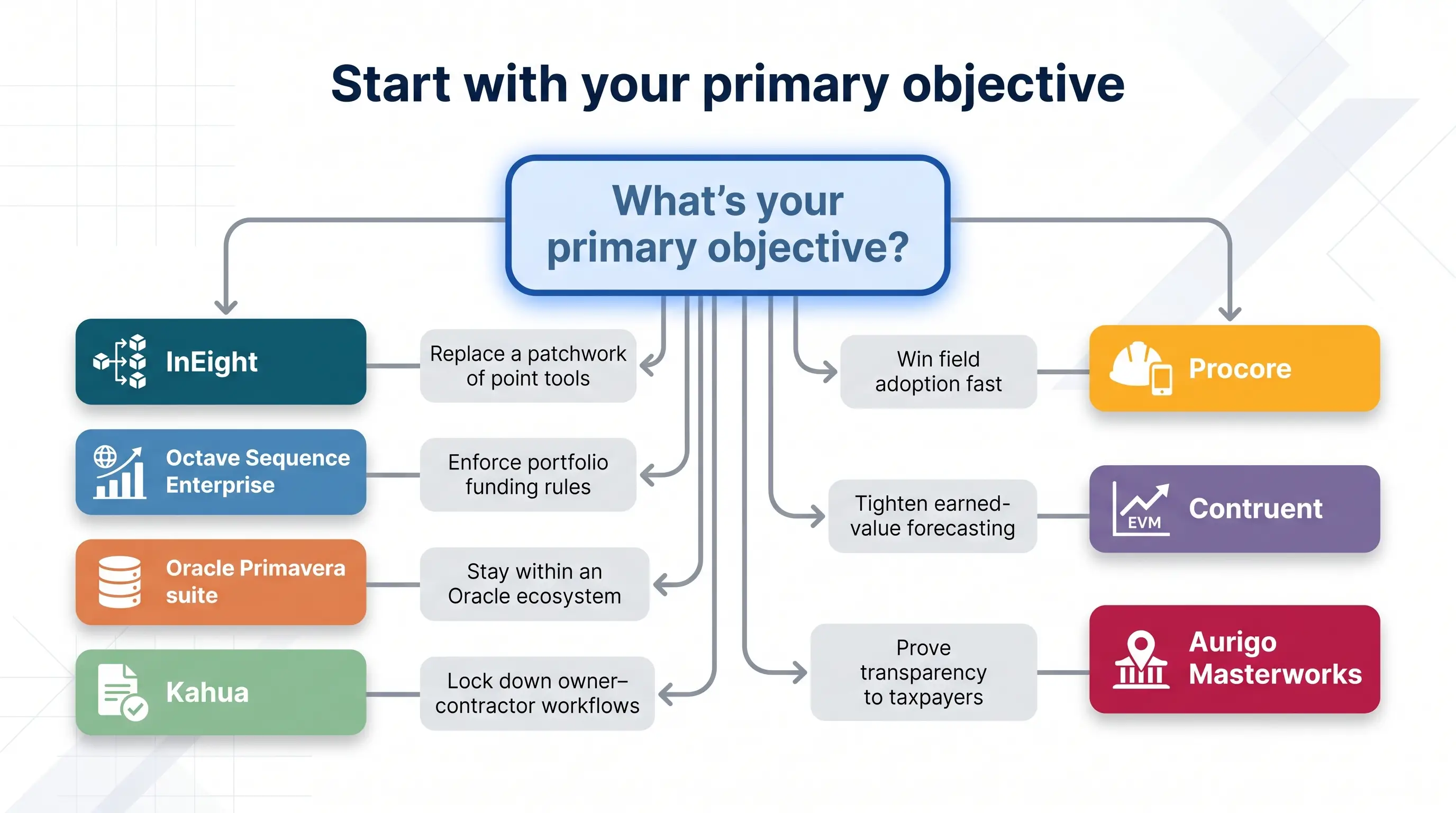
Estimates in one app, P6 schedules in another, field progress in a third - sound familiar? InEight links estimate, schedule, cost, risk, documents, and field data in one model. Approve a change once, and budget, forecast, and dates update together. Result: fewer reconciliation days and a clean portfolio roll-up across regions.
Boards that care more about multi-currency, multi-grant visibility than jobsite photos choose Sequence. Low-code tools encode funding rules and KPI dashboards once, then replicate them worldwide. Portfolio managers tweak an escalation curve and watch five-year cash flow recalc in seconds.
When hundreds of P6 schedules and Oracle ERP are in place, adding Unifier for cost and Aconex for documents keeps everything in one vendor family. P6 activities sync natively to Unifier’s cost sheet, and finance trusts the numbers flowing through Oracle Integration Cloud.
Kahua’s low-code engine lets you enforce a four-step federal approval on one project and a two-step private-equity process on the next without new code. Contractors see only their work packages, while owners keep contingency and internal rates hidden.
More than 4,300 G2 reviews (4.6 / 5 average) show Procore’s reach. Crews tag a change on a tablet, and cost engineers see exposure minutes later. Add Portfolio Financials later if you need cap-planning views.
Contruent focuses on time-phased budgets, earned value, and trend logs. Load the baseline, link schedule progress, and the estimate at completion recalculates every time quantities move - no extra spreadsheets.
Capital-planning, funding tags, and GIS dashboards make Masterworks a fit for DOTs and cities. One capital project owner uses it to manage its program and produce citizen-ready maps of progress.

Large capital programs require careful oversight of supplier charges, purchase order commitments, and financial approvals. InvoiceAction automates invoice validation, purchase order matching, approval routing, and exception management.
Improve accounts payable accuracy and maintain greater control over invoice processing across complex, document-intensive projects.
Sticker price is only act one. Enterprise platforms stack fees the way contractors stack mark-ups, so missing a tier can sink the business case.
Ignore “eight-week” promises. Ask for working-day targets to hit four dates:
Request references that reached those dates.
Treat migration as a mini-project: inventory, standardize codes, validate totals, stage one test project, and archive source files for auditors. A disciplined cleanse may add weeks, but skipping it locks confusion in forever.
Lock down four core links before go-live:
Add GIS, BI, or e-signature in phase two.
Set least-privilege roles, document gates, and immutable logs before inviting the first contractor. Ask vendors to prove these controls live; plug-ins added later raise risk.
Treat predictive features like subcontractors: credentials first, oversight always. Verify data lineage, permission awareness, and confidence bands before trusting any automated recommendation.
 Best Practices for Financial Forecasting and Budgeting
  Using SharePoint for Budgeting: Streamlining Processes
  Project Management and Invoicing Software
  How Finance Automation Improves Efficiency and Business Results
  Smarter Workflows With AI Document Automation for Business
  Real-Time Cost Tracking: Key to Electronics Manufacturing Success
