How a Video Editing Service Streamlines Business Content Workflows
Published: September 21, 2026
A team may have clear processes for finance, HR, and document approvals. Then a product launch video comes along, and work shifts to email threads, a shared drive full of files named FINAL_v3, and a marketing manager chasing an overloaded editor.
Video requires coordination across several roles. One recording may need a full-length edit, short clips, captions, and thumbnails, each with its own review requirements. Without clear handoffs, adding an editor can simply move the bottleneck somewhere else.
The goal is to publish consistent, on-brand video across channels without overloading internal staff. An external editing partner can handle repeatable production tasks, but your team still needs to own the brief, approvals, and final delivery requirements.
Efficient workflows separate predictable processing from decisions that require expertise, context, and oversight. docAlpha uses AI and intelligent rules to automate document capture, extraction, validation, and routing while directing exceptions for human review.
Increase processing capacity while keeping employee attention focused where judgment adds the most value.
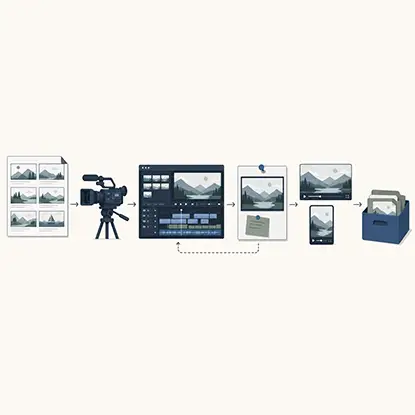
A business video production workflow is the path a video takes from idea to archive. It typically has six stages: pre-production (brief, script, shot list), production (recording), post-production (editing, graphics, audio, color), review and approval, distribution, and repurposing and storage. A digital or media asset management system, often called a DAM or MAM, helps teams organize and find the finished files.
Delays often appear between stages: footage sits on a drive, a stakeholder doesn't know a draft is ready, an updated logo arrives after the first edit, or someone requests a vertical cut after launch. Clear ownership and timely notifications help close these gaps.
Recommended reading: Learn How AI Connects Content Creation With Predictive Marketing Analytics
If several of these sound familiar, the process may need attention before you look for a faster editor.
The costs include missed campaign windows, outdated training content, and staff hours spent chasing files. Two useful starting measures are time from recording to first draft and the average number of revision rounds before approval.
Assign a clear role to each participant. The external editor handles agreed production tasks. Your marketing or communications lead owns the outcome. Subject-matter experts and legal reviewers check relevant details, while publishing owners receive the approved assets.
Work suited to an editing partner includes:
Responsibilities to keep in-house include:
The dividing line is final judgment versus repeatable execution. Editors bring creative judgment, but your team remains responsible for decisions that depend on customer knowledge, regulation, or internal policy.

A streamlined content operation loses some of its efficiency when invoices from agencies, editors, freelancers, software providers, and other vendors still require manual processing. InvoiceAction uses AI-powered capture, validation, matching, and workflow automation to streamline AP.
Reduce repetitive finance work and extend process automation across more of the business.
An external partner doesn't remove stages from the workflow. It changes who handles the work and how files and decisions move between people.
A structured order form replaces scattered requests. It should capture the goal, audience, target length, aspect ratios, brand kit version, music direction, deadline, and approvers. Include a file-naming guide and check that all required footage and assets are available before the editing clock starts.
Agree on first-draft and revision timelines rather than relying on an informal deadline. If a provider quotes a 24- or 48-hour first draft, confirm when that window begins and which project types it covers. A shared brand toolkit helps editors handle audio cleanup, color correction, and graphics consistently. For launches with several deliverables, confirm how many videos can be edited at once.
Identify useful short clips, vertical versions, and chapters before editing starts. Not every long-form video needs every format. Order the versions your distribution plan requires so they can be scheduled alongside the main video.
Keep timestamped comments in one review location instead of sending separate notes by email. Name each version clearly, consolidate conflicting feedback, and designate one person to submit the final revision request. Use access settings to limit who can view drafts and approve them.
Specify resolution, aspect ratio, caption format, and any thumbnails for each destination, such as YouTube or LinkedIn. Don't assume every supporting asset is included in the editing price. List add-ons in the original brief and check them at delivery.
The partner's platform, your review tool, your project system, and your asset library need defined roles. Otherwise, outsourcing can add another inbox rather than reduce coordination.
Choose one place for actionable video feedback. If your project system supports a review integration, test how comments, versions, and approval status move between tools. If it doesn't, a clearly labeled review link attached to the project task may be enough.
Some providers run ordering through their own portal rather than by email. Tasty Edits, a video editing service built around that model, uses VOMA, its Video Order Management Application, to centralize orders, uploads, feedback, and deliverables, with direct communication between clients and assigned editors. This gives teams a shared record of requests and deliveries. Define which approvals belong in that hub and which must remain in your internal system.
Buyers don't need to follow every software release, but they should understand how an editor handles captions, transcript-based edits, and generated content. Ask who checks automated captions for names and technical terms. Set rules for generated footage or audio before those tools are used on a project.
Marketing teams can streamline video editing while still losing time to manual document capture, data entry, and information handoffs elsewhere in the business. docAlpha uses AI-powered intelligent document processing to capture, classify, extract, and validate business data automatically.
Reduce repetitive work across operations and give employees more time for decisions, strategy, and creative work.
Distribution requirements change. Check current export specifications, thumbnail options, and text placement guidance when planning deliverables. Keep important text away from areas covered by playback controls or captions, and update the brand toolkit when requirements change.
Store approved masters and any agreed project files in your asset library. Include the title, campaign, version, usage-rights details, and approver. Keep the task, due date, and review link in the project tool. Automate delivery notifications where supported, but assign someone to confirm that the files are complete.
A strong portfolio doesn't explain how a provider will handle your workload. Ask about the commercial terms and operating details as well:
A useful framework for evaluating video production partners can organize those questions around production capabilities, timeline accuracy, and budget transparency.
Customer reviews can help you assess communication and revision handling. Tasty Edits' Trustpilot page is one place to gather customer perspectives before a test project. Read reviews for specific examples, then use a paid edit to assess fit with your own requirements.
Recommended reading: Discover the Best AI Image and Video Generators for Marketing Teams
Per-video pricing can make budgeting straightforward when campaigns and training releases have defined deliverables. Model volume packs and add-ons separately. The following Tasty Edits rates provide a worked example; confirm current prices and terms before committing a budget.
Deliverable | Single video | Pack rates | Notes |
Long-form edit | $327 | $305 each in a 4-pack; $278 each in an 8-pack | $278 applies only to the 8-video pack |
Short-form vertical edit | $94 | $88 each in a 15-pack; $80 each in a 30-pack | Standalone vertical edits |
Thumbnail add-on | $43 per order | Not applicable | Not included by default |
Vertical reformat of a long-form video | $43 per order | Not applicable | Separate add-on, ordered per video |
Suppose a quarter calls for eight long-form videos, 30 standalone verticals, and eight thumbnail add-ons. At the listed pack rates, the total is $4,968: $2,224 for long-form edits, $2,400 for verticals, and $344 for thumbnails. At single-video rates, the same example totals $5,780. The $812 difference matters only if you need and use the full volume.
Keep two distinctions clear. The $278 long-form rate requires an eight-video pack; a single edit is listed at $327. Editing is priced per video without a subscription contract. YouTube channel management is a separate subscription service and shouldn't be included in the editing budget unless you're buying it.
Per-video purchasing can avoid an ongoing monthly charge when output is irregular. Pack discounts may reduce unit costs, but they also require a larger purchase. Check payment timing, usage deadlines, and add-on quantities before comparing a pack with a monthly plan.

Scaling content production is easier when repeatable work follows a defined workflow, and the same principle applies to the documents surrounding business operations. docAlpha uses AI-powered document processing to automate information capture, validation, and workflow routing.
Free teams from repetitive processing and build more scalable operations behind business growth.
Standard operating procedures, or SOPs, give both teams a shared reference. Keep the documentation short enough to use. A practical kit covers six areas:
Complete briefs and current assets reduce avoidable revision loops. Give editors the information they need before work starts, and update the shared documents when a recurring issue appears.
Start with one recurring series rather than moving every video project at once. Use the pilot to test both editing quality and the handoffs around it.
Choose a series with a predictable schedule, such as product updates or training modules. Record time from recording to publication, revision rounds, and late deliveries. Name approvers, reserve review time, and submit the first orders using the intake brief.
Add vertical cuts and thumbnails where the content plan calls for them. Attach review links to project tasks and check that approved masters reach the asset library with the right labels. Fix missing assets, naming problems, and approval delays before increasing volume.
If the first series is running reliably, add a second and test parallel editing. Compare turnaround and on-time delivery with the baseline. Share the results alongside the next quarter's realistic volume forecast.
Recommended reading: Discover How AI Improves Information Access and Automates Business Workflows
Track these alongside audience and business results, not as substitutes for them. Workflow measures show whether production is reliable. Audience response also depends on the message, distribution, and content itself; an editing partner can't guarantee it.
Outsourcing post-production requires clear rules for rights, data access, and file ownership.

Businesses can streamline marketing production while customer purchase orders still move through inboxes and manual data-entry processes. OrderAction uses AI to capture, validate, and transform incoming POs into ERP-ready sales orders.
Reduce repetitive order entry and extend process automation from marketing activity into revenue-generating operations.
A practical handoff point is immediately after recording, once the footage, brief, and brand kit are complete. The partner returns a first draft on an agreed timeline, reviewers leave feedback in a shared location, and approved files go to your archive. Strategy, scripting, filming, final compliance sign-off, and publishing remain with your team unless separately agreed.
A video editing service works best when its ordering and review process fits those responsibilities. Tasty Edits offers per-video editing with a dedicated editor and manager, long-form and short-form edits, and optional thumbnails and vertical reformats. Its stated service model includes 24- to 48-hour first drafts, unlimited revisions, royalty-free music and stock footage, audio and video enhancement, and parallel editing capacity. Confirm the scope and timing for your project, including any limits on revisions or simultaneous work.
Use a paid test edit on a real project to assess the fit. Check whether the intake captures your requirements, feedback reaches the right person, and files arrive ready for publication. Compare prices against expected output and include the internal time needed to manage reviews.
A reliable video workflow starts with clear responsibilities: define the stages, prepare complete briefs, set review deadlines, and make approved files easy to find. An editing partner can then take on repeatable production work without leaving your team to chase every handoff.
Look for shorter turnaround, consistent brand presentation, and less time spent coordinating revisions. Whether you build capacity in-house or work with a partner such as Tasty Edits, test the process with one series first. Use the results to decide what to improve and when to expand.
 Animated Explainer Video for SaaS
 Top AI Image and Video Tools for Modern Marketing Teams
 AI-Powered Knowledge Access and Workflow Automation
 How Video Tools Streamline Modern Workflow Automation
 Smarter Content Workflows for Modern Marketing Teams
 Boost Digital Efficiency with Video-Driven Workflows
