6 Tools to Automate Monthly NetSuite Reporting
Published: November 11, 2026
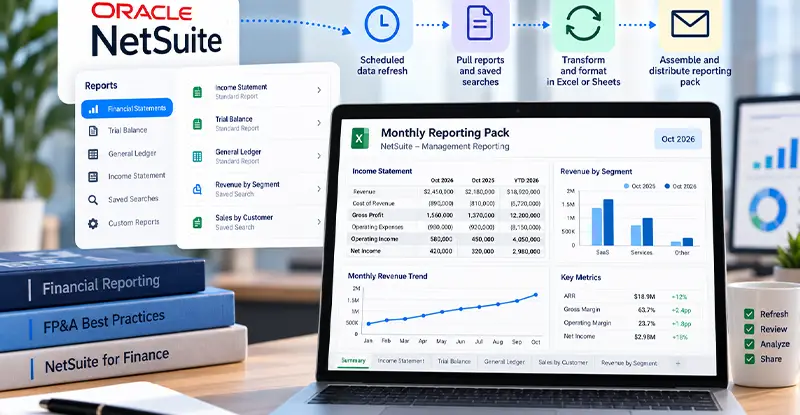
For a controller at a 120-person US SaaS company, month-end may still mean copying the NetSuite income statement, trial balance and general ledger into Excel before assembling the management pack. The useful automation preserves the reporting model while removing that repeated handoff.
An FP&A manager at a 200-person US healthcare company has a related need: sales and revenue saved searches refreshed in Google Sheets without relying on an active browser session. A CFO at a 90-person US SaaS company needs a reviewed summary and a clear owner when the refresh fails. Compare tools against those jobs, including the cost of setup and ongoing operation.
The six options below cover different parts of that handoff: supplying a spreadsheet, maintaining financial layouts, assembling a bundle or distributing an existing report.
Reporting automation starts with data already in the ERP. Artsyl's NetSuite document automation addresses upstream capture and approval; the tools below help finance turn the resulting ERP data into recurring analysis and reporting.

Automated report refreshes are useful only when the transactions entering NetSuite are accurate. InvoiceAction uses intelligent supplier invoice extraction, validation, purchase order matching, and approval workflows to help finance teams resolve discrepancies before downstream reporting.
Spend less time investigating preventable AP errors during month-end close.
Tool | Monthly reporting job / Working output | Refresh or delivery setup | Commercial position |
Coefficient | Monthly reporting job: Refill spreadsheet analyses from saved searches, records or queries | Connector needs one time administrator configuration; scheduled Excel files must be in OneDrive. | NetSuite is a premium source on Enterprise; custom quote |
CloudExtend ExtendInsights | Monthly reporting job: Feed NetSuite searches and SuiteQL into recurring Excel analysis | Scheduled workbooks need OneDrive for Business or SharePoint and Microsoft 365 administrator consent | NetSuite Enterprise starts at $150/month; custom quote |
Solution 7 by Zone | Monthly reporting job: Reuse financial statement layouts and distribute management packs | SuiteAnalytics Connect plus configured reporting and distribution | Demo and pricing discussion |
insightsoftware Spreadsheet Server | Monthly reporting job: Refresh and distribute Excel reports, including across ERP systems | Configure data connections and Windows scheduling; Distribution Manager jobs need a logged-in user | Pricing supplied on request |
NetSuite native scheduling | Monthly reporting job: Email existing reports or saved-search results | Permissions, recipient setup, schedules and email limits | Existing NetSuite features; account entitlements apply |
Calxa | Monthly reporting job: Assemble monthly management bundles with budgets and charts | Configure the Enterprise integration, sync and delivery workflow; monthly-period data | Enterprise: $1,200/tenant/month plus $2,000 base implementation in USD |
Sources for the table and their conditions appear in the relevant profiles. Prices are vendor-listed amounts, not like-for-like total project costs.
Coefficient keeps NetSuite data flowing into existing Google Sheets and Excel models. It imports saved searches, records and lists, datasets, SuiteQL and standard reports such as the income statement or trial balance, with scheduled refresh. A controller can keep an established variance workbook and drop the repeated export. Scheduled refresh in Excel requires the workbook to be saved in OneDrive.
Changes can also go back to NetSuite. Users can export updates from the sheet to NetSuite records using field mappings, so corrections made during review don’t need re-keying in the ERP.
Historical snapshots save a dated copy of imported data, which keeps the issued September pack fixed after later postings land. Alerts notify Slack, Microsoft Teams or email when a value crosses a threshold, such as a department running over budget.
For the CFO summary, AI Dashboards turn the workbook’s live NetSuite data into a shareable BI-quality dashboard from a plain-English prompt.
NetSuite is a premium source on Coefficient’s Enterprise plan, which has custom pricing.
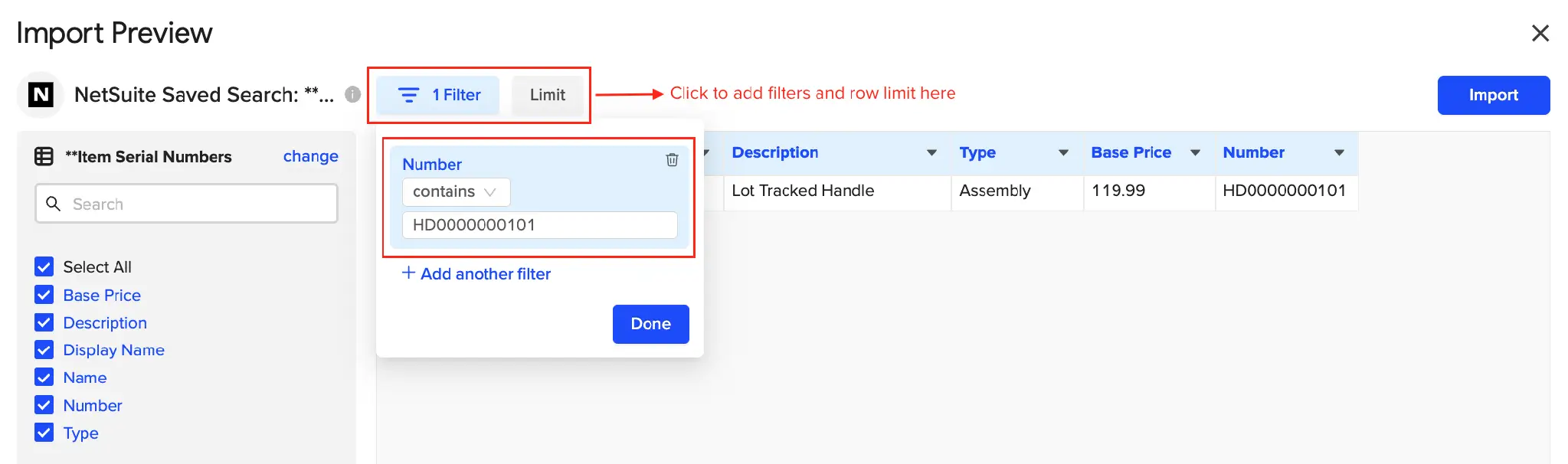
Coefficient’s documented saved-search preview shows the fields and sample rows available before import. Source: Coefficient NetSuite help. Vendor documentation screenshot detail.
Recommended reading: Discover How AI-Powered AP Automation Works with NetSuite
ExtendInsights is another option for teams keeping Excel at the center of reporting. Its NetSuite Enterprise offering includes saved-search and SuiteQL access, hourly scheduled downloads, and XAVI formulas for financial reporting. That gives finance more than one building block: detailed search extracts for supporting schedules and financial functions for statement-style layouts.
A recurring departmental expense analysis can use an approved saved search as a reusable input, while financial functions support statement-style views. That combination suits a team maintaining both detailed schedules and a recurring pack. The intended scheduling behavior of financial formulas and dependent calculations belongs in the workflow evaluation.
CloudExtend's scheduled-refresh setup uses Microsoft Excel, a workbook in OneDrive for Business or SharePoint, Microsoft 365 administrator consent, and a saved template or query. These are the operating requirements for that scheduled workflow.
The NetSuite Enterprise edition starts at $150 per month, with the user, environment and feature scope supplied in a custom quote. The starting amount is not labeled per user; lower-priced plans on the page serve other data sources.
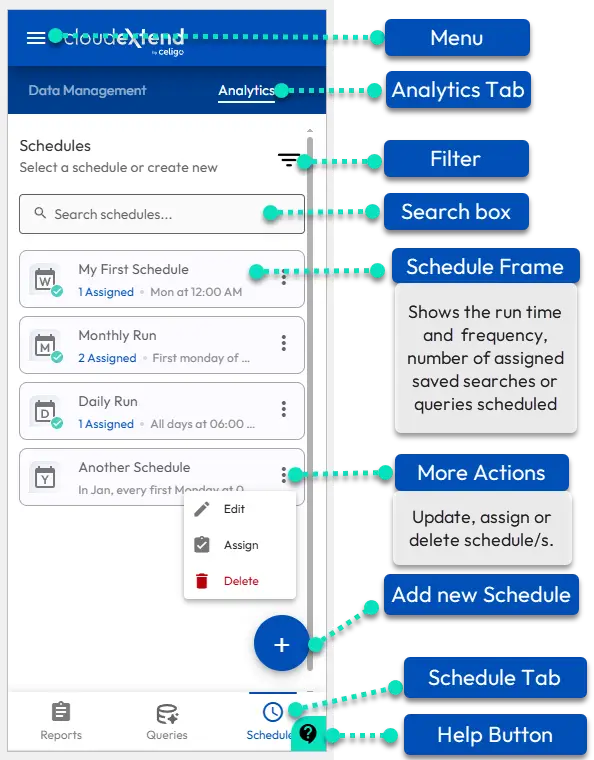
CloudExtend’s documentation annotates the Enterprise Schedule tab, including run frequency and assigned saved searches or queries. Vendor documentation image; no live-account testing. Source: CloudExtend workspace guide.

Reporting automation addresses what happens after transactions reach NetSuite; supplier invoices still need to be captured and approved. InvoiceAction automates invoice extraction, ERP-aware validation, matching, and configurable approval routing to support the upstream AP process.
Create a cleaner handoff from supplier documents to the financial reports your business relies on.
Solution 7 is relevant when the challenge is maintaining a financial presentation rather than downloading a flat transaction list. The product supports refreshable NetSuite reporting inside Excel, with control over layouts and comparative views, and drill-down into supporting detail.
Consider a controller producing the same income statement by subsidiary every month. Approved financial logic, reusable formulas and layouts can reduce the need to reconstruct each entity's presentation. Finance maintains the account mappings, reporting periods and chart-of-accounts changes behind that reusable framework.
The Solution 7 SuiteApp listing documents automated workbook distribution, including management packs and static reports for recipients. This gives finance a way to serve pack readers as well as users working with refreshable reports and live drill-down; those recipient roles have different needs.
The setup requires NetSuite SuiteAnalytics Connect, alongside the Excel and distribution environment. The current product page offers a demo and a pricing discussion; a deployment budget needs to cover those components as well as the add-in.
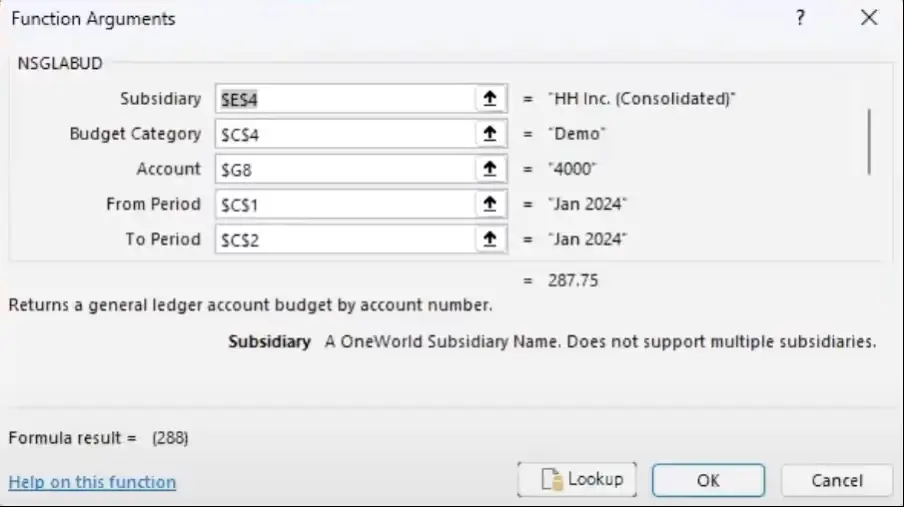
Solution 7’s vendor example shows financial-function arguments for subsidiary, budget, account and periods. Source; documentation UI.
Recommended reading: Learn How ERP Systems Support Cost Accounting and Financial Reporting
Spreadsheet Server suits finance teams with an Excel reporting estate that needs managed refresh and delivery. Its product documentation describes ERP-connected Excel formulas, drill-down and automated report distribution, with NetSuite among the supported environments.
Its more distinctive monthly job is coordinating several workbooks and recipients. For example, a finance operations manager may need an overall expense pack plus selected departmental worksheets, rather than one identical file sent to everyone.
The Distribution Manager job configuration lets teams select workbooks or folders, set replacement values, and choose whether a run refreshes, distributes, or does both. A halt-on-error setting adds control over the run. This is useful when different recipients need different parts of the monthly reporting output.
The v26 scheduling guide uses Windows Task Scheduler, with a logged-in user required for Distribution Manager jobs. Pricing is supplied on request, with connection, scheduling, implementation and users part of the deployment scope.

Spreadsheet Server task-failure and completion notifications. Vendor documentation, cropped and enlarged; original field blur preserved.

Missing fields and inconsistent document details create rework long before a controller assembles the monthly pack. docAlpha combines intelligent document extraction with configurable checks and human exception routing before information moves downstream.
Address document-data issues earlier and reduce avoidable reconciliation effort.
An existing NetSuite report can become a recurring email deliverable through Oracle's scheduling features for standard and saved reports, including monthly recurrence. This is a useful baseline when the report already answers the recipient's question.
For record-level lists, saved-search scheduling can email results at regular intervals, either embedded in the message or attached as CSV or XLS. This can cover a repeatable exception list or monthly operational extract without introducing a spreadsheet connector.
The native route works well when the desired deliverable is close to a report or search finance already maintains. Review, reconciliation and the management narrative remain part of preparing the issued pack.
Oracle's saved-search email guidance sets a 10,000-row limit and truncation for emails over 5 MB; standard report emails have a separate 20 MB limit. Access to these existing-platform features depends on the account's permissions and entitlements.
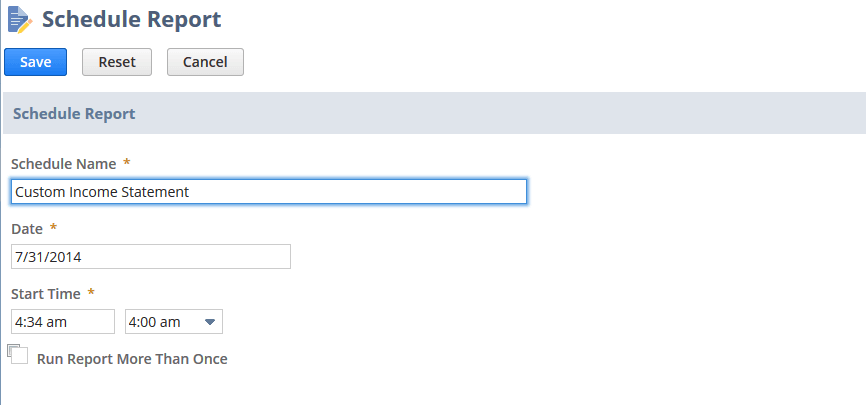
Oracle’s documentation example shows the native report scheduler’s date, time and repeat controls. Use this route when an existing report already meets the reporting need. Source: Scheduling a report. Vendor documentation screenshot detail; interface layout may differ by account.
Recommended reading: Learn How to Connect NetSuite Document Workflows with Business Automation
Calxa is worth evaluating when stakeholders want a consistent management bundle with budgets, charts and annotations. Its NetSuite reporting page documents packaging reports into bundles and scheduling their delivery, rather than leaving finance to assemble a fresh email attachment set each month.
The integration is designed around monthly summaries. Calxa's NetSuite guidance says it stores journal information as monthly amounts, with no transaction detail or support for NetSuite aged receivables/payables reports. It requires monthly financial periods; 4-4-5 and 13-by-four-week calendars are unsupported.
That makes it a candidate for a summarized management pack, while invoice-level aging and detailed investigation need another reporting route.
The NetSuite integration requires Calxa Enterprise, with ERP synchronization overnight or on demand. A reporting schedule can place delivery after that sync. The US pricing lists $1,200 per tenant per month plus $2,000 for base implementation, in USD; more complex configuration is quoted separately.
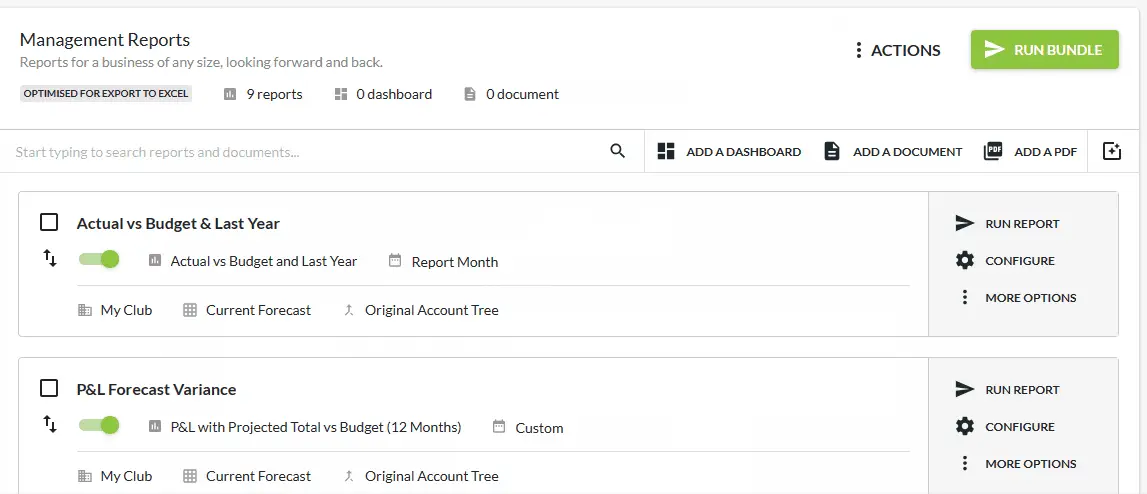
Calxa’s generic “My Club” report-bundle demo, not a demonstrated NetSuite connection. Still from a vendor documentation animation, cropped for readability.
Use the same reporting scenario across the shortlist, including any financial formulas, schedules and distribution steps the team needs. Here is a synthetic example, not a customer result or a tested product benchmark. For this exercise, define the pack as a P&L, balance sheet, cash summary, budget variances and commentary, with trial balance and GL detail supporting review. Adapt the sections to the CFO’s decisions and company reporting policies.
A controller needs September actual-versus-budget expenses by department, a summary for the CFO, and a supporting transaction schedule for finance. The approved September expense total is $184,000. One department has $42,000 of actuals against a $38,000 budget: a $4,000 unfavorable variance, or 10.5% when rounded to one decimal place.
Run the workflow in this order:
If an AI assistant drafted the workbook, validate its formulas and refresh behavior in the same test; generating the workbook does not establish or maintain the connection.
Finally, approve and archive the issued pack with its reporting scope and refresh time. An automated refresh can retrieve a later posting after the first review, so a changing workbook and an issued monthly pack need distinct handling.
Choose the tool that removes the expensive repeated step in your workflow and fits the way the team works. Downloading, calculating, reviewing and distributing each need an owner, with finance continuing to own the close and reconciliation.

Controllers need trustworthy transaction detail for reconciliations, variance analysis, and management reporting. InvoiceAction applies intelligent invoice processing and exception review to identify discrepancies earlier in the payables workflow.
Help finance teams concentrate on reporting insights instead of tracing avoidable invoice-entry errors.
We selected six ways to automate a recurring monthly reporting job using NetSuite data: spreadsheet imports, refreshable financial layouts, workbook distribution, native report emails and summarized management bundles. Eligibility required a documented NetSuite connection or native feature, together with repeatable reporting, refresh or distribution. Tools focused only on upstream transaction capture fall outside that job.
For each option, we examined its working output, source-data coverage, scheduling or delivery setup, and applicable pricing.
 Cost Accounting and Financial Reporting in ERP
 AI Invoice & Order Automation for NetSuite Users
 What Are the Latest Financial Reporting Standards?
 Unlocking the Power of NetSuite Cloud ERP
 Invoice Processing Software for Distributors
 How AI Agents Simplify Power BI Reporting and Data Analysis

