Intelligent Automation Meets Mobile:
How Flutter Apps Integrate with Document Processing & RPA Workflows

Published: June 18, 2026
Many business processes still rely on documents, forms, approvals, and manual data entry. While automation technologies have existed for years, the way people interact with them is changing.
Today, workflows often begin on a mobile device rather than at a desktop workstation. Users upload documents, complete forms, and submit information directly through applications.
This trend is particularly visible in industries that handle large volumes of records and paperwork. Organizations investing in healthcare app development are increasingly looking for ways to combine mobile experiences with intelligent automation, document processing, and workflow management.
As a result, mobile applications are becoming the front door to automated business operations.
Traditional automation projects focused on internal systems.
Employees reviewed documents, transferred information between platforms, and manually triggered business processes. Much of the work happened behind the scenes.
Today, many workflows begin with an action taken by a user.
A patient uploads an insurance document through an app. A customer submits a signed contract from a smartphone. An employee photographs a receipt while traveling.
Instead of waiting for manual review, intelligent document processing systems can automatically identify document types, extract information, and prepare data for further actions.
This approach reduces administrative effort and shortens processing times.
More importantly, it creates a smoother experience for users who expect fast digital services.

RPA alone can automate repetitive tasks, but it cannot easily understand invoices, contracts, forms, shipping documents, or customer correspondence. docAlpha combines intelligent document processing with workflow automation, allowing organizations to eliminate manual touchpoints and create more resilient business processes.
Flutter is often associated with cross-platform mobile development. However, its role increasingly extends beyond creating user interfaces.
Modern Flutter applications frequently act as the connection point between users and automation platforms.
A Flutter app can be used to:
From the user's perspective, the process appears straightforward.
Behind the scenes, document processing engines, AI models, and automation workflows may be working together to move information through multiple systems.
This separation allows organizations to improve operational efficiency without making applications more complicated for end users.
Recommended reading: What Is Intelligent Document Processing (IDP)
Document processing has evolved significantly in recent years.
Instead of relying entirely on manual review, organizations can now use artificial intelligence to analyze documents and extract relevant information automatically.
The technology is commonly used for:
Once information is extracted, it can be validated and transferred to business systems automatically.
This helps reduce repetitive administrative work while improving accuracy.
For organizations managing thousands of documents each month, the impact can be substantial.
Eliminate Manual Invoice Handling From RPA Processes
Bots can move data quickly, but manually processing vendor invoices, utility bills, freight invoices, and credit memos often creates bottlenecks. InvoiceAction combines intelligent document processing with workflow automation to reduce exceptions and accelerate invoice approvals.
Book a demo now
Healthcare provides a strong example of how mobile applications and automation can work together.
Many providers still process large volumes of patient forms, consent documents, insurance information, and medical records.
Without automation, staff often spend significant time reviewing paperwork and entering information manually.
A mobile application can simplify this process.
Patients submit documents through the app, intelligent processing tools extract relevant information, and automation workflows route data to the appropriate systems.
This reduces delays while allowing healthcare professionals to spend more time focusing on patient care.
Patient onboarding is another area where automation can deliver measurable improvements.
Many healthcare organizations require patients to complete multiple forms before receiving services.
Traditionally, these forms were reviewed manually before information was entered into healthcare systems.
Today, much of this work can be automated.
Patients complete forms through a mobile application, documents are processed automatically, and workflows guide the information to the correct destination.
The result is a faster onboarding experience for patients and reduced administrative workload for staff.
Recommended reading: Learn How Healthcare Organizations Optimize Claims Workflows with Intelligent Automation
Document processing and robotic process automation solve different parts of the same challenge.
Document processing focuses on understanding information.
RPA focuses on acting on that information.
A typical workflow may look like this:
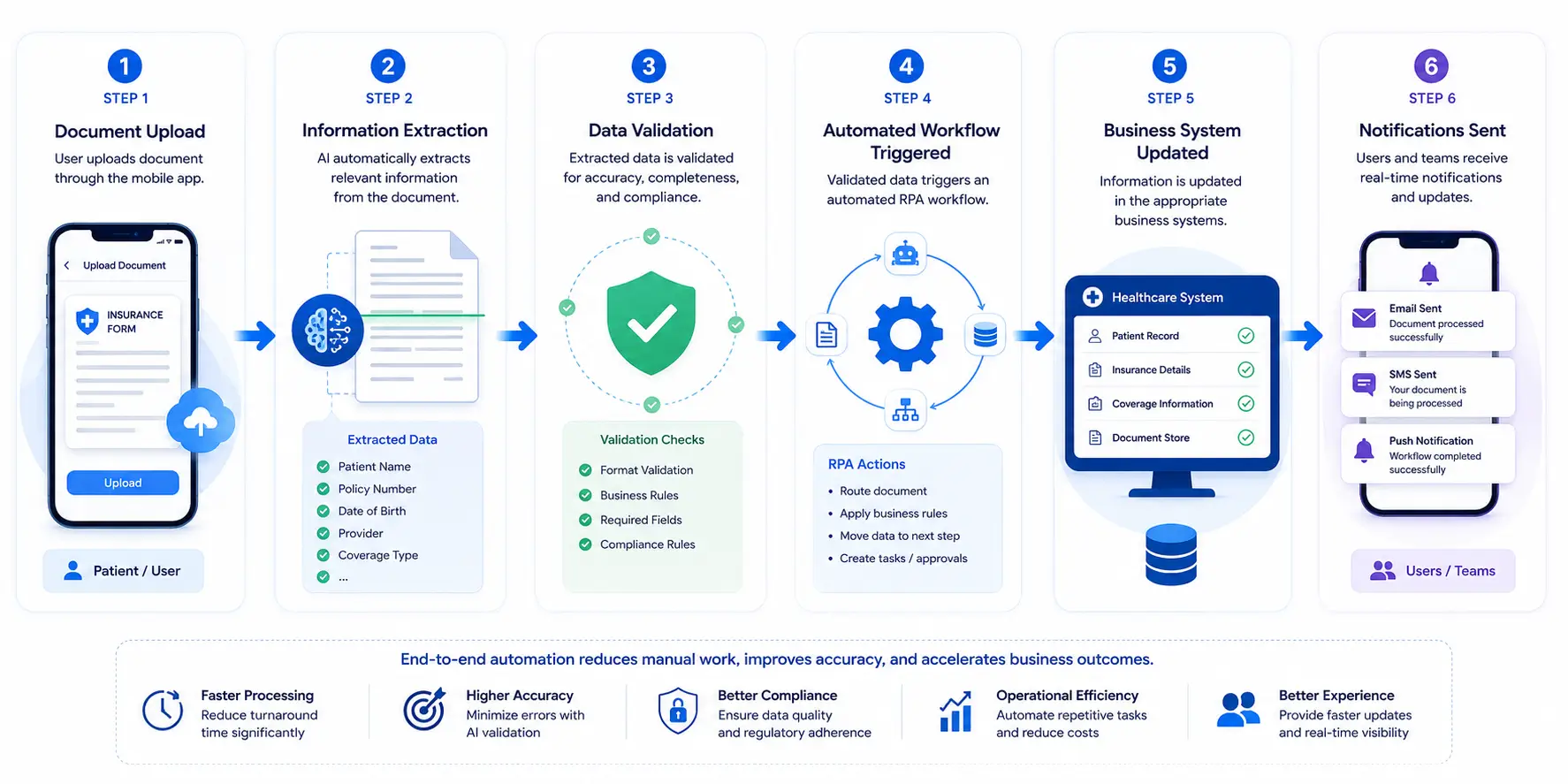
The process requires minimal manual intervention while maintaining visibility throughout the workflow.
This combination of AI-driven document understanding and automated execution is becoming increasingly common across industries.

As transaction volumes increase, traditional bots often struggle with document variability and exceptions. OrderAction uses machine learning and business rules to automate order entry and help organizations scale order-to-cash operations.
Organizations often focus on automation capabilities first.
However, user experience remains equally important.
Even the most sophisticated workflow will struggle if users find the application difficult to navigate.
Before implementing automation, businesses should evaluate:
The most successful projects combine efficient automation with intuitive mobile experiences.
Users should benefit from automation without needing to understand the technology working behind the scenes.
Recommended reading: Discover How Intelligent Automation Is Reshaping Data Entry
Automation is no longer limited to internal systems and administrative departments. Increasingly, it begins with a mobile interaction.
Users submit documents, complete forms, and initiate processes directly from their smartphones. Intelligent document processing and automation workflows then handle much of the work in the background.
Flutter fits naturally into this model by providing a flexible mobile layer between users and complex business systems.
As organizations continue investing in automation, mobile applications will play an increasingly important role in how information is collected, processed, and transformed into action.
Turn Document Chaos Into Intelligent Processes
As organizations expand their use of automation, unstructured documents frequently become the weakest link. docAlpha applies AI and machine learning to process invoices, contracts, purchase orders, and forms, enabling end-to-end workflows that deliver greater efficiency and operational visibility.
Book a demo now
 AI Automation: What It Is and How It Works in 2026
 How IDP Converts Business Documents Into Actionable Data
 All About Intelligent Document Processing
 Efficient Claims Workflow: CMS 1500 OCR Data Capture and Automation in Healthcare Processing
 How AI and RPA Power Secure Digital Approvals
 Embedding Intelligence in Robotic Process Automation
