Why Hybrid Teams Need a Centralized Way to Handle Business Correspondence
Published: November 02, 2026
It's Monday, and your vendor mails an invoice to your office. Your mail room rep isn't back until Thursday, and your remote accounting team is unaware of this mail.
Hybrid work allows employees to work from various locations. However, mail is sent to business addresses. Sure, there is a common email inbox, but what about physical mail? Digital mail services let your team receive and handle mail no matter who is in the office.
Here's What You'll Find
Mail isn't always part of your communication stack.
According to Gallup, 52% of remote-capable workers in the US worked a hybrid schedule in 2026. These employees are away from their office on a regular basis.
There's a piece of mail that was left on the front desk. A picture is taken and sent to an employee. They ask if the physical copy is needed. Now there is ambiguity about who should take the next step.
Have a common process for handling your business mail wherever your employees may be.
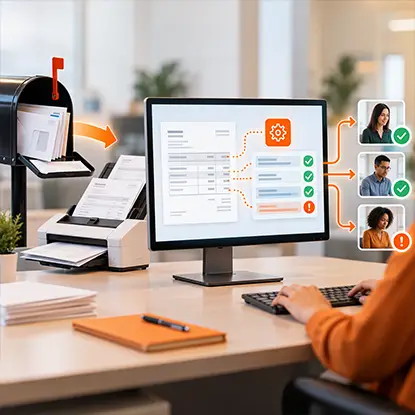
A central mailbox makes correspondence accessible, but it does not determine what information needs attention or which process comes next. docAlpha captures and classifies incoming documents, extracts relevant details, and routes records through configurable workflows and exception review.
Help distributed teams process business paperwork more consistently, wherever they work.
When you have one address to receive mail, your senders have a place to send, and your business can begin managing inbound mail.
This does not mean your entire team needs to hire a front desk rep or have a dedicated office space.
An iPostal1 PO box is a digital mailbox at a physical street address rather than a conventional post office box. You can view pictures of your envelopes and request your mail to be scanned or forwarded.
Just having an address is not enough.
Who will open your mail? If you receive something time-sensitive, who gets notified? How do you track if something was completed? Having these answers will allow your business address to become a business function.
Say you receive a piece of mail on a Friday. You're the office manager and you receive the contract, but the person who needs to sign is out of the office. You forward the picture of the mail and sit back to receive further instruction.
No one knows who will complete this task.
Common problems you may run into when handling mail are:
With digital mail, you can eliminate some of the friction between your employees and physical copies of your mail. Just having a common digital inbox will not solve your issues with handing off mail. Make sure your process allows for quick decisions, due dates and archiving information.
Recommended reading: Learn How a Document Management System Centralizes Business Correspondence
Once you've established an address to receive your mail, here are some tips to keep in mind when managing it.
Focus on what types of mail come into your office that create bottlenecks. Don't overcomplicate your process with simple pieces of mail that may come to you.
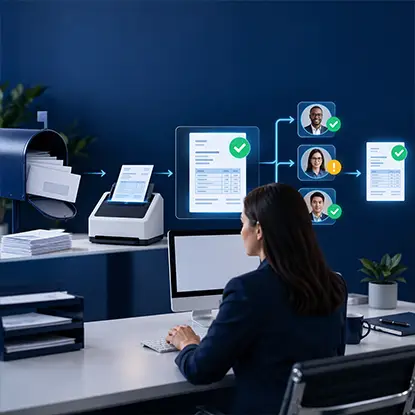
A digital mailbox solves the problem of accessing mailed invoices, but staff may still need to rekey amounts and coordinate approvals manually. InvoiceAction captures and validates supplier invoice data and directs exceptions to the appropriate reviewers.
Streamline invoice handling after mail is scanned, without depending on repeated email handoffs.
When you receive a piece of mail that you want to scan, you are creating a digital copy of that information. Keep that in mind when scanning any confidential information.
Your company should have protocols on what information you can share digitally.
Make sure you know who can view that piece of information and if others can request to have your mail opened/scanned. Understand how your mail service stores this information and what your company does when receiving digital copies.
Just like digital copies, you should understand if any physical copies of your mail should be retained. Some pieces of mail may need to be signed, mailed, or kept as a hard copy.
Check whether your mailing address meets the requirements for a registered office, registered agent, or receiving legal notices in your jurisdiction.
Recommended reading: Discover How to Protect Sensitive Information in Digital Document Workflows
Some mail will be more important than others. You may have a piece of mail that you can save for later, but you may also receive something that requires immediate action.
It's important to create a list of senders and types of mail that should be considered urgent. You should have someone who can back up your team when they aren't able to handle their mail. Make sure your team knows who will be looking at newly received mail and how to escalate urgent mail.
If you receive packages, you'll want to make sure you have a process to handle those as well. You may want to forward a package to one of your team members; just make sure you know where it's being sent and who is expecting it.
Now that you have a process for your team, monitor what is happening with your mail.
Are you receiving mail that sits untouched? Do you have mail that has no one assigned to it? Is your team aware of what mail they need to request a hard copy of? Are you receiving time-sensitive mail and following through?
You can look at any overdue tasks and unassigned tasks and see if you're facing common issues with your process. Try testing your process with one piece of regular mail before transferring urgent pieces of mail to your new address.
If you find that your team is still relying on one person to remind others, your process isn't efficient enough. Allow your team to see who is handling mail, streamline your handoff process and simplify your workflow.

Digitizing physical mail improves access, yet the document still needs to be understood, checked, and processed. docAlpha combines AI-powered extraction, Intelligent Rules, and human exception handling to turn business correspondence into structured information for downstream systems.
Build a bridge between digital mail intake and efficient enterprise operations.
There's no need to have all of your mail at your team's office when working hybrid. You just need to know where it's being received, who is responsible for it and what you need to do next.
Having a central address, utilizing a digital mail service and knowing what steps to take will allow your team to manage mail throughout the week.
 4 Steps to A Near-Paperless Office
 Data Protection in 2025: What You Need to Know
 How Process Monitoring Drives Competitive Advantage in 2026
 Essential Communication Tools for Efficient Hybrid Work Teams
 Bringing Intelligence to Mailroom Management
 Why Businesses Need Document Management Systems

