4 Things an AI Agent Needs Before It Touches Your ERP Data

Published: November 04, 2026
Most conversations about AI agents start with what the agent can do. Reconcile invoices, chase a late shipment, draft a reorder. Far fewer start with what the agent is standing on when it does it.
That matters more than it sounds. An agent that reads two systems that disagree about a customer will not stop and ask which one is right. It will pick one, sound sure about it, and hand you the result. The model is rarely the weak point. The plumbing underneath it usually is.
So here are four things worth sorting out before an agent gets near your ERP, CRM or finance data, and what each one looks like when it is done well.
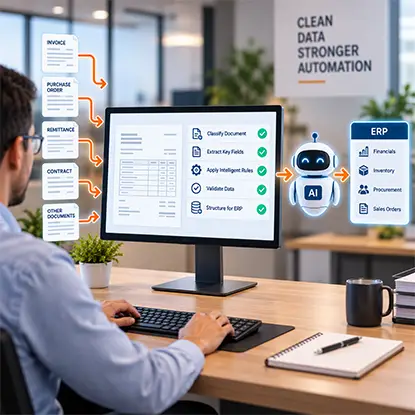
AI agents cannot make dependable decisions from inconsistent or incomplete supplier records. docAlpha uses AI-powered document classification, extraction, Intelligent Rules, and validation to prepare structured information from incoming invoices, orders, and other business documents for connected enterprise workflows.
Improve the quality of document-derived inputs before downstream automation acts on them.
Agents reason over whatever they can read. If the CRM says a deal closed on Tuesday and the ERP has no sales order yet, the agent inherits that gap and treats it as fact. The same goes for a vendor whose bank details changed in one system but not in the accounts payable tool. The agent does not see a mismatch. It sees two answers and picks one.
Teams usually deal with this in one of three ways. Nightly exports are simple, but the data is already old when the agent reads it. Point-to-point scripts are quick to write and slow to maintain, because every API change breaks one. The third option is a sync layer that keeps records consistent between systems as they change.
The detail that matters most is direction. A read-only copy lets an agent look but not fix, so every correction becomes a manual task in the original system. With two-way sync, a change made in the CRM, the ERP or a database shows up in the others in real time, and each field has one designated owner so a conflict has a clear winner.
Before you wire an agent to any pair of systems, get answers to three questions:
Recommended reading: Discover How AI-Powered Data Management Creates Reliable Business Data
Until recently, connecting an AI assistant to a business app meant building a custom integration for that assistant and that app. Every new pairing was a new project. The Model Context Protocol, usually shortened to MCP, changes the shape of the problem. Anthropic introduced it in late 2024 as an open standard, and it gives AI clients one common way to discover what a system offers and to call it.
In practice, an MCP server sits in front of a system and lists the things an assistant is allowed to do: look up a customer, read an order, create a task. Any client that speaks MCP, such as Claude or ChatGPT, can use that list without a bespoke connector.
Worth knowing, though: MCP is a doorway, not a security policy. It does not decide what an agent should be allowed to read or change. That is up to whoever runs the server. So when you evaluate one, ask which actions it exposes, whether it separates read from write, and how it handles authentication. MCP connectors for CRMs, ERPs, databases and other business apps exist for exactly this purpose, so an assistant can work with that data without a custom build for each pairing.

An agent cannot reliably interpret a supplier invoice when vendor details, quantities, or purchase order references are inconsistent. InvoiceAction automates invoice capture, ERP-aware validation, matching, and human review of exceptions within defined AP workflows.
Improve upstream invoice accuracy before automated systems consume the data.
A prompt tells an agent what to do. A job description tells it what it is responsible for, what it may touch, and when to stop and ask. The second is what keeps an agent useful in a finance or operations process.
Think about how you would onboard a new analyst. You would not hand over every login on day one. You would give access to the systems the role needs, ask for review before anything consequential, and check the first weeks of work closely. Agents deserve the same treatment:
Take supplier invoice exceptions. An agent can compare a flagged invoice with its purchase order and goods receipt, find the quantity that does not match, and draft a note for the buyer. A person reads the note and decides. Nothing posts until they do.
Some teams build this pattern with AI agents for ERP and CRM that work across records and databases, ask for approval before writes and keep a log of every run. The same approach works whichever agent you choose. The point is that scope, approval and logging are decided before the agent runs, not after the first surprise.
Recommended reading: Learn How to Balance AI Automation with Human Oversight
An agent's output has to land somewhere a person can look at it. Sometimes that is a Slack message or an email. Often it deserves a proper screen: an approval queue, an exceptions dashboard, a small internal tool where a controller can accept or reject what the agent drafted.
Those tools used to wait in an IT backlog. Now more of them are built by the people who need them, with AI coding tools, in an afternoon. That creates a new question: where does an app like that run? Someone has to handle hosting, a database, logins and permissions. If nobody does, the tool ends up on a personal account or a laptop, and the data it shows sits outside every policy the company has.
Some platforms now let teams deploy internal apps they build themselves, while handling hosting, a managed PostgreSQL database and workspace access, and leaving IT in control of who can open what. Whatever you use, look for the basics: single sign-on, roles inherited from your identity provider, and versioned deploys you can roll back.
Put the four together and the day looks unremarkable, which is the goal.
Nobody had to chase a spreadsheet, and nobody had to trust the agent blindly.

Connecting an AI agent to an ERP is not enough: business data must be accurate and processing rules must be clear. docAlpha extracts and validates information from incoming documents, then routes it through defined workflows and integrations with enterprise applications.
Turn document intelligence into structured operational data while retaining control over exceptions.
None of this needs a big-bang project. Pick one process with a clear owner and a visible cost, such as invoice exceptions or order status requests. Connect the two systems involved and check that the data agrees. Let the agent read before it writes, and keep approval human for the first few weeks. Measure the hours that come back.
Trust gets earned on your own records, not on a demo. If the first process holds up, the second one is mostly configuration.
The agent is the visible part of the project, but what decides whether it works sits mostly underneath: data that agrees, a standard way in, clear limits and a place for people to check the result. Get those four right and the model is the easy part.
Recommended reading: Learn Best Practices for Implementing Intelligent Process Automation
 Automated Invoice Processing in 2025–2026: AI Automation with Human Oversight
 AI Algorithms in Intelligent Process Automation (2026 Guide)
 How AI Agents Expand Automation Beyond Back-Office Workflows
 How ERP and AI Work Together to Streamline Business Systems
 How Access Controls Secure Automated Business Workflows
 How Authorization Management Secures Automated Workflows

