Adding AI Features to an Existing SaaS Product Without Breaking It: Architecture, Data and Rollout

Published: November 05, 2026
Most SaaS products were designed long before anyone on the team thought about language models. The billing module, the permissions model and the database schema all assume predictable requests that return the same answer every time. A model call behaves differently. The same input can produce two different outputs, one request can take several seconds where your API normally answers in well under one, and every call comes with a variable price.
These differences don't make AI a poor fit for a mature product. They do mean the new feature has to be added in a way that protects what customers already pay for: a product that stays up, and data that never crosses from one account to another. Finance will also want a monthly infrastructure bill it can predict.
Most of the risk comes from three decisions: where the AI code lives in your architecture, what data it can see, and how you release it to users. Once those are settled, the choice of model becomes a fairly reversible decision. If you work with an outside team on SaaS development, such as Anadea, ask them to review those three areas with you before anyone writes the first prompt.

Adding AI features to an established SaaS application can introduce complexity, especially when users need information from uploaded invoices and other business documents. docAlpha provides AI-powered document classification, data extraction, validation, and configurable workflows that can complement existing business applications.
Introduce practical document automation while reducing the need to build every extraction and exception-handling step from scratch.
Start by choosing one task in your product where a model clearly helps, and pick the technology after that. Good candidates are tasks that are slow, repetitive or depend on reading a lot of text: summarizing a long ticket thread, drafting a first reply to a customer, pulling fields out of an uploaded invoice, or turning a plain-language question into a report filter.
To check whether the idea is specific enough, try to describe the feature in one sentence that names the user, the input and the output. "Account managers get a three-line summary of every support thread longer than ten messages" passes the test. "An AI assistant on the dashboard" fails it, because nobody on the team could say when that assistant has given a wrong answer.
Keep the first release to one such feature. A narrow scope keeps the test set small, and adoption is much easier to read in your analytics when only one AI function is live.
Put model calls in a separate service and keep them out of your existing request handlers. Calling a provider directly from those handlers is the most common mistake: when the provider slows down or returns errors, pages that used to load quickly start to hang, and customers report the incident as an outage of your whole product.
With a separate AI service, your app sends a request and gets back either a result or a clear "not available" response that the interface already knows how to handle. The parts that change often live inside that service:
Anything that takes longer than a couple of seconds belongs in a background queue, with a notification when the result is ready. Summaries of long documents and bulk classification work well this way, and users accept a short wait as long as the interface shows progress.
Recommended reading: Discover How AI Algorithms Support Intelligent Process Automation
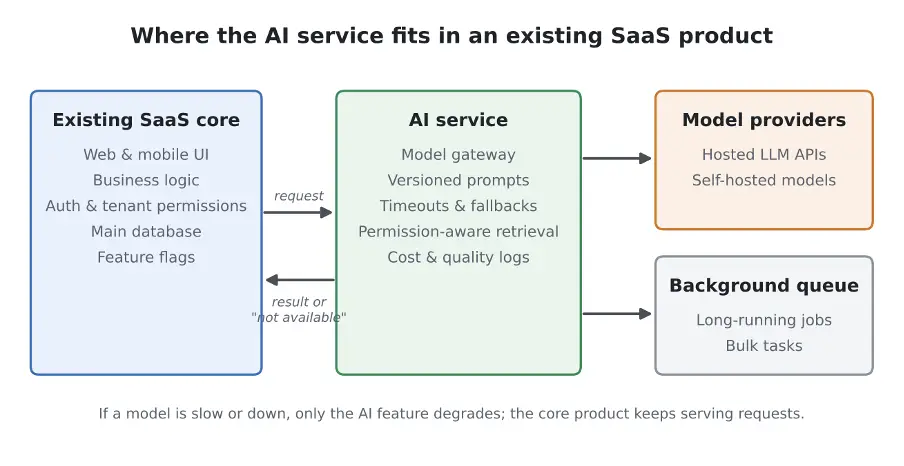
The AI service runs beside the core application, so a slow or failed model call affects one feature while the rest of the product keeps working.
Send the model only the data the current user is allowed to see, and settle privacy questions before you build a prototype. In a multi-tenant product, the choice of what goes into a prompt is a security decision as much as a quality one.
Retrieval is the usual way to give a model context: you index documents or records, find the pieces relevant to a question and include them in the prompt. The retrieval step has to follow the same permission rules as the rest of your product. If a user can't open a document in the UI, the AI feature shouldn't be able to quote from that document either. Teams that build a separate vector index sometimes forget to copy tenant IDs and access lists into it, and the result is an assistant that can mix one customer's content into another customer's answer.
Before the first prototype, go through a short readiness check with whoever owns the data. Legal and security will ask these questions anyway, so answering them early saves a round of delays later.

Adding AI to a SaaS product is less valuable when uploaded PDFs and scans still require users to retype critical information. docAlpha transforms document content into structured, validated data for configured downstream business workflows.
Reduce repetitive data entry and make document information more useful to the applications customers already rely on.
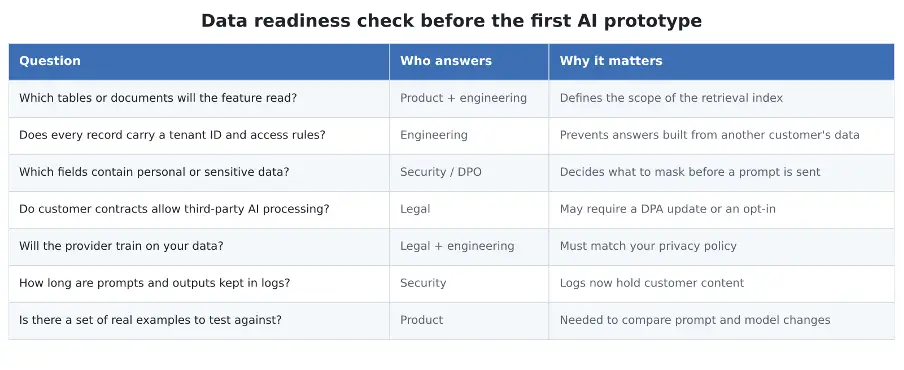
A one-page readiness check that product, engineering, security and legal can fill in together in one meeting.
Logs deserve a separate mention. Prompts and outputs now contain customer content, so they need the same retention rules and access controls as your main database.
The build itself depends on scope, but most of the long-term cost comes from usage-based model fees. A traditional feature costs about the same whether a customer opens it once a month or a hundred times a day. AI features are billed per token, so your most active users also become your most expensive ones.
A rough calculation shows how fast the numbers grow. Suppose a feature sends 2,000 tokens per request, an average active user triggers it five times a day, and 10,000 users are active. That comes to 100 million tokens a day, or about three billion a month, before you count retries. Small changes to prompt length or call frequency move that figure a lot.
A few controls keep the bill predictable. Cache answers for repeated inputs, trim context to the passages the model needs, and send simple tasks to smaller, cheaper models. Per-tenant usage limits that match your pricing plans help too. Some companies put AI features in a higher tier or sell them as credits; whichever route you choose, make the pricing decision after a few weeks of real cost data from the beta.
Recommended reading: Learn How to Choose AI Software for Scalable Business Automation
Release it in stages behind a feature flag, starting with traffic no customer sees. If you ship an AI feature to every account on the same day, you lose the chance to learn cheaply, while a flag lets you watch real behavior and switch the feature off in minutes when something goes wrong.
A typical sequence starts with shadow mode. The model runs on real traffic, but users never see its output, and you compare its answers with what people did in the end. Internal use by your own support or sales team comes next, followed by a small group of customers who opted into a beta. Only after that does a gradual percentage ramp begin.
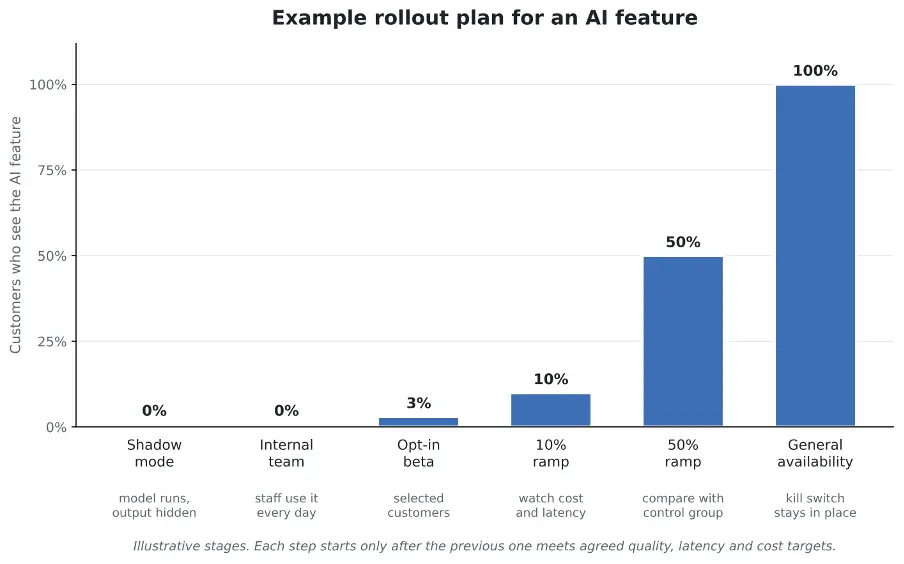
Exposure grows only after each stage meets its targets, and the kill switch stays in place after general availability.
Each stage needs an exit criterion written down in advance. Good candidates are the share of AI outputs that users accept without editing, the rate of negative feedback, p95 latency and cost per active user. An evaluation set of a few hundred real examples, scored before every prompt or model change, catches regressions that a quick manual check would miss.
Keep the kill switch after launch, too. Providers update their models, and a prompt that worked well in spring can behave differently after an update in autumn.

A successful AI rollout should solve a defined customer problem rather than add another feature with uncertain value. docAlpha brings AI-powered capture, classification, extraction, Intelligent Rules, and exception handling to document-intensive processes that can connect with existing enterprise systems.
Give customers a clearer path from incoming documents to more efficient operations.
For most established products, the answer depends on what the product owns. Thin tools that mostly pass text to a model are easy to copy. Products that hold a customer's data, workflows and permission structure are in a much stronger position, since AI features work best on top of that kind of data. For an established SaaS company, the bigger risk is a rushed AI feature that leaks data or slows the app down.
If you plan a first AI feature this quarter, write down a one-sentence description of it, the list of data it needs, and the numbers that would make you turn it off. Those written answers will shape the architecture and rollout decisions that follow.
 AI Algorithms in Intelligent Process Automation (2026 Guide)
 AI Development Made Simple: How to Create AI Software with A-listware
 Overcoming Main SaaS Development Issues in Intelligent Automation
 How AI Improves Legacy Software Modernization and Migrations
 AI Inference Platforms for Smarter Business Automation Workflows
 How an AI Center of Excellence Drives Enterprise AI Success

