7 Top Enterprise VPN Solutions for Businesses: Dedicated IP and Zero-Trust Picks

Published: October 16, 2026
Our 2026 shortlist: TorGuard, NordLayer, Cloudflare Zero Trust, Zscaler, Palo Alto Prisma Access, Cisco Secure Access, and FortiSASE. Each solves a different use case, from five-seat fixed IP to global five-nines SSE, so “best” depends on your stack.
A VPN grants network reach; ZTNA grants application reach. Your payroll app is accessible, but the adjacent file server stays invisible, cutting lateral-movement risk the way every CISA advisory urges.
Yes, if partners, SaaS dashboards, or cloud firewalls rely on source-IP allowlists. A single-tenant egress IP stops Monday-morning “login denied” tickets. Remember: it is an access input, not identity; keep SSO and MFA live.
It cleans up reputation issues that plague shared exits, but it does not improve encryption or replace identity checks. Treat it as stability, not a silver bullet.
No. A dedicated IP is exclusive to you; a static IP might be shared but rarely changes. Confirm which model, and whether IPv6 is included, in writing.
Not without an admin portal, audit logs, SSO, and a documented SLA. Consumer tools focus on anonymity, not accountability.
WireGuard for speed and modern crypto, OpenVPN for ubiquity, IPsec for site-to-site. Pick what fits existing gear and future integrations; protocol choice alone will not make or break security.
Vendors reclaim it, often within days. Purge the IP from every allowlist, remove DNS entries, and keep a contact name in case an old automation script balks.
Absolutely. Dual-stack SaaS and mobile users already speak IPv6; a VPN that ignores it creates audit gaps. Test both stacks during the proof of concept.
Track p95 latency (target under 150 ms), one-gigabyte file throughput, reconnect time when swapping networks (under five seconds), CPU and battery hit, and log-delivery lag (under 60 s to SIEM). User-perceived snappiness beats raw tunnel speed every time.
Remote access isn’t just a tunnel anymore. Today, you can spin up a classic VPN, route traffic through a cloud gateway with a fixed egress IP, or hide every internal app behind a zero-trust edge. This guide zeroes in on seven services that still give you a dedicated, reputation-safe address, yet sidestep the old “one big subnet” headache.
We’ve organized the picks by use case so a five-person startup and a global enterprise can both skip straight to the right fit. Expect plain-English notes on IPv6 quirks, hidden add-ons, and the CISA-driven security must-haves behind every recommendation (updated October 13, 2026).

Secure network access keeps employees connected to essential business applications, but connectivity alone does not eliminate repetitive document processing. docAlpha automates document capture, classification, data extraction, validation, and downstream workflows across connected enterprise systems.
Reduce manual administrative work and help distributed teams operate more efficiently within their existing IT environments.
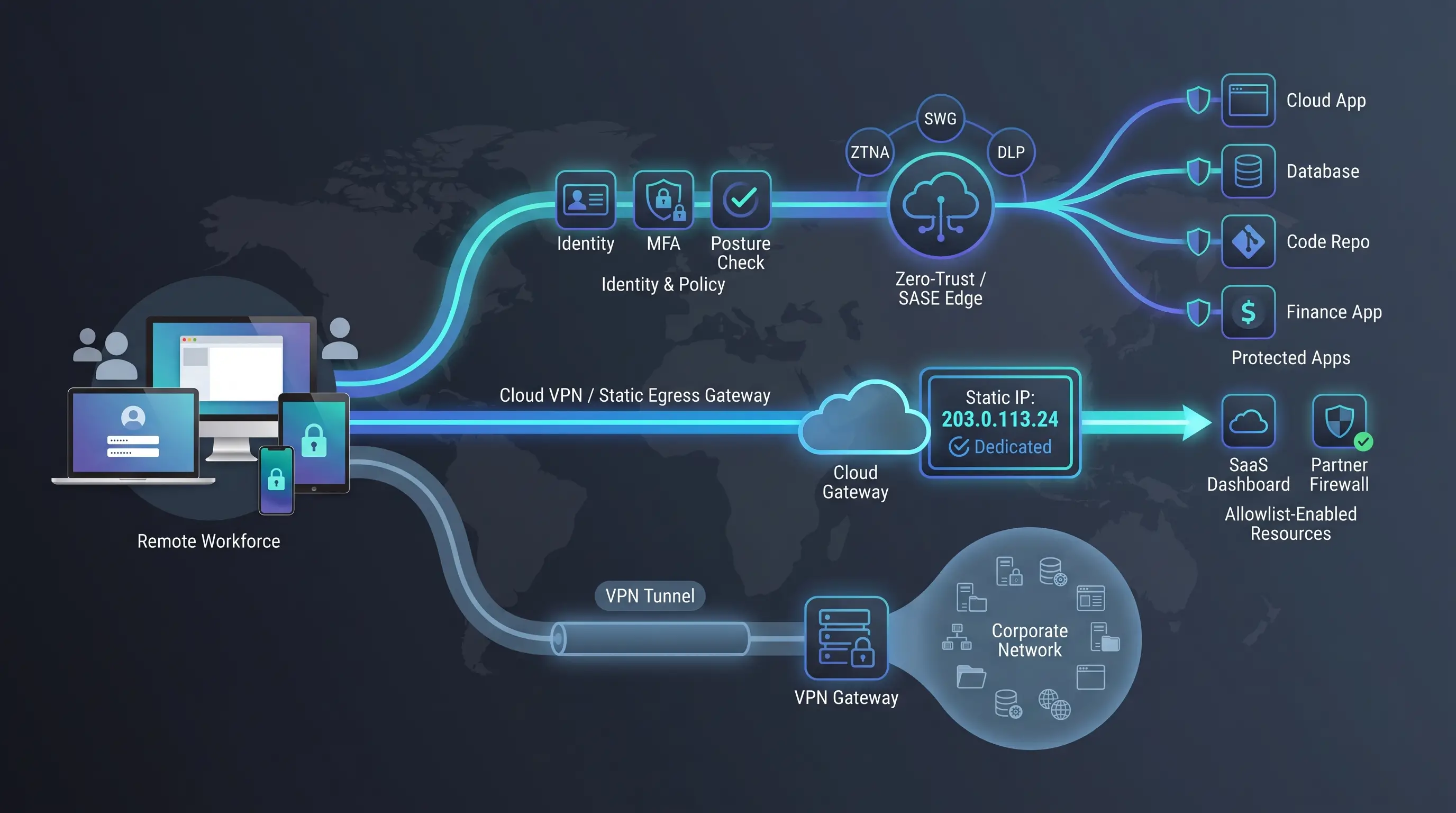
Need the bumper-sticker version? Start with this table. Find the column that matters most, then jump to the deeper review that follows.
Best for | Architecture | Static-IP type | Price visibility | Deployment |
Small teams that live or die by an allowlist | Managed VPN | Public egress (bundled) | Full plan table | SaaS |
Mid-market IT that wants one clear invoice | Cloud VPN + light SSE | Private gateway IP | Full plan table | SaaS |
Cloud-first teams chasing identity-based access | ZTNA + SWG | Public IPv4 / IPv6 egress (add-on) | Entry-tier prices public | SaaS |
Global enterprises replacing legacy concentrators | ZTNA + SSE | Public egress (add-on) | Quote only | SaaS |
Companies already invested in Palo Alto gear | Hybrid SASE + VPN | Customer-specific egress | Quote only | SaaS |
Cisco shops needing VPNaaS and ZTNA under one roof | Hybrid SSE + VPN | IPv4 web-only egress (add-on) | Quote, 50-seat minimum | SaaS |
Fortinet estates that want a single security pane | SASE + VPN | Public egress (included) | Quote only | SaaS |
Abbreviation key: ZTNA = Zero-trust network access, SWG = secure web gateway, SSE = security service edge, SASE = secure access service edge.
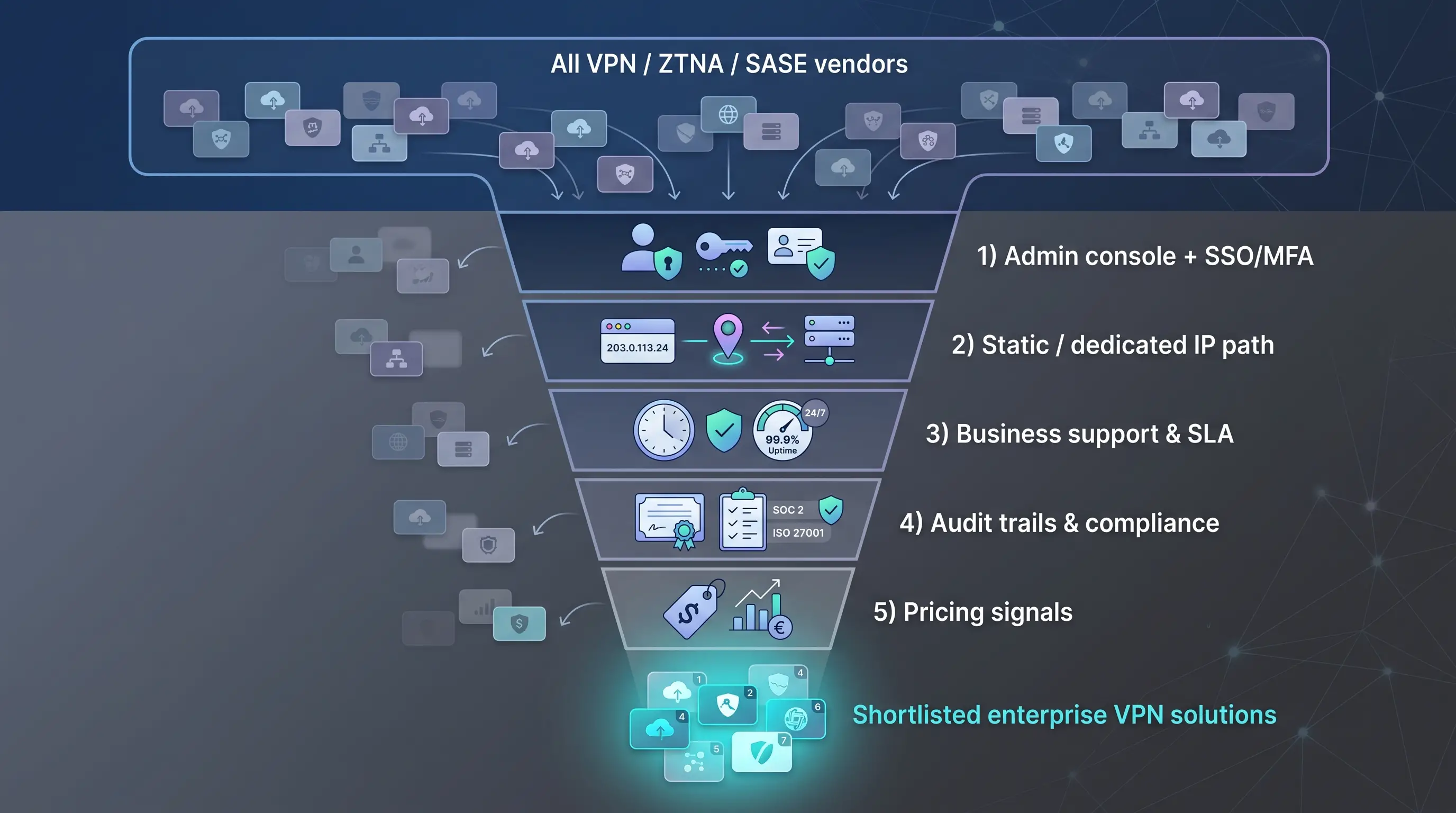
Every vendor had to clear five must-haves with no exceptions or back-room passes (criteria verified October 13, 2026):
Vendors that passed moved on to scoring; those that failed any one item never made the page.
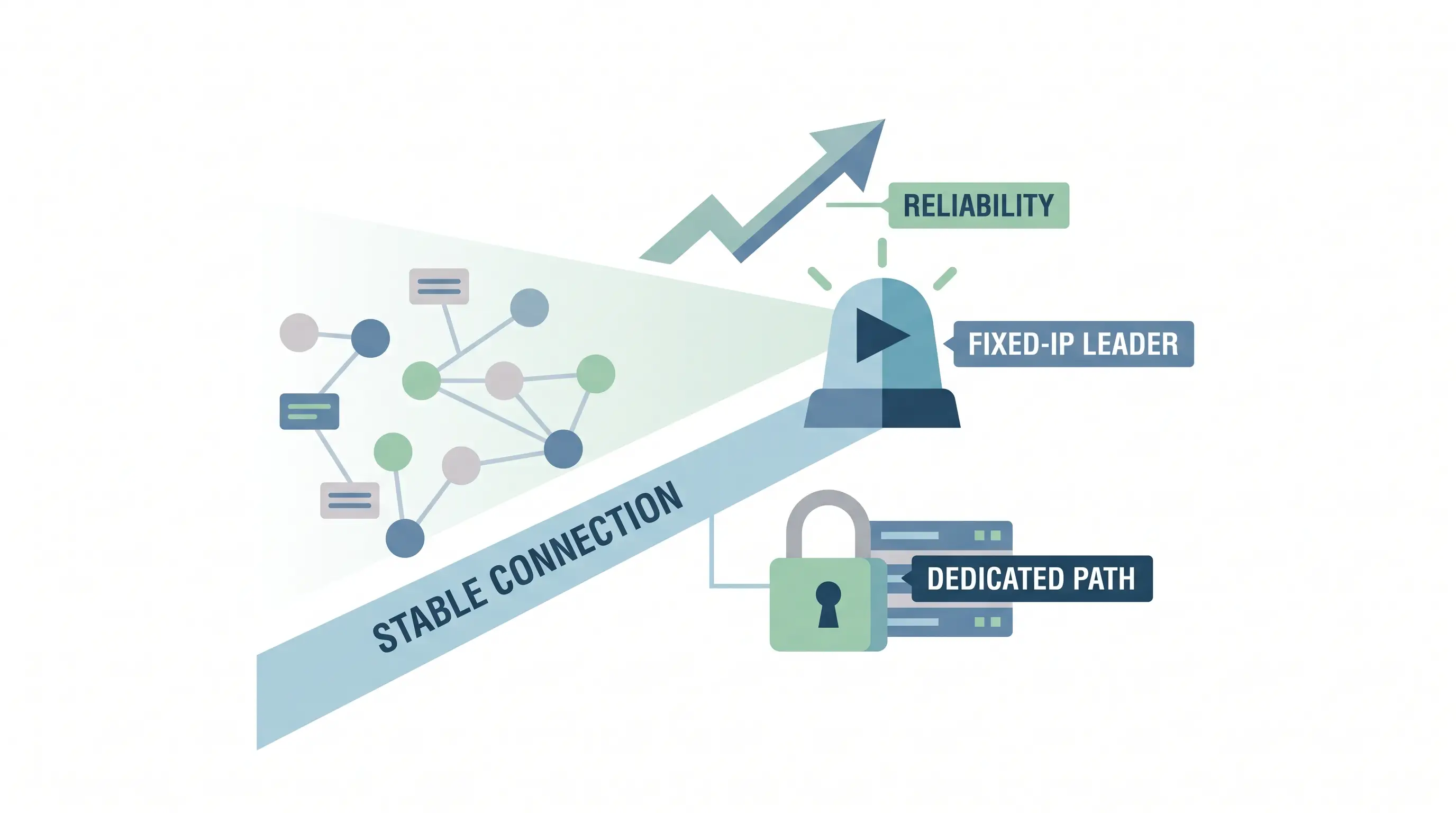
TorGuard dedicated IP VPN gives small teams something rare: a dedicated public IP the moment you check out, with no sales call, no ticket, and no waiting. Plans start at $14.29 per month for a unique address that bypasses captchas and avoids the reputation issues that plague shared exits, so partner allowlists work on the first try. Pick a plan, and the address is live in minutes.
That instant clarity matters for a five-person company. Assign each user a fixed egress IP, and those “login from new location” tickets vanish. The service runs on WireGuard or OpenVPN, so you get a fast, encrypted tunnel without the weight of a full SASE suite.
Trade-off: TorGuard stops at the tunnel. You won’t find device-posture checks, SCIM provisioning, or per-app policies. If your only goal is “give my small team one clean, reputation-safe IP,” TorGuard nails it. If you’re chasing zero-trust segmentation and compliance reports, keep reading.
Recommended reading: Discover How Secure Workspace Architecture Strengthens Enterprise Cybersecurity
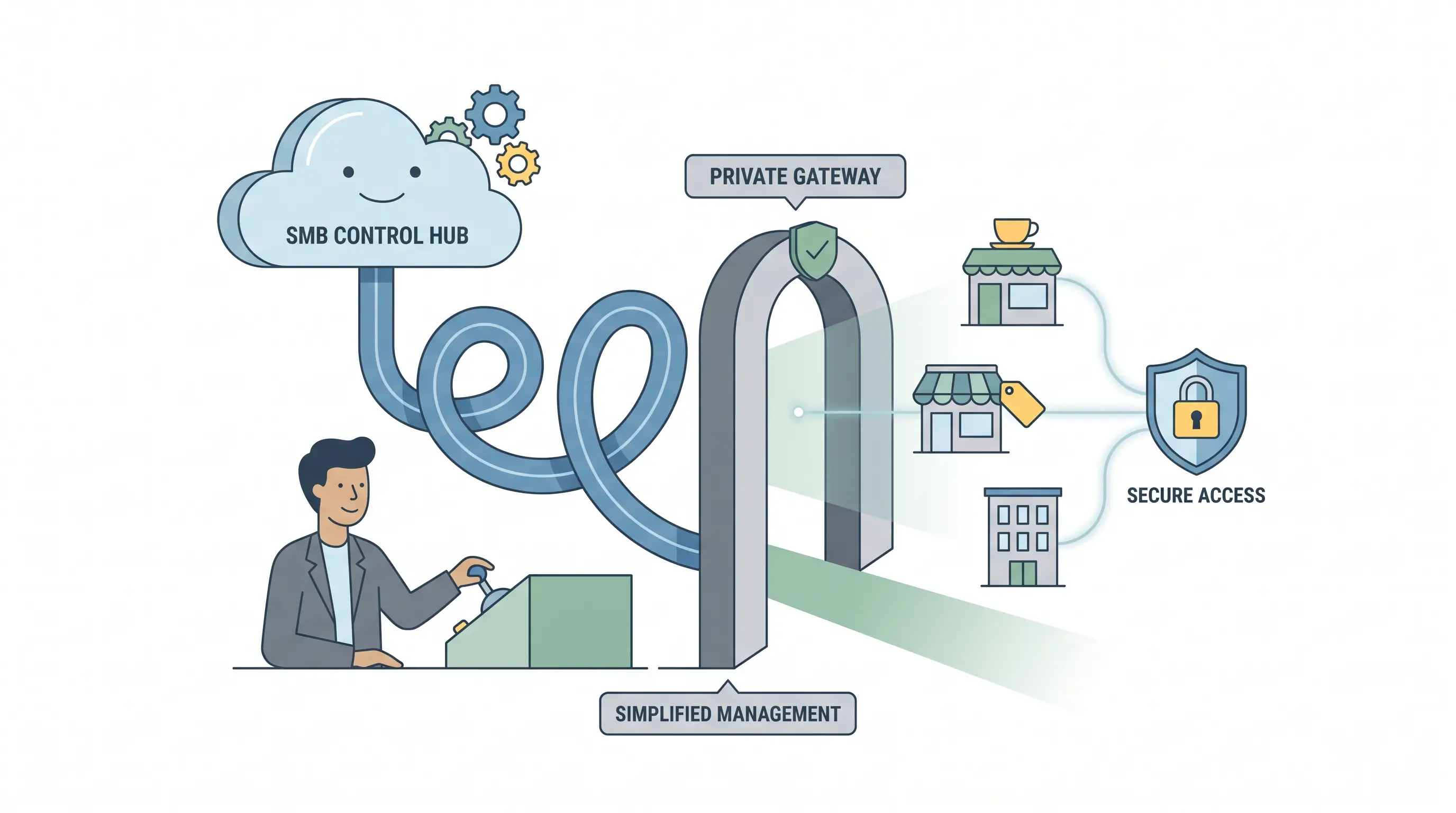
When a consumer VPN feels too fragile but an enterprise SASE suite is overkill, NordLayer slots neatly in the middle. Spin up a Virtual Private Gateway, claim a dedicated public IP, and route every laptop and phone through it within minutes. The console plugs into Azure AD, Okta, Google, or JumpCloud, so onboarding feels familiar.
Transparent pricing: Lite, Core, and Premium plans now start at $8, $11, and $14 per user monthly when billed annually, with a $40-per-month add-on for each Private Gateway. One invoice covers everything; no surprise line items for IPs or logs.
Security rides on NordLynx and OpenVPN. Built-in posture checks block a connection the moment a device drifts out of compliance, and audit reports land in the console in seconds. Compliance paperwork, ISO 27001, SOC 2 Type I, and HIPAA-mapped controls, sits openly on the website.
NordLayer’s sweet spot is clarity: you know the price, the IP address, and the user count that fits. If tomorrow’s roadmap calls for deep traffic inspection or a native CASB, you may outgrow it. Today, lean IT teams get cost, control, and speed in one tidy package.

Enterprise VPNs and zero-trust solutions help organizations manage access to applications and business resources. docAlpha complements that infrastructure by automating document processing, applying intelligent business rules, and moving validated information through connected workflows.
Extend operational efficiency beyond network connectivity and reduce the manual steps required to process business documents.
Cloudflare Zero Trust product overview page screenshot
Cloudflare pushes private traffic through its global edge, enforcing identity and device posture at every hop, so access feels faster than a legacy concentrator and far harder to probe.
Deployment is quick: create a Cloudflare Tunnel for each internal service, roll out the WARP client, and connect your identity provider. Users see a short login page, not an open VPN port, and app-level policy means contractors can reach Git without ever touching the finance subnet.
According to Cloudflare’s product documentation, enterprise plans reserve at least two single-tenant IPv4 addresses, each paired with its own IPv6 range, in different cities for automatic fail-over.
Pricing stays friendly: up to 50 users are free, and the pay-as-you-go tier remains $7 per active user each month; reserved IPs require an Enterprise quote. Budget separately for browser isolation or DLP if they’re on your roadmap.
Heads-up: some older SaaS tools still ignore IPv6. Test dual-stack behaviour before you freeze the allowlist, and confirm the Enterprise SKU covers every region you need.
For organizations already running Panorama and Next-Gen Firewalls, Prisma Access adds cloud scale and static egress without forcing a forklift upgrade.
The path is straightforward: bolt Prisma Access onto Panorama, keep GlobalProtect for full-tunnel traffic, and layer in app-level ZTNA as you modernize. Each tenant receives unique public egress IPs; you can then:
Licensing mirrors the firewall world: users become mobile-user units, branches are sold by bandwidth, and logs route through the Strata Logging Service. Prices vary by reseller, but recent quotes cluster around $9–$12 per user monthly for the standard bundle, plus log-retention and advanced-security add-ons.
The upside is clear: a published 99.999 percent uptime and processing-latency SLA covers both access and inspection paths. The downside is complexity; new buyers may find the policy tree and à-la-carte menu intimidating.
Prisma Access shines when you want to phase out concentrators on your own schedule. Keep GlobalProtect for SMB shares today, move browser apps to ZTNA tomorrow, and retire hardware only when every corner case is gone.
Recommended reading: Learn How to Protect Your Business Against Identity-Based Cyberattacks
For organizations already running Cisco switches, firewalls, and Secure Client, Secure Access adds ZTNA and cloud VPN under one pane, plus a single-tenant Reserved IP for SaaS allowlists.
The suite blends Secure Private Access (ZTNA), Secure Internet Access (SWG), and a cloud VPN-as-a-Service. Static egress arrives through Reserved IP: one IPv4 address per region, tied to proxy web traffic. It currently excludes IPv6, QUIC, and remote-browser-isolation flows, so confirm which SaaS endpoints truly need the fixed source.
Commercials start at a 50-user minimum across Essentials or Advantage tiers; recent partner quotes cluster between $9 and $14 per user monthly, before add-ons. In return, you gain Talos threat intelligence, built-in ThousandEyes visibility, and a published 99.999 percent availability SLA.
Operationally, Secure Access shines when legacy AnyConnect tunnels still serve deep network reach. Keep Secure Client installed, migrate browser apps to ZTNA, and decommission concentrators only after every straggler protocol has a new home. Test the Reserved IP path against HTTP, HTTPS, and modern web-socket traffic; anything outside that subset will bypass the static address.
FortiSASE extends the familiar FortiGate stack into the cloud and throws in dedicated IPv4 egress at every tier, with no add-on required.
Fortinet documentation notes that each point of presence hands your tenant one single-tenant public IP address by default (up to four PoPs). Need more for source-IP anchoring? Request an extra block and Fortinet provisions it without touching user licenses. Note: standard-tier instances created before release 25.2.c must upgrade to enable the dedicated-IP feature.
Management stays inside FortiManager and Fabric, so seasoned admins hardly notice the jump from hardware to cloud. FortiClient handles both classic SSL VPN and newer ZTNA tunnels, letting you retire concentrators only when the last legacy protocol is gone.
Watch-outs: some FortiClient workflows still drop IPv6, so dual-stack apps may tunnel v4 while v6 routes locally. Licensing can sprawl; users, devices, connectors, and analytics all carry separate SKUs, so pin down quantities early. Nail the SKUs and FortiSASE rewards you with tight policy control and a published 99.999 percent SLA.

Modernizing enterprise access does not always mean replacing the applications employees rely on. docAlpha helps organizations automate document capture, extraction, validation, and workflow processing around existing ERP and business systems.
Reduce repetitive data entry and improve operational efficiency while continuing to use established enterprise applications.
Dedicated-IP type | IPv6 egress | SSO | SCIM | Clientless ZTNA | Non-web apps | Public pricing? |
Public egress (bundled) | No | Portal 2FA | , | , | Yes | Yes |
Private-gateway IP | No | Yes | Yes | , | Yes | Yes |
Public IPv4 + IPv6 (add-on) | Yes | Yes | Yes | Yes | Yes | Entry tier |
Public egress (add-on) | Partial² | Yes | Yes | Yes | Yes | Quote |
Customer-specific egress | Yes | Yes | Yes | Yes | Yes | Quote |
IPv4 web-only (add-on) | No | Yes | Yes | Yes | Yes | Quote |
Public egress (included) | IPv6 caveats⁴ | Yes | Yes | Yes | Yes | Quote |
¹ Desk-research weighting explained earlier in the article.
² IPv6 supported for most ZPA traffic; dedicated egress IP applies only to IPv4 today.
³ Cisco lists this as an “availability objective”; confirm wording in your contract.
⁴ FortiClient may tunnel IPv4 while sending IPv6 locally, so test dual-stack apps.
Key: SSE = Security Service Edge, SWG = Secure Web Gateway, ZTNA = Zero-Trust Network Access, SASE = Secure Access Service Edge.
Need something off the beaten path? These four platforms solve edge-case problems the headline seven do not.
Check Point SASE. Combines private-app access, secure internet, and a full-mesh backbone. Every private gateway gets its own static public IP, ideal for site-to-site tunnels when you already run Quantum firewalls or Harmony endpoints.
Twingate. Ships two lightweight connectors, enforces per-app least privilege, and posts transparent pricing up to 500 users at $10 per user monthly. Static egress is an Enterprise add-on, but most MSPs value the five-minute deployment more than the extra line item.
Proton VPN for Business. A privacy-first option: lease dedicated servers in 20+ regions at $9.99 per user plus $39.99 per server. Each server has its own fixed IP, and the plan includes SSO, SCIM, and MDM hooks, handy for lean teams that still need device control.
OpenVPN Access Server. The self-hosted wild card. You pick the cloud region (and its public IP), patch the box, and scale on your terms. Great for Kubernetes clusters or remote rigs, but uptime is only as solid as your own infrastructure skills.
If one of these profiles matches your quirks, spin up a weekend proof of concept alongside the main contenders. Nothing beats seeing your real traffic flow.
Recommended reading: Discover How to Automate Employee Access Reviews and Strengthen Security
Start with your application mix, then choose the minimum architecture that solves today’s pain without over-buying.
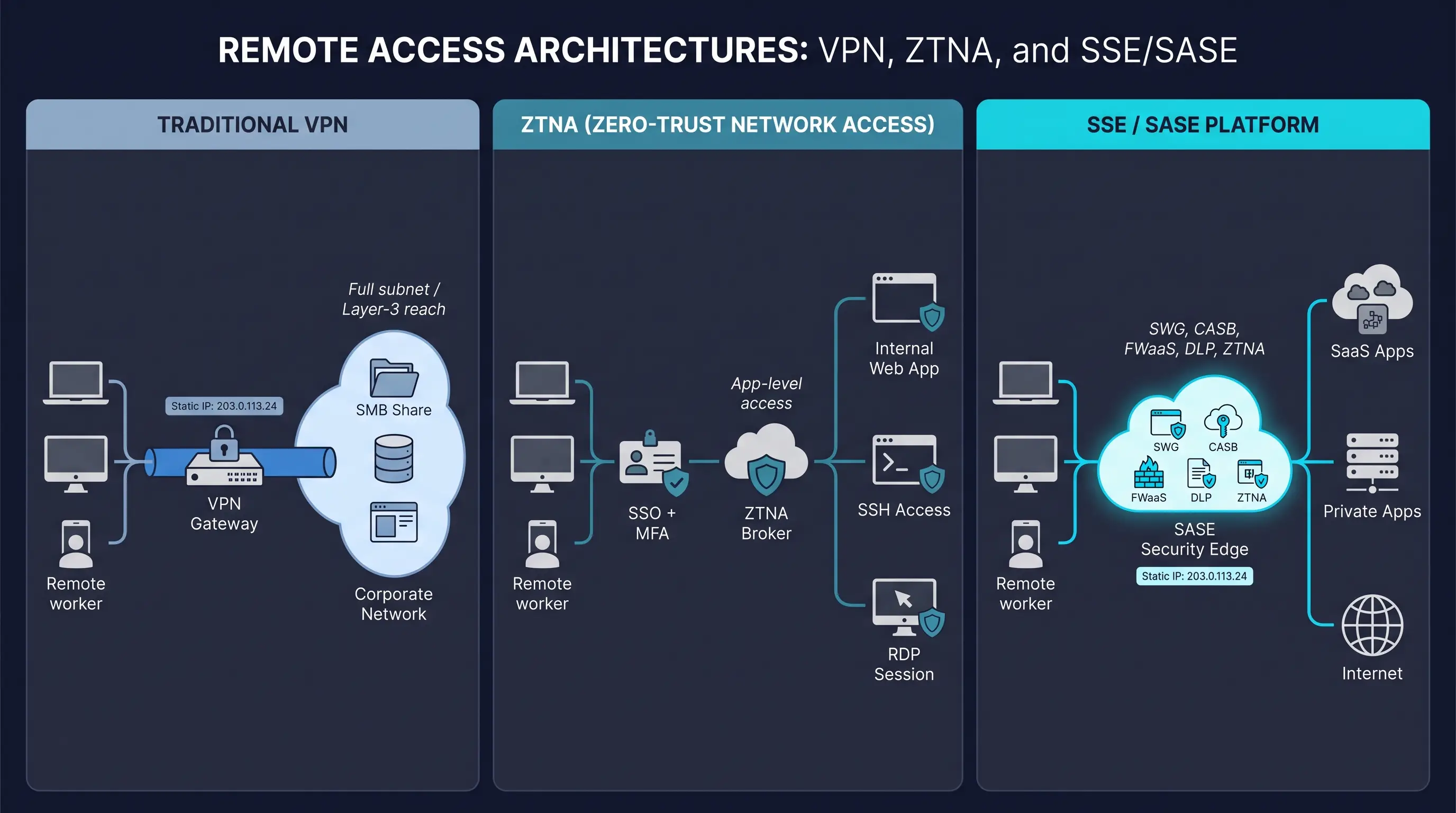
Old-school VPNs excel when whole subnets must talk end-to-end. Think factory PLC telemetry, finance teams glued to an on-prem SMB share, or a site-to-site tunnel feeding a legacy Oracle database. One tunnel, any port, minimal refactor.
Use a VPN when:
Treat the VPN as a tactical anchor; layer ZTNA on modern web apps while dusty protocols retire.
Zero-trust network access shrinks permissions from “entire subnet” to “this app, this user, this device.” Apps stay on private IPs, outbound connectors dial the cloud, and SSO plus posture checks gate every session.
Choose ZTNA when:
Roll out one app at a time; watch help-desk tickets drop, then reassess which VPN cases still justify a full tunnel.
Security Service Edge (SSE) and full Secure Access Service Edge (SASE) fold web filtering, firewall-as-a-service, CASB, DLP, digital-experience monitoring, and ZTNA into one cloud backbone and promise it all under an SLA-backed umbrella.
Choose SSE or SASE when:
Remember the trade-off: vendor lock-in. Shortlist two providers, run side-by-side pilots, and verify SD-WAN, SIEM, and IdP integrations before signing a multiyear deal.

Enterprise security strategies increasingly emphasize accountability, auditability, and controlled access to business resources. docAlpha automates document processing through intelligent validation rules, workflow routing, exception handling, and processing audit trails.
Improve visibility into document-driven operations and reduce the administrative effort required to maintain consistent business processes.
The sticker price is just the headline; real cost hides in licenses, logs, and support. Use this six-point script before you sign.
Run the numbers, build a three-year total cost of ownership table, and the CFO’s follow-up email will feel a lot less scary.
Ask for the paperwork before the pilot; auditors love receipts you already have.
Tick these boxes now, and the eventual compliance review turns into a five-minute rubber-stamp.
Swap the engine in flight by moving traffic in four measured steps, each with a clear success metric.
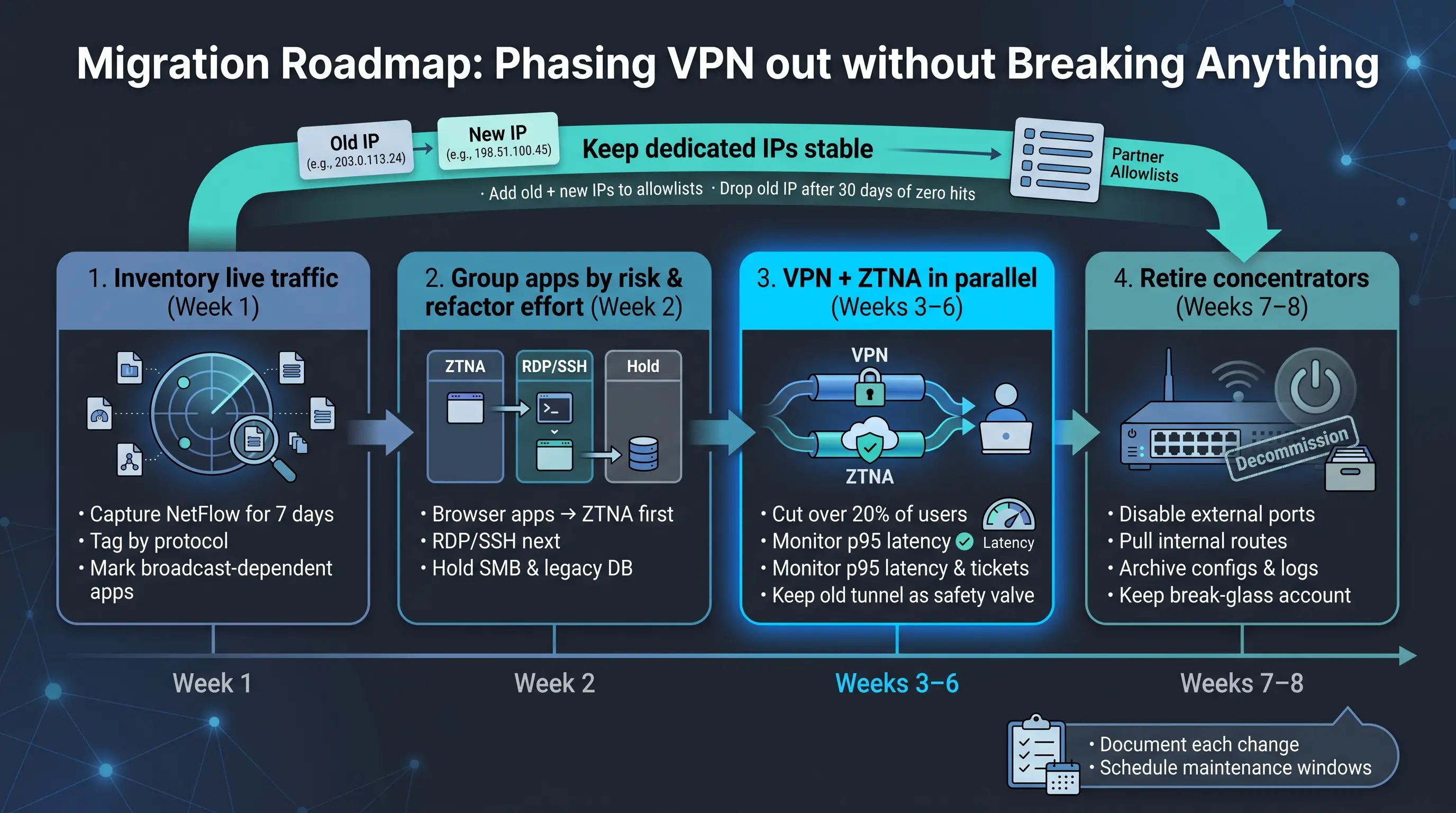
Throughout, keep dedicated IPs stable: add old and new egress addresses to every partner allowlist, then drop the VPN IP only after 30 consecutive days of zero hits.
Document each change, schedule maintenance windows, and the cut-over feels less like a leap and more like walking down a well-lit staircase.
Recommended reading: Learn How to Build a More Resilient and Secure IT Infrastructure

Reliable, controlled access to enterprise applications is essential for distributed teams, but employees may still spend hours manually entering data, reviewing documents, and transferring information between systems. docAlpha uses AI-powered document processing and workflow automation to streamline repetitive business activities.
Help employees spend less time on manual document handling and more time on work that requires their expertise.
Dedicated egress IPs and modern zero-trust controls are no longer mutually exclusive. Use the research, matrices, and checklists above to shortlist a provider, run a proof of concept, and adopt the solution that balances cost, compliance, and user experience for your organization.
 Why Cybersecurity Models Fail Regulated Industries Today
  How to Defend Business Data Against Identity Based Cyber Attacks
  Automate Access Reviews Like You Did AP with AI in 2026
  Building Resilient Systems with IT Support and Cybersecurity
  Boost Cloud Security: Resilience with Advanced Network Protocols
  How Remote Desktop Enables Secure Cross-Device Access
