Top Ways to Automate Business Email Workflows and Boost Productivity
Published: December 19, 2025
Automating email workflows can save you hours of time, reduce manual errors, and significantly enhance productivity. By using automation, you can ensure that repetitive tasks like sending follow-ups or processing invoices are handled more consistently and efficiently, allowing you to focus on more strategic aspects of your business.
To begin automating your email workflows, start by assessing which tasks are most repetitive and time-consuming. Identify these tasks, create templates for responses, and utilize auto-responders for acknowledgment messages. Gradually implement automation tools that can streamline processes such as invoice management and customer communications.
You’ll need a reliable digital infrastructure for your business, which includes registering a custom domain name, selecting a trustworthy web hosting provider, and creating a professional website. After that, establish a professional email setup using platforms like Google Workspace, Microsoft 365, or Zoho Mail, and configure the necessary email records (MX, SPF, DKIM, DMARC).
Automated invoice processing involves setting up a system that can automatically extract invoice data from emails, route invoices for approvals, and integrate with accounting software to streamline payments. This eliminates the need for manual entry and helps maintain accurate financial records while ensuring bills are paid on time.
Advanced tools for email automation include email marketing automation integrated with Customer Relationship Management (CRM) platforms, workflow automation platforms like Zapier and Power Automate, and AI-powered email assistants that can intelligently sort emails, suggest replies, and help schedule meetings. These tools enable more sophisticated automation strategies tailored to your business needs.
Is your inbox overflowing? It's a common story for many business owners. Keeping up with emails can feel like a full-time job. But what if you could put your email on autopilot and get back hours in your day? You can, and it's easier than you think. By automating your email workflows, you can save time, reduce mistakes, and focus on what you do best, growing your business.
This guide will show you how to set up a solid business foundation and use automation to transform your email from a time-drain into a productivity machine. We'll cover everything from simple templates to advanced AI tools, giving you a clear path to get started.

docAlpha monitors inboxes, extracts data from attachments and email bodies, and auto-routes jobs using built-in AI. Cut manual email handling and accelerate downstream document processing from the moment messages arrive.
Before you can automate, you need a strong digital setup. This is the groundwork that makes everything else possible.
Think of your digital infrastructure as the home for your business. It needs to be professional, secure, and easy for customers to find.
First, you'll need to choose and register your domain name. This is your address on the internet (like yourbusiness.com) and a key step to launch your brand with the right domain. Pick a name that’s memorable and reflects your brand. Next, select a reliable web hosting provider. This is the service that puts your website online. Look for one with great uptime and customer support.
With your domain and hosting sorted, it's time to build a professional website. You can go the DIY route with a website builder or hire a professional developer. Either way, your site should look great and be easy for visitors to use. Finally, secure your site by setting up an SSL certificate. This encrypts data passed between your site and its visitors, building trust and protecting information.
Recommended reading: Discover Ways to Automate and Enhance Information Workflows
Using a professional email address is essential. A generic address like yourbusiness@gmail.com doesn’t inspire much confidence. A professional email (you@yourbusiness.com) shows you mean business, enhances credibility, reinforces your brand with every message, and provides better security.
Popular platforms like Google Workspace, Microsoft 365, and Zoho Mail make it easy to get started. If privacy is a priority, an ad-free business email provider can offer an alternative to free, ad-supported services that may rely more heavily on user data collection. Once you choose one, you'll need to configure your email domain. This involves setting up a few records:
After the technical setup, create a logical email structure for your team (e.g., info@, sales@, support@). Make sure everyone can access their email on mobile devices to stay connected on the go.
Turn Incoming Emails into Validated Vendor Invoices
InvoiceAction reads invoice data from email attachments and metadata with zero-touch processing. Minimize delays and errors in your accounts payable workflow.
Book a demo now
Now that your foundation is solid, let's explore how automation can change the game.
Email workflow automation is about using software to handle repetitive email tasks automatically. Instead of manually sending follow-ups or sorting messages, you create rules that do the work for you. The benefits are huge: you save time, ensure every email is handled consistently, and minimize human error. Common tasks ripe for automation include sending welcome emails, processing invoices, and tracking purchase orders.
To know what to automate, you first need to understand where your time is going. Start by identifying your most repetitive email tasks. Do you send the same reply to customer inquiries every day? Do you manually forward invoices to your accounting team?
Calculate how much time you spend on these manual processes each week. You might be surprised. Once you have a list, prioritize the tasks that are the most time-consuming or error-prone. These are your best candidates for automation.
Recommended reading: How Modern Businesses Succeed With Process Automation Tools
You don't need to be a tech wizard to start automating. These simple strategies can make a big impact right away.
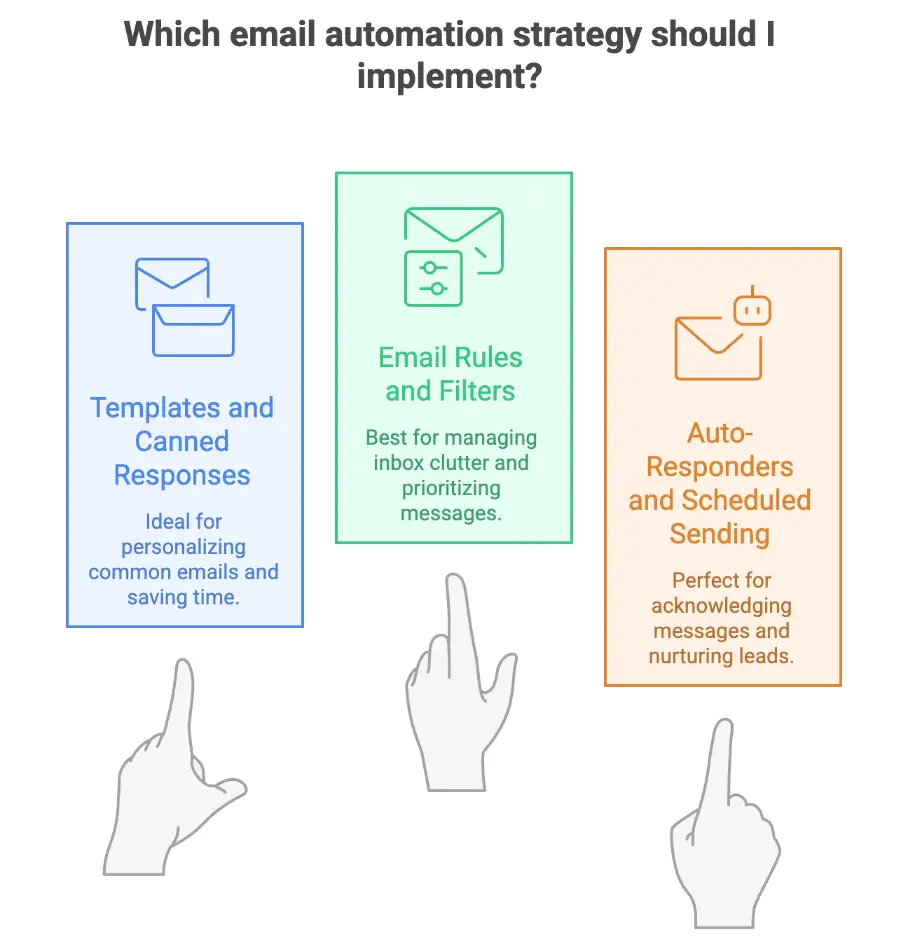
For emails you send over and over, templates are a lifesaver. Create pre-written responses for common scenarios like new client welcomes, support queries, or meeting confirmations. Use personalization tokens (like [First Name]) to make each message feel personal. Keep your templates organized in a library so you and your team can access them quickly.
Most email platforms have built-in tools to manage your inbox automatically. Use rules and filters to sort incoming messages into specific folders or apply labels. For example, you can create a rule that automatically moves all emails from a certain client into a dedicated folder. This helps you manage priorities and keeps your main inbox clean. You can also set up rules for conditional forwarding, like sending all billing-related emails directly to your accountant.

OrderAction pulls structured and unstructured data from emails and routes it for review. Free up your team from tedious tasks and focus on fulfilling more orders faster.
Auto-responders are perfect for acknowledging that you've received a message. A simple "Thanks, we've received your request and will get back to you soon" can go a long way. You can also set up more complex drip campaigns, a series of automated emails sent over time to nurture new leads or onboard new customers.
Scheduled sending is another great feature. It lets you write emails when you have time and schedule them to send at the perfect moment, optimizing for your recipient's time zone.
Invoices processing can be a major headache. Automation can streamline the entire process, from receipt to payment.
Set up your system to automatically extract invoice data from emails. Tools can scan incoming emails and their attachments (like PDFs), pull out key information like the vendor name, invoice number, and amount due, and send it directly to your accounting software (like QuickBooks or Xero). This eliminates manual data entry and reduces errors.
Create an automated workflow for invoice approvals. When an invoice arrives, the system can automatically route it to the right person for approval based on rules you set. If an invoice is over a certain amount, it can be sent to a manager for a second look. The system sends notifications to approvers and can even escalate the request if it isn't handled in time, all while creating a clear audit trail.
After an invoice is approved, the automation can continue seamlessly. With just a few clicks, you can trigger payment workflows directly from the approval. The system can schedule payments, send automated reminders for late payments, and log payment confirmations. This ensures bills are paid on time and financial records stay accurate. Plus, with tools like our PDF editor, you can easily make any necessary adjustments to invoices before processing payments.
Intelligent Invoice Capture Starts at the Inbox
InvoiceAction pulls invoices directly from monitored email accounts and processes them automatically. Reduce manual AP entry and gain faster visibility into your payables pipeline.
Book a demo now
Just like invoices, purchase orders (POs) involve a lot of back-and-forth communication that you can easily automate.
Automate the creation of POs from approved requests within your team. Once a PO is generated, it can be automatically emailed to the vendor. The system can then track whether the vendor has received and confirmed the order, giving you a clear view of your procurement process.
Stop manually emailing vendors for updates. Set up an automated system to request status updates and parse the responses. You can track when an order has shipped, get delivery confirmations, and even integrate this information with your inventory management system to keep stock levels up to date.
Three-way matching, comparing the purchase order, the receipt of goods, and the vendor's invoice, is critical for financial control. This can be a tedious manual task, but automation makes it simple. A system can automatically match all three documents. If everything lines up, it can authorize the payment. If there's a discrepancy, it will flag the issue for human review.
Recommended reading: 10+ Ways to Save Your Business Money with Cloud Invoice Processing Software
Ready to take your automation to the next level? These advanced tools offer even more power and flexibility.
Integrate your email with a Customer Relationship Management (CRM) platform to unlock powerful marketing automation. You can nurture leads with personalized email sequences, send messages based on user behavior (like visiting a specific page on your site), and track the performance of your campaigns to see what works. Many businesses also combine CRM automation with an email newsletter tool to streamline campaign management and maintain consistent communication with subscribers.
AI-Driven Email Capture Right From Your Inbox
docAlpha extracts, registers, and organizes documents from email with zero user input.
Gain complete control and visibility while automating job creation from multiple inboxes.
Book a demo now
Tools like Zapier, Make (formerly Integromat), and Power Automate let you connect different apps and create custom workflows without writing any code. For example, you could create a workflow that automatically adds a new email subscriber to your CRM, sends them a welcome email, and notifies your sales team in Slack.
For businesses that want to connect email with the rest of their software stack without custom development, platforms like IFTTT can also play a valuable role. IFTTT lets users create simple "if this, then that" automations that connect email with hundreds of business apps and services. For example, you can automatically save email attachments to cloud storage, create calendar events from incoming messages, trigger notifications for high-priority emails, or sync information across productivity tools. While enterprise document automation platforms handle complex workflows and data extraction, IFTTT is an excellent option for lightweight, no-code automations that eliminate repetitive manual tasks.
Artificial intelligence is making email even smarter. AI-powered assistants can learn how you work to automatically categorize your emails, suggest replies, and even draft entire messages for you. These tools can also help with scheduling meetings by finding a time that works for everyone and sending out the invitations automatically.
To get the most out of automation, it's important to roll it out thoughtfully.
Don't try to automate everything at once. Start small with one or two high-impact, low-complexity workflows. Before you automate any process, take the time to document how it works currently. This will help you build a better, more efficient automated version. Set clear goals and KPIs so you can measure your success.
Recommended reading: Learn How Process Automation Enhances Business Performance
Automation changes how your team works, so manage the transition carefully. Provide clear user guides and training to help everyone get comfortable with the new tools. Listen to their feedback and be prepared to make adjustments to your workflows.
When you automate workflows that handle sensitive data, security is paramount. Ensure your tools protect customer and company data, and use access controls to limit who can see what. Be aware of regulations like GDPR and make sure your automated processes are compliant. Always have a backup and disaster recovery plan in place.
From Inbox to ERP: Sales Order Processing Reimagined
OrderAction reads, registers, and validates orders received by email - no manual input required. Shorten order cycles and improve customer response times.
Book a demo now
How do you know if your automation efforts are paying off? Track the right metrics.
Measure the time saved per employee to see the direct impact on productivity. Look for a reduction in errors to quantify improvements in accuracy. You can also track how much faster your team is responding to customers. A cost savings analysis can show you the direct financial return on your investment in automation tools.
Automation isn't a "set it and forget it" solution. Regularly audit your workflows to find opportunities for improvement. Use A/B testing to optimize the wording and timing of your automated messages. Keep an eye on new features and tools that can make your automation even more powerful.
Recommended reading: How Process Automation Drives Business Growth Through Technology
Automating your email workflows does more than just clear your inbox. It gives you back your most valuable resource: time. It empowers your team to work more efficiently, deliver better customer service, and focus on strategic growth.
You have the power to transform how your business communicates. Start by picking one repetitive task and automating it this week. You'll be amazed at the difference it makes. The future of your productivity is just a few clicks away.
Automated Invoice Processing from Email to ERP
From attachment to approval, InvoiceAction handles invoice intake, validation, and routing. Improve accuracy, shorten cycle times, and free up your AP team for strategic work.
Book a demo now
 How Does Invoice Automation Work?
 Invoice Approval Workflow: What Is It?
 Exploring the Benefits of OCR Technology Across Diverse Business Processes
 Document OCR – Simplifying Work Processes
 Accounts Payable Automation and Payment Optimization
 Improving Accounts Payable Invoice Processes
