7 Solutions That Make Process Automation Work More Efficiently

Published: March 26, 2026
Operations teams that combine multiple automation layers consistently outperform those relying on a single tool
Most businesses have already automated something. They’ve got a bot handling invoice approvals, or a workflow tool routing expense reports, or maybe a document scanner that pulls data from PDFs. And yet, the time savings never seem to match the pitch deck.
The problem isn’t automation itself. It’s that individual tools, running in isolation, create new handoff points and data gaps that slow everything back down. Real efficiency gains come from building a stack where each layer feeds the next. These seven solutions cover the core components of that stack - what each one does, where it fits, and what kind of results you can actually expect.

With docAlpha, organizations can connect AI-driven data capture to workflow execution across complex document-centric operations. Reduce friction, improve visibility, and create stronger automation outcomes across the business.
IDP software uses machine learning and AI to extract, classify, and validate data from unstructured documents - invoices, purchase orders, contracts, claims forms, and anything else that arrives as an image or PDF rather than a structured database record.
This matters because document handling is where most automation stacks hit their first wall. You can automate approvals and routing all day, but if someone still has to manually key invoice data into your ERP, you haven’t solved the bottleneck. According to Precedence Research’s 2025 market analysis, 63% of Fortune 250 companies have already deployed IDP solutions, and the global IDP market is growing at a 26.20% CAGR - from USD 10.57 billion in 2025 to a projected USD 91.02 billion by 2034.
The efficiency case is straightforward: IDP cuts document processing time from days to minutes, removes manual data entry entirely, and reduces error rates that compound downstream in AP, AR, and compliance workflows.
One thing teams often overlook is what happens right after an exception is flagged. IDP identifies the problem - a missing invoice field, a vendor code that doesn’t match - but someone still needs to be notified immediately. That notification step is frequently still manual, which creates a gap at the edge of an otherwise automated process. Integrating cloud communications directly into the exception workflow closes it. Skyetel provides carrier-grade SIP trunking and communications APIs that plug into automation platforms, so exception alerts and approval requests go out via voice or SMS as part of the automated pipeline rather than as a manual follow-up step.
For organizations running high invoice volumes or managing healthcare claims, this is where to start. You can read more about how AI algorithms drive intelligent process automation to understand how the underlying models handle classification and exception logic at scale.
Recommended reading: What Is Intelligent Document Processing (IDP)? A Complete Guide
RPA bots mimic human actions across software interfaces - logging into systems, copying and pasting data, filling forms, triggering approvals, and moving records between applications. They don’t require API access or system integration; they work at the UI layer, which makes them deployable in environments where deeper integration isn’t feasible.
The numbers behind RPA adoption are worth taking seriously. According to Flobotics’ 2025 industry survey data, RPA automates 70-80% of rules-based business processes and can increase productivity 3x to 5x over manual workflows. Across accounts and inventory management specifically, teams see an average 31% improvement in process efficiency and a 42% reduction in manual data entry errors.
The cost argument is also clear: an RPA bot typically costs about one-third of an offshore FTE equivalent, and most deployments recover that investment within nine months.
Common applications include AP and AR processing, HR onboarding document handling, compliance reporting, and order management. For teams looking to get the workflow design right before automating, it helps to understand building smarter automated workflows as a foundation.

By using InvoiceAction, finance teams can apply Intelligent Document Processing to invoice capture, validation, routing, and approvals. Reduce manual entry, accelerate processing, and improve control across AP workflows.
Low-code and no-code platforms give non-developers the ability to design and deploy automated workflows through visual drag-and-drop interfaces. Process owners can build what they need without waiting months for an IT sprint.
Gartner projects that 70% of new enterprise applications will use low-code or no-code development by 2025, up from less than 25% in 2020. The global LCNC market is on track to exceed $30 billion in 2026, according to data compiled by UserGuiding, citing Gartner research.
The practical impact shows up in two places: development speed and IT backlog. Teams report development timelines cut by up to 70% when operations staff can build and iterate directly. That means faster deployment of automation for niche processes that never made it onto the IT roadmap - expense approvals, vendor onboarding, internal request routing.
The honest limitation here is governance. Low-code tools can produce sprawl fast if there’s no central oversight. Organizations that get the most out of LCNC pair it with clear workflow ownership and a version control process, not just a drag-and-drop license.
Recommended reading: What to Know About Intelligent Automation and How It Works
Orchestration is what turns a collection of automation tools into an actual system. It sequences tasks, routes work between bots and humans, handles exceptions, and makes decisions based on rules or AI model outputs - all without manual intervention.
Without orchestration, RPA bots, IDP engines, and approval workflows run as separate islands. A bot finishes processing a document, but nothing tells the next system it’s done. Someone has to check. That’s a manual handoff, and manual handoffs are where efficiency leaks out.
Gartner’s Hype Cycle for Enterprise Process Automation 2025 flags AI-driven orchestration as a top enterprise priority for organizations scaling beyond point-solution automation. McKinsey’s analysis indicates that organizations can automate up to 50% of their total workflow volume when orchestration is in place to coordinate across systems.
The build-versus-buy question matters here. Purpose-built orchestration platforms offer pre-built connectors and exception handling frameworks that would take months to develop in-house.

That gap becomes easier to close with docAlpha, which applies AI and Intelligent Document Processing to structure, route, and validate business documents. Increase throughput, strengthen control, and make automation work the way it should.
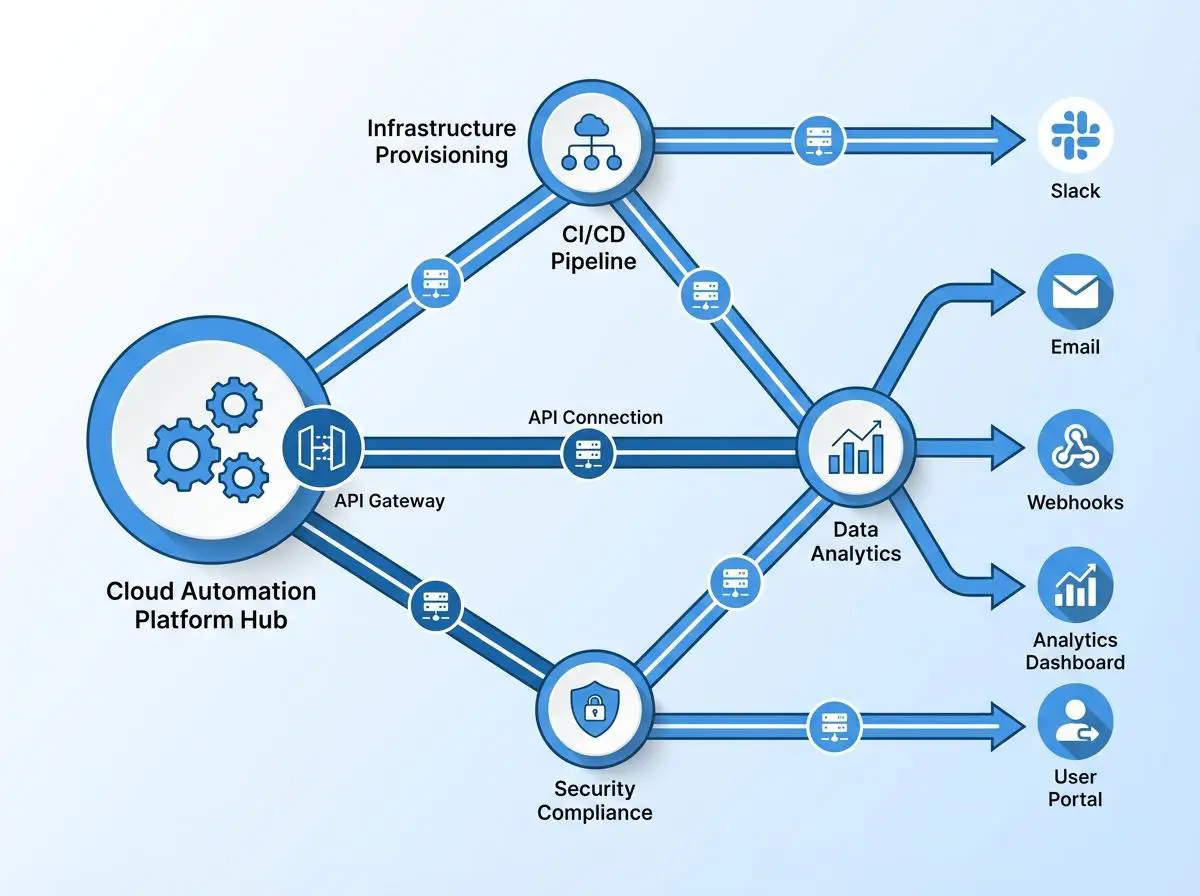
Cloud-native automation platforms eliminate on-premises infrastructure constraints and enable elastic scaling as process volumes grow
On-premises automation deployments come with a ceiling. Licensing is fixed, scaling requires hardware procurement, and remote access introduces security complexity. Cloud-based automation platforms remove those constraints - deploying new automations takes hours rather than months, and capacity scales with actual workload.
McKinsey research cited by Cflow in their 2025 process automation analysis found that organizations using cloud-based automation tools have seen a 35% reduction in operational costs on average. The shift to cloud-native infrastructure also opens up integrations that weren’t practical on-premises.
The shift to cloud-native infrastructure also opens up integrations that weren’t practical on-premises - including communication workflows, real-time API connections, and event-driven triggers that fire based on data changes rather than scheduled batch jobs.
For high-volume environments - invoice approval escalations, order confirmation workflows, patient notification systems in healthcare - cloud deployment is what takes a process from 80% automated to genuinely end-to-end.
Recommended reading: Cloud Automation in AP: Tips, Tricks and Use Cases
No automation stack works if the underlying systems don’t share data. ERP, CRM, document management, communication platforms, and financial systems each hold pieces of the same process - and if they don’t exchange data in real time, automation tools end up re-creating the silos they were supposed to eliminate.
Integration Platform as a Service (iPaaS) tools and API management layers solve this. They create standardized connections between applications, so data flows automatically when a process moves from one system to the next.
According to BizData360’s 2025 analysis, citing Gartner research, 80% of enterprises will rely on AI APIs and workflow automation platforms to manage business processes by 2026. Microsoft was named a Leader in the 2025 Gartner Magic Quadrant for Integration Platform as a Service, which signals how mature and central iPaaS has become to enterprise automation strategies. That same report notes 55% of businesses are already using APIs to generate new revenue streams - not just reduce costs.
The practical takeaway: before adding more automation tools, audit your integration layer. Automation running on disconnected systems creates speed but not accuracy.

By combining AI with process automation, OrderAction helps teams manage customer order documents with greater precision and less manual effort. Improve workflow reliability and support stronger operational performance as volumes grow.
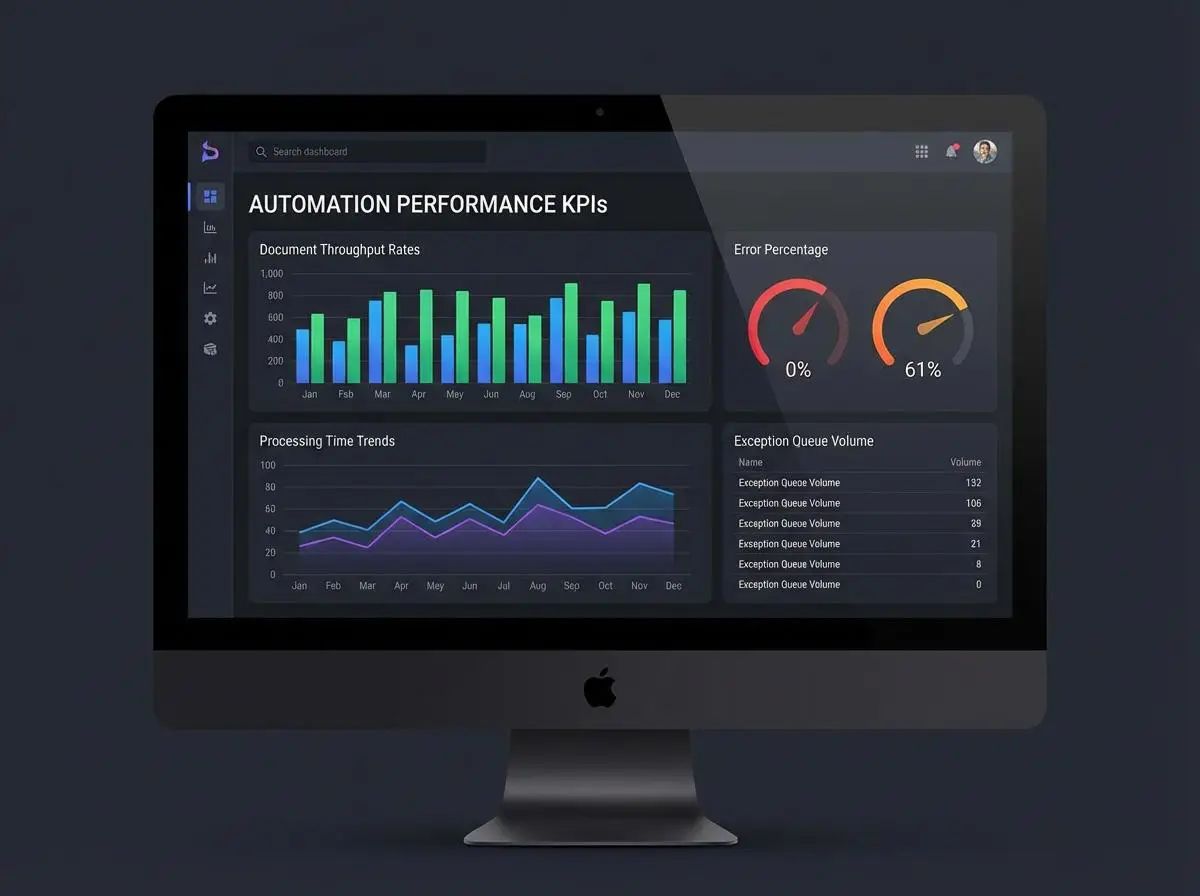
Real-time monitoring dashboards give operations managers the visibility needed to catch bottlenecks before they become backlogs
Automation without measurement is guesswork at scale. Teams that deploy automation and then don’t monitor it closely tend to see initial gains flatten within six months, because bottlenecks shift rather than disappear.
Analytics dashboards track what matters: processing volumes, error rates, exception queue sizes, throughput by document or transaction type, and SLA compliance. That data tells you which processes are performing as designed and which ones need tuning.
The ROI connection is direct. Kissflow’s 2026 automation statistics report found that 60% of organizations achieve ROI within 12 months of automation implementation - but the ones that don’t typically lack visibility into where exceptions are handled manually or where approval delays persist. Monitoring closes the feedback loop.
For teams managing complex compliance environments, this visibility is especially important. You can explore how analytics connect to governance workflows in the context of document automation in legal and compliance to see how monitoring tools support audit trails and regulatory reporting.

Rather than stopping at basic automation, docAlpha helps organizations use document intelligence to drive smarter process automation.
Create measurable efficiency gains while improving consistency across high-volume operations.
These seven solutions aren’t alternatives to each other - they’re layers. IDP feeds clean data into RPA bots. Orchestration coordinates those bots and routes exceptions. Cloud platforms provide the infrastructure to scale. Integration middleware makes sure data moves cleanly between systems. Analytics tell you where it’s working and where it isn’t.
The practical starting point is always the same: find the highest-volume manual process in your operation right now, and build outward from there. That’s where the efficiency gains are actually sitting.
 Future of Process Automation: Driving Business Growth in 2026
 AI Algorithms in Intelligent Process Automation (2026 Guide)
 Machine Learning Algorithms in Business Process Automation
 Low-Code Workflow Automation for Business Users Today
 Workflow Automation for Faster Document Routing
 Smarter PO Workflow Automation for Purchasing Teams
