Three-Way Match Breaks at the Loading Dock: Fixing Receiving Data in ERP

Published: November 17, 2026
Most accounts payable teams blame suppliers for match exceptions. Wrong prices, sloppy invoices, missing PO numbers. Some of that is fair. But pull a month of exceptions and sort them by root cause, and a big pile usually traces back to something that happened, or didn't happen, at your own receiving dock. The goods arrived. Nobody posted the receipt, or someone posted it two days later with the wrong quantity. Ardent Partners' State of ePayables research puts the average invoice exception rate at 18.4%, and every one of those invoices needs a person to touch it. If you run AP, a controller's desk or a receiving crew, this piece is about the leg of the match you probably watch least.
Quick refresher: a three-way match compares the purchase order, the supplier invoice and the goods receipt before payment is released. If quantities and prices agree within tolerance, the invoice goes through. That's the whole definition, and you already know it.
What gets less attention is that the three documents are not created equal. The PO comes out of a purchasing system with approvals and a buyer who cares about it. The invoice comes from a supplier who wants to get paid, so it shows up. The receipt is the only document created by people whose real job is something else: unloading trucks, putting stock away, shipping orders out. Receiving data entry is the task that gets squeezed when the dock is busy.

A purchase order, invoice, and goods receipt must agree before an invoice can move forward, but manual checks create bottlenecks. InvoiceAction uses intelligent invoice capture and configurable matching rules to flag price, quantity, and receiving differences.
Reduce routine verification effort and direct mismatches to the people who can investigate them.
Here's how that plays out on an ordinary week:
None of these are exotic. They're what happens when a manual step depends on the busiest people in the building.
Recommended reading: Learn How Three-Way Matching Works in Invoice Processing
A bad receipt doesn't stay on the dock. It splits into three separate problems, and each lands on a different team.
In accounts payable, it becomes an exception. A clerk opens the invoice, sees a quantity variance or a missing receipt, and starts emailing the warehouse. The warehouse has moved on to today's trucks. Days pass, the early-payment discount expires, and the supplier calls asking where the money is. Invoice processing that should take minutes now takes a week of follow-up, and that's labor no automation tool can remove if the underlying receipt is still wrong.
In inventory, it becomes a phantom. Overstated receipts show stock you don't have, so order processing promises customers product that isn't on the shelf. Understated receipts hide stock you do have, so purchasing reorders it. Either way, the planners stop trusting system counts and start keeping their own spreadsheets, which is how you end up with three versions of the truth.
In accounting, it distorts the close. Goods received but not invoiced (GRNI) accruals depend on receipts being posted in the right period. If a large delivery arrives on the 30th and gets received on the 2nd, your balance sheet understates both inventory and liabilities for that month, and someone in finance spends close week reconciling the gap by hand.
The common fix for all three is the same: one receiving record, created once, that every team reads from. That's easier when receiving, purchase orders and stock levels sit in a single erp inventory portal that warehouse, purchasing and AP all see, rather than a receiving log in one tool and invoice queues in another. When the AP clerk can look at the same receipt line, timestamp and photo of the packing slip that the dock created, the "who received this?" email disappears. The goal isn't more software. It's fewer places for the same fact to live.
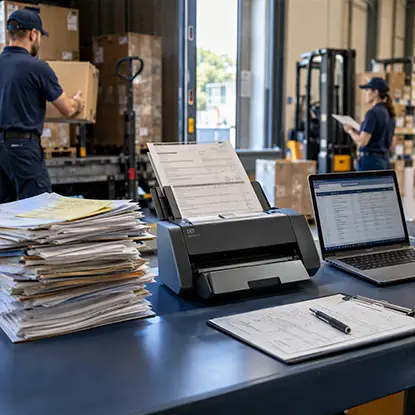
Receiving teams may accumulate handwritten slips and emailed shipping paperwork that is later keyed into systems. docAlpha captures, classifies, and validates document information for connected operational workflows.
Reduce rekeying and help procurement and AP work from more consistent supporting records.
The single biggest improvement most mid-market companies can make is moving receipt creation from the office to the dock, and from end of shift to the moment of unloading.
Give receivers a handheld or tablet that pulls up the open PO when they scan a barcode on the packing slip or pallet label. They confirm quantities line by line against what's physically there. The receipt posts immediately, with the user, date and time attached. This one change kills batch keying, cuts transcription errors and makes late receipts visible the same day.
The packing slip is evidence. A photo or scan attached to the receipt record gives AP something to check when a supplier disputes a short-ship claim. Document capture tools can also read the slip and pre-fill quantities, though your receivers should still count what's on the pallet rather than trust the paper. Data capture at the dock works best as a cross-check, not a replacement for counting.
If the same vendor ships in cases and you buy in eaches, set up the vendor-specific conversion once. Then the receiver enters "4 cases" and the system records 96 units. Without it, you'll see the same quantity variance on every invoice from that vendor, forever.
Partial, damaged, substituted, over-shipped. Each should be a coded option on the device, not a free-text note. A coded reason lets the system route the issue automatically and lets you report on it later.
Recommended reading: Discover Why Accurate PO Matching Prevents Invoice Exceptions
Even a clean dock will produce some mismatches. The question is who handles them and how fast.
Start with tolerances. Most ERPs let you set price and quantity tolerances by vendor, item category or dollar amount. A price variance of, say, 2% or $50 on low-value consumables usually isn't worth a human's time; a 1-unit shortage on a $4,000 component is. Set tolerances by risk rather than one global number, and review them quarterly against what your exceptions actually show.
Then route exceptions to the person who can fix them:
This is where process automation and invoice automation pay off. Workflow rules can hold an invoice that arrives before its receipt, check again each day, and release it automatically once the receipt posts, instead of throwing an exception on day one. Intelligent automation tools can also learn which variance patterns get approved every time and suggest tolerance changes. Just keep the routing logic visible enough that your team can explain why an invoice was held.
Timing matters as much as routing. If your suppliers routinely invoice on ship date, expect invoices to beat the goods to your building. A short hold window for unreceived lines, rather than an instant exception, takes a lot of noise out of the queue.

Partial shipments, late receipts, and unit-of-measure differences can make supplier invoices appear incorrect. InvoiceAction validates invoice information against configured ERP records and routes exceptions through structured AP workflows.
Improve invoice accuracy and reduce avoidable payment delays while warehouse teams correct source records.
You can't fix what you only hear about in complaints. Track a handful of numbers every month and share them with both AP and the warehouse:
The same Ardent research found that the top-performing AP teams in its sample post exception rates 47% lower than the rest of the market, while the average AP department still needs 8.2 days to process a single invoice. Those teams aren't magically getting better invoices. They're getting cleaner matches, and clean matches start with clean receipts. Simple data analytics on the metrics above, even a monthly pivot table, will show you which vendors, docks and shifts produce most of your problems.
Recommended reading: Learn How ERP Integration Improves Receiving and Invoice Workflows
You don't need a full system replacement to make progress. A realistic sequence for a mid-market team looks like this:
Three takeaways if you only remember a few things. Treat the receipt as a financial document, not a warehouse chore, because your payables, inventory and accruals all depend on it. Post receipts at the dock while the goods are in front of someone, not from a pile of slips at end of shift. And measure exceptions by cause, so your fixes target the leg of the match that's actually breaking.

A scanned packing slip is only useful when its information can be checked and transferred into the appropriate business process. docAlpha automates data extraction, validation, and workflow routing from incoming documents for integrated enterprise applications.
Reduce manual document handoffs while keeping final received quantities grounded in what the warehouse actually counted.
 Three-Way Match in Invoice Processing
 PO Matching: Why Purchase Order Matching to Invoice Is Important
 ERP Integration: Best Practices
 How Invoice Exception Handling Works in Automated AP Systems
 How to Integrate Invoice Automation with ERP Systems
 Beyond Three-Way Matching: Detect AP Contract Violations Now

