The Hidden Cost of Disconnected Customer Support: How Integrating Your CRM and Helpdesk Transforms B2B Service Operations
Published: June 24, 2026
For a B2B company running on purchase orders, invoices, and multi-step approvals, a single support request rarely starts at zero. The customer on the line has an order in flight, an invoice in dispute, or a contract renewal three weeks out. Yet the agent answering often sees only the ticket text in front of them, because the helpdesk and the CRM live in separate systems. Closing that gap is exactly the kind of work Cloudfresh handles as a Zendesk professional services team, and it starts with understanding what the disconnect actually costs.
The expense is easy to underestimate because it hides inside normal-looking workdays. Support agents spend an average of 3.3 hours each day just gathering context across disconnected tools - pulling up order status in one tab, payment history in another, account notes in a third. Every switch carries a cognitive penalty: the agent has to rebuild the mental model of the issue from scratch before they can move forward.
In B2B, that penalty multiplies. A single account may involve an end user, a procurement contact, and a finance approver, each with a different slice of the history. When the agent can’t see which invoice is overdue or whether a renewal is pending, the conversation slows, the customer repeats themselves, and the resolution drifts past the first contact.

Customer service teams often spend valuable time searching for documents hidden in inboxes, shared drives, and disconnected applications. docAlpha automatically extracts and organizes information from emails, service requests, contracts, warranty claims, and correspondence for immediate access. AI-driven document capture creates a complete customer information ecosystem. Improve service quality while empowering teams with accurate data at every interaction.
That first-contact miss is where disconnected systems quietly bleed revenue. First contact resolution is one of the clearest predictors of whether a B2B customer stays: companies above an 85% FCR rate see roughly 25% higher retention than those stuck below 70%. The mechanism is direct - when an issue gets solved in one interaction, the customer has no reason to start shopping for an alternative. When it doesn’t, every repeat contact widens the door.
Retention math makes the stakes concrete. Across B2B, around 89% of customers cite service quality as a primary reason they stay with a vendor, and roughly half have switched vendors in a single year after poor service experiences. For a portfolio where most revenue comes from existing accounts, a support team flying blind on account context isn’t a back-office inconvenience - it’s a churn engine.
Recommended reading: CRM vs. ERP: What's the Difference?
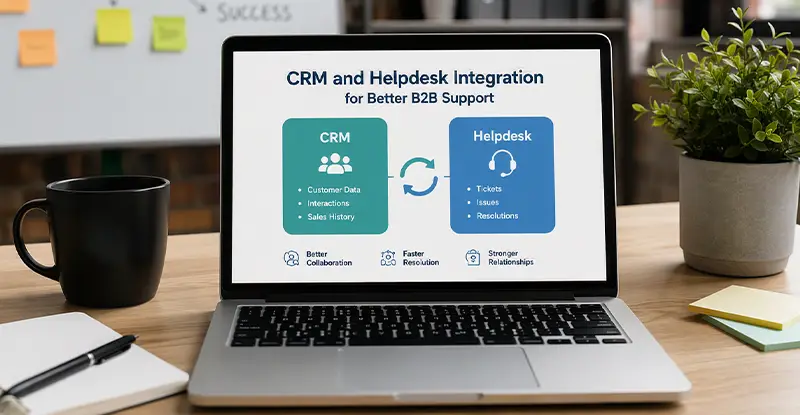
So what does connected support actually look like? The goal is narrow and practical: when an agent opens a ticket, the customer’s account tier, open deals, renewal date, and payment status appear next to the conversation - no second tab, no guesswork. For teams running HubSpot as their CRM and Zendesk as their helpdesk, that view is achievable with the platforms’ own connectors plus a thin automation layer where the native sync stops.
The connection rests on two official apps that do different jobs. The Zendesk-built connector pushes ticket events - creation, resolution, CSAT rating - into HubSpot as timeline activity on the matching contact, using three triggers and a webhook set up automatically during install. The HubSpot-built Data Sync app handles record alignment: HubSpot contacts with Zendesk users, and HubSpot companies with Zendesk organizations.
Direction matters, and this is where most teams trip. User and organization records can sync both ways, so a corrected phone number or company name stays consistent across systems. Ticket data, by contrast, flows one way - from Zendesk into HubSpot - and archived tickets are excluded. If you need a HubSpot form submission to spin up a Zendesk ticket, or a renewal date to land in front of the agent, that path runs through middleware, not native sync.

When AP information is difficult to access, customer service and finance teams struggle to provide timely answers. InvoiceAction automatically captures, validates, and processes invoices while keeping financial data synchronized across business systems. Automated invoice workflows improve transparency and operational efficiency. Resolve payment-related inquiries faster while reducing processing costs.
Deciding what to sync is the real design work, not the clicking. Start with the fields an agent must see to resolve a B2B ticket without leaving Zendesk: account tier or plan, lifecycle stage, renewal or contract end date, open deal value, and recent payment status. These are not native Zendesk organization fields, so they get mirrored from HubSpot into mapped user or organization properties - and custom field mapping beyond name, email, phone, and domain requires HubSpot’s Operations Hub (Data Hub) Starter tier or higher.
The automation layer covers what the connectors leave out. A workflow tool such as an iPaaS connector can create a Zendesk ticket the moment a high-value HubSpot deal stalls, or flag an organization in Zendesk when an invoice crosses a payment threshold, so the agent sees the commercial signal before they reply. The principle is to surface the signal and assign the next step while leaving the human to decide how to handle the account.
None of this works if the matching keys are loose. Zendesk associates records to HubSpot by email address only, so a contact using a personal address on one side and a work address on the other simply won’t link, and the agent is back to a blank ticket. This is why the unglamorous prep - auditing ticket structure, custom fields, and contact models before connecting anything - determines whether the integration helps or just adds noise.
“The teams that get the most out of a HubSpot–Zendesk connection are the ones that resist syncing everything. We start by asking what an agent must see to close a B2B ticket without leaving the helpdesk - usually plan tier, renewal date, and payment status - and we map only those. Surfacing the right five fields next to the ticket does more for resolution than mirroring fifty.” - Vita Usatiuk, Sales Executive - CX Solutions Consultant at Cloudfresh
Recommended reading: Discover How Intelligent Process Automation Transforms Operations
The rollout sequence protects you from a cleanup project later. Connect the native apps first and confirm that contacts and ticket activity land where expected. Then configure Data Sync for the object relationships operations actually relies on. Only after that foundation is stable should you layer in custom field mappings and automation - and pilot each step with one customer, one ticket, one record before expanding. Roughly 84% of system-unification projects fail or partially fail, most often on overlooked permissions and mapping issues, so a small, boring pilot is the cheapest insurance you can buy.
The metrics that move tell you the integration is earning its keep. Watch first contact resolution climb as agents stop hunting for context, average handle time drop as the tab-switching disappears, and repeat-contact rate fall - the same repeat contacts that account for a meaningful share of contact-center operating costs. Over a quarter or two, those shifts show up where leadership cares: in retention and in the cost-to-serve line.

Disconnected service operations create delays, duplicate work, and inconsistent customer experiences. docAlpha automates document-driven workflows across departments, ensuring critical information reaches the right teams without manual intervention. Automate classification, validation, routing, and workflow execution with AI. Increase customer satisfaction while lowering service delivery costs.
The takeaway is simpler than the architecture. You don’t need a heroic rebuild to give agents customer context; you need a deliberate decision about which fields matter, the discipline to sync only those, and a pilot before a full rollout. Get that right, and support stops being the place where account knowledge goes missing - and becomes the place where it shows up exactly when the customer needs it.
Recommended reading: Understanding the B2B Business Model: Strategies for Success
 HubSpot Partner: Steps to Achieve Seamless Onboarding Success
 Smarter SaaS Support Starts With the Right AI Tools
 Predictive CRM: Next Evolution in Customer Relationship Management
 Building Business Trust Through Clear Communication
 How to Integrate Invoice Automation with ERP Systems
 Composable Enterprise Software for Modern Business Systems
