Best Inventory Management Software for Manufacturing: BOM Without Leaving Shopify
Published: August 28, 2026
No single winner. If you live inside Shopify and need basic BOMs, start with Organizely. If QuickBooks Online handles your books and you run variable-yield recipes, SOS Inventory is a better fit.
Not natively. You will need a connector such as Material Manager for simple kits or a full MRP like Katana when routing, WIP, and capacity planning matter.
Inventory apps track stock movements. MRP layers material and production planning on top. ERP folds finance, purchasing, quality, and more into one database; cost and complexity rise at each step.
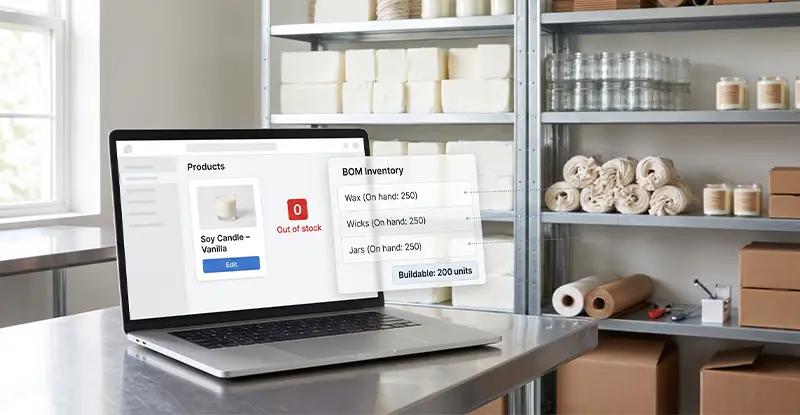
Only some platforms calculate available-to-make quantity, what Organizely calls “buildable” quantity, and push it to Shopify. Organizely, Katana, and inFlow do. Cin7 Core sends only finished-goods stock unless you script a workaround.
Yes, if it adjusts for stockouts, explains its math, and lets humans override. Ignore pretty charts without action or audit trails.
Yes, but only if the connector maps POS orders, returns, and location transfers correctly. Test this during your trial.
Shopify will shut down Stocky on August 31, 2026. Merchants must move to a third-party inventory system before that date.
Component apps go live in days. Full MRP or ERP deployments can take four to twelve weeks, mainly for data cleanup and training.
Have another question? Let us know and we will expand this list with real-world answers.
You open Shopify and a red “0” blinks beside your bestselling candle, even though shelves still brim with wax, wicks, and jars. The problem isn’t stock; it’s visibility.
Inventory management software for manufacturing fixes that blind spot by reserving components, generating work orders, and tracking real bills of materials, jobs Stocky will abandon when Shopify retires the app on August 31, 2026.
We tested 9 Shopify-friendly platforms, tearing down pricing and features. Below, you’ll see how each one handles available-to-make quantity, multi-level assemblies, purchase orders, and AI-driven planning so you can keep making, not guessing.
Need the fastest match? Scan this mini cheat sheet, then jump to the deep dive.
Organizely: Lean, Shopify-first teams that want manufacturing inventory inside Shopify; offers BOMs, POs, and work orders without an ERP.
Katana: DTC brands that rely on visual scheduling; drag-and-drop Gantt boards for make-to-order or make-to-stock jobs.
MRPeasy: Small shops seeking full material-requirements planning at a starter price; multi-level BOMs, finite-capacity scheduling, and lot traceability.
Cin7 Core: Companies juggling ecommerce, wholesale, and B2B portals; adds advanced manufacturing when needed and unifies every sales channel.
Fishbowl Advanced: QuickBooks-centric manufacturers running barcode-heavy warehouses; delivers deep shop-floor control and accountant-ready postings.
inFlow Manufacturing: Makers who need straightforward inventory, light assembly, and a mobile app the team can learn in an afternoon.
SOS Inventory: Small-batch food, beverage, or cosmetics producers handling variable yields and posting directly to QuickBooks Online.
Odoo Manufacturing: Growing operations that want a modular ERP path; add accounting, quality, or maintenance modules as needed.
Material Manager: The budget pick for deducting components inside Shopify; under $50 per month keeps simple BOM math honest.
Each pick serves a distinct use case; the next section unpacks our scoring so you can decide whether the quick match fits.
docAlpha uses AI-powered document capture to extract and validate data from purchase orders, inventory records, shipping documents, and other operational documents before delivering structured data to ERP workflows.
Reduce manual data entry, improve inventory data accuracy, and keep manufacturing operations moving with reliable information.
Selecting inventory management software for manufacturing shouldn’t feel random, so we built a scoring model before opening a single demo.
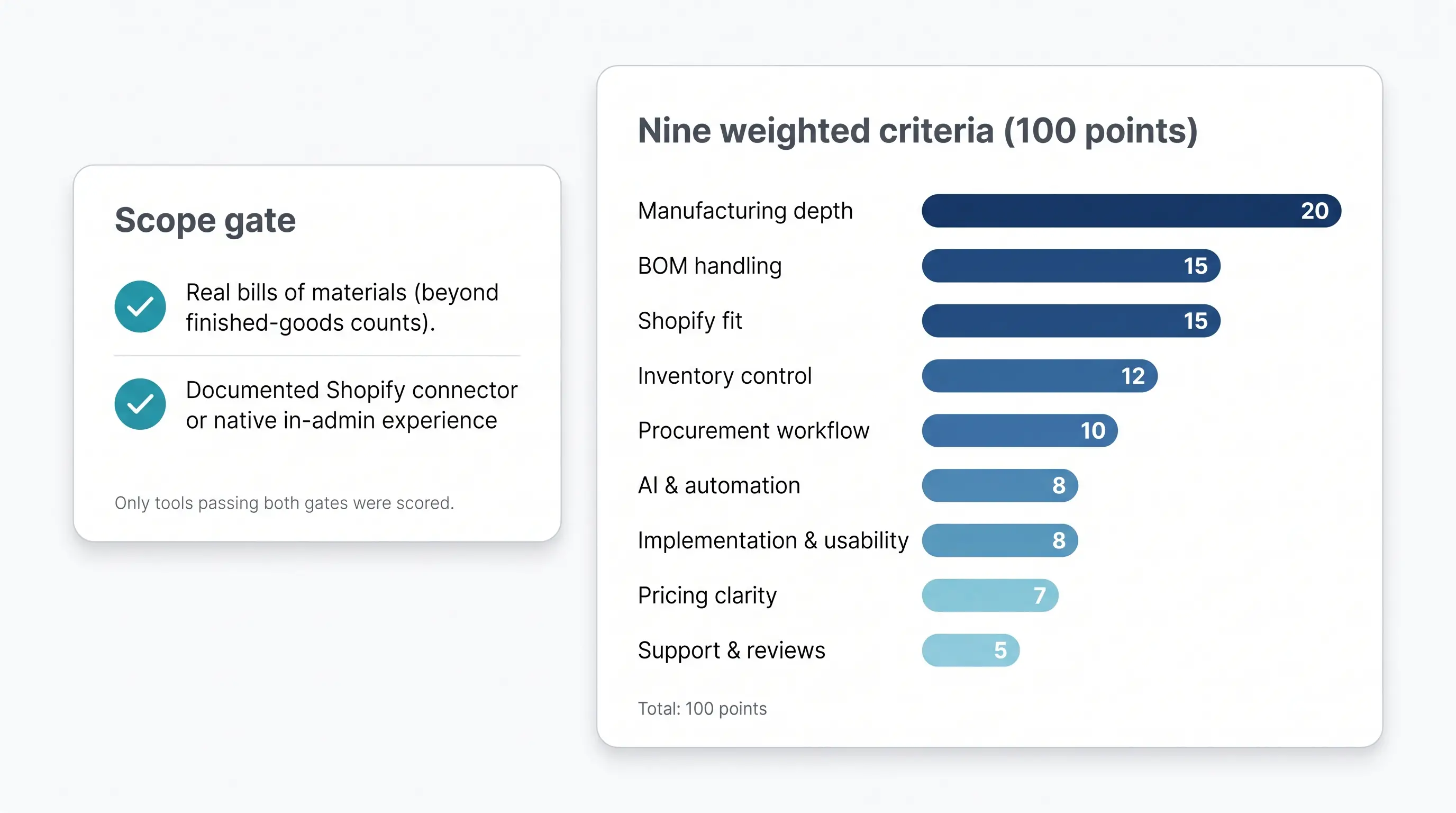
To reach the shortlist, a product had to:
Pure demand planners or finished-goods trackers sat out.
Criterion | Weight |
Manufacturing depth | 20 |
BOM handling | 15 |
Shopify fit | 15 |
Inventory control | 12 |
Procurement workflow | 10 |
AI & automation | 8 |
Implementation & usability | 8 |
Pricing clarity | 7 |
Support & reviews | 5 |
Each weight answers one question: Will this matter on your shop floor in the next quarter? A flashy chatbot with no audit trail, for example, lost points quickly.
We captured the tier where manufacturing features begin, then added published costs for users, extra locations, lot or serial tracking, and required modules. Quote-only add-ons are flagged so you can quiz the sales rep, not your accountant, later.
Every tool’s bill-of-materials depth is labeled L1 for simple kits, L2 for assemblies and WIP, and L3 for multi-level BOMs with routing and cost roll-ups. You’ll see those tags in the next comparison grid.
Next up, the side-by-side table that brings these scores together.
For Shopify-first makers who need BOMs and work orders without adopting a full ERP, Organizely software is a solid starting point. The cloud app connects your Shopify store in minutes, syncs products and orders automatically, and wraps forecasting, purchasing, and unlimited-location tracking into a 14-day free trial so you can prove fit before you pay.
Founders Christian Santos and Matt built the app for their own store, Kinetic Labs, where Warehouse Manager Pallavi Seth provides the lone named testimonial.
Most merchants would rather extend the admin they already use than juggle another dashboard. Organizely adds L2 BOMs, work orders, purchasing, and bin tracking to any Shopify plan, so your team keeps one login while gaining manufacturing muscle.
A 14-day free trial, 50 percent off for three months, and no contracts keep commitment low.
Organizely offers no multi-level BOMs, routings, or variable-yield features yet. Shops that need L3 depth or finite-capacity scheduling should look at later contenders.
With 1.1 million orders processed, 140 000 SKUs tracked, and 5 million Shopify events synced, Organizely delivers core manufacturing control at coffee-money prices while leaving room to grow.
Recommended reading: Discover How Manufacturing ERP Improves Inventory Control
Katana turns a color-coded whiteboard into a live browser timeline. Move a manufacturing order to Tuesday and watch materials, priorities, and finish dates reshuffle in real time. That clarity keeps many direct-to-consumer brands loyal.
Orders sync within seconds of checkout, reserve raw materials, and launch make-to-order jobs. Multiple stores and Shopify POS feed one schedule, so no one guesses which channel owns which components.
With the Manufacturing Management add-on, Katana reaches L2 to L3 BOM depth with routing, capacity planning, and operation-level costing. Add Traceability for lots and expiry, and Warehouse Management (July 21, 2026) for multi-bin control.
Core $299 plus Manufacturing $199 equals $498 per month to start. One inventory location is included; budget the Warehouse add-on or manual transfers if you operate several sites. Unlimited users prevent seat creep.
The July 2026 AI replenishment engine creates a 12-month forecast and drafts purchase and manufacturing orders for one-click approval, working with existing shortage alerts.
If your shop already lives by sticky notes and Gantt charts, Katana delivers familiar clarity; just add every module to the quote before you trust the $299 headline.

InvoiceAction uses AI-powered AP automation to capture supplier invoices, validate invoice data, and match transactions against purchase orders and receiving information within ERP-driven workflows.
Reduce overpayments, exceptions, and manual reconciliation while improving control over inventory-related spending.
Spreadsheet chaos gets expensive fast, but MRPeasy brings L3 BOMs, finite-capacity scheduling, and lot traceability for $49 per user per month on the Starter plan.
Open the dashboard to find routings linked to production orders. One click issues materials, and red or green load cues flag scheduling clashes.
Depth runs far past simple assemblies: phantom and matrix BOMs, co- and by-products, and disassembly rules come standard. Step up to Professional at $69 or Enterprise at $99 per user per month for expiry dates, serial tracking, subcontracting, and the AI sales-forecast module launched in May 2026.
Shopify integration is native. Orders sync at intervals you set, reserve components immediately, and push finished stock back after completion. High-volume stores can turn on the hourly bulk-sync mode added in July 2026 to avoid API throttling.
Costs scale with headcount, not features. A three-user shop pays $147 plus tax; each new hire raises the bill, and multi-warehouse or quality modules live on higher tiers.
Implementation demands effort, and the learning curve is real, but the reward is true MRP power at a thrift-shop price.
Selling through Shopify, a B2B portal, Amazon, and trade shows can feel like herding cats. Cin7 Core pulls every channel into one hub, then layers manufacturing so pallet-size wholesale orders and single-item ecommerce picks draw from the same stock.
Standard assemblies give you L2 BOMs with nested structures, labor, and overhead. Switch on the Advanced Manufacturing add-on to unlock product-family BOMs, capacity planning, and co-manufacturing workflows.
Shortage reports convert to purchase orders, feed warehouse put-away, and tag lots for traceability, no spreadsheet detours.
Core inventory plus ecommerce starts at $349 per month (Cin7, July 2026). Advanced Manufacturing and extra users are quote only; expect a larger annual figure. Build a full software bill with the sales rep before you budget.
For brands balancing wholesale palettes, Amazon cartons, and multiple 3PLs, Cin7 Core offers a single pane of glass, just enter the add-on math and stock-sync nuance into your plan before signing.
Recommended reading: How OCR Document Capture Automates QuickBooks Workflows
Need manufacturing inventory that your accountant and warehouse crew both understand? Fishbowl Advanced speaks QuickBooks on one side and barcode scanners on the other.
The core Inventory plan tracks locations and quantities, while true L3 BOMs, work orders, and MRP live in the Advanced Manufacturing module at $675 per month (July 2026 price). Open a work order to nest sub-assemblies, clock labour to the minute, and roll landed cost into every pallet the dock scans. Lot and batch tracking satisfy FDA or big-box recall demands.
Fishbowl syncs with Desktop, Enterprise, and Online, so finished goods post to the ledger automatically.
Inventory begins at $349 per month; add Advanced Manufacturing plus extra seats and, if needed, the AI Insights add-on (beta announced in June 2026). Build a complete quote or risk sticker shock.
Juno promises forecast insights and reorder suggestions, but rollout dates vary. Ask for a live demo before you base planning on a beta badge.
Expect a heavier lift than pure-cloud apps: disciplined data import, barcode mapping, and possible on-prem hosting. Once tuned, pickers praise scanner workflows and controllers like that valuations tie straight back to QuickBooks.
Choose Fishbowl when barcode precision, audit trails, and accountant-approved entries matter more than chasing the lowest monthly bill.

OrderAction automatically extracts and validates customer order information from emails and documents before creating structured transactions for ERP-connected order processes.
Move orders into production and fulfillment faster while reducing costly keying errors and administrative work.
Need inventory software that feels closer to a spreadsheet than an ERP? inFlow Manufacturing covers L2 BOMs and light assemblies without drowning you in setup.
The interface works like a polished spreadsheet that learned to scan barcodes. Click Build to deduct components and roll up cost; switch on the Production Management add-on at $39 per month for simple routing and labour steps, no capacity math required.
Mobile apps stand out. Staff receive, pick, and pack with a phone camera, and when a Shopify order lands, stock adjusts and confirmation returns within minutes.
Hit 1 200 orders, add a second warehouse, or require variable yield and you’ll need the next tier, or a deeper MRP.
If you value clarity, mobility, and Friday-to-Monday go-live speed, inFlow replaces Excel without demanding a consultant.
Recommended reading: How ERP Software Transforms Manufacturing Operations
Variable-yield batches drive spreadsheet users crazy: every kettle finishes a little high or low. SOS Inventory solves that by letting you record actual yield on each work order, perfect for food, beverage, and cosmetics makers who live in QuickBooks Online.
Built for QBO first, SOS pushes part numbers, costs, and journal entries straight into the ledger, so accountants and makers stay in sync.
On the Pro plan you get L3 BOMs, work centers, WIP, scrap capture, and co-products. Plus and higher tiers add unlimited locations, lot or serial control, and barcode scanning for painless traceability audits.
Even with those extras, many shops still pay less than half the bill for larger MRP suites, especially when the built-in QuickBooks Online link replaces paid add-ons from competitors.
The connector syncs orders and stock but reserves components inside SOS. Keep an SOS tab open during refunds or bundle sales to confirm reservations flow correctly.
SOS skips fancy AI forecasting on purpose; its pitch is solid fundamentals, variable yield, accurate costs, and tight QBO integration, at under two hundred dollars a month.
When the brief is bigger than inventory, purchasing, quality, maintenance, even CRM, Odoo Manufacturing gives you a build-it-your-way path.
Picture Lego bricks: start with the free Inventory app for locations, transfers, and counts. Add the Manufacturing module to gain L3 BOMs, work orders, routings, and cost roll-ups. Need quality checks or equipment maintenance? Add those blocks later. Every module shares one data model, so serials, costs, and vendor records stay in sync.
Out of the box, Odoo is a toolkit, not a turnkey. You choose barcode flows, approvals, and accounting bridges. Many U.S. merchants hire a partner for the first build and keep tweaking screens as processes evolve.
The connector syncs orders and pushes finished goods back, but test Combined Listings, POS returns, and partial refunds; edge cases fall outside Odoo’s core QA path.
Choose Odoo when you need manufacturing inventory control today and a full ERP tomorrow. You’ll trade plug-and-play ease for a system you can shape to nearly any workflow.
docAlpha combines intelligent document processing with configurable business rules and ERP integration to automate data-intensive workflows across purchasing, inventory, production, and supply chain operations.
Scale transaction volumes without scaling manual work while improving data quality across the enterprise.
Need a simple way to replace the “deplete-ingredients” spreadsheet without leaving Shopify? Material Manager is an entry-level option for micro-brands.
The app lives entirely in Shopify Admin: link a jar, wick, and fragrance oil to a candle variant once, and each sale deducts components in real time. Build ahead and finished-goods stock climbs back up, so overselling fades without ERP overhead.
What you won’t get: routing, WIP, or variable yield. If you outgrow L1 kitting, plan to graduate to Organizely or Katana for deeper BOMs and work orders.
Shopify App Store shows a modest review base (4.2 out of 5 from 19 reviews, June 2026). Run refunds and partial returns during the trial period to confirm component math stays accurate.
For makers who pour, sew, or print in short runs, and want Shopify to remain the only login, Material Manager delivers raw-material accuracy at coffee-money cost.
Think of the market as a ladder; each rung solves a different operational problem.
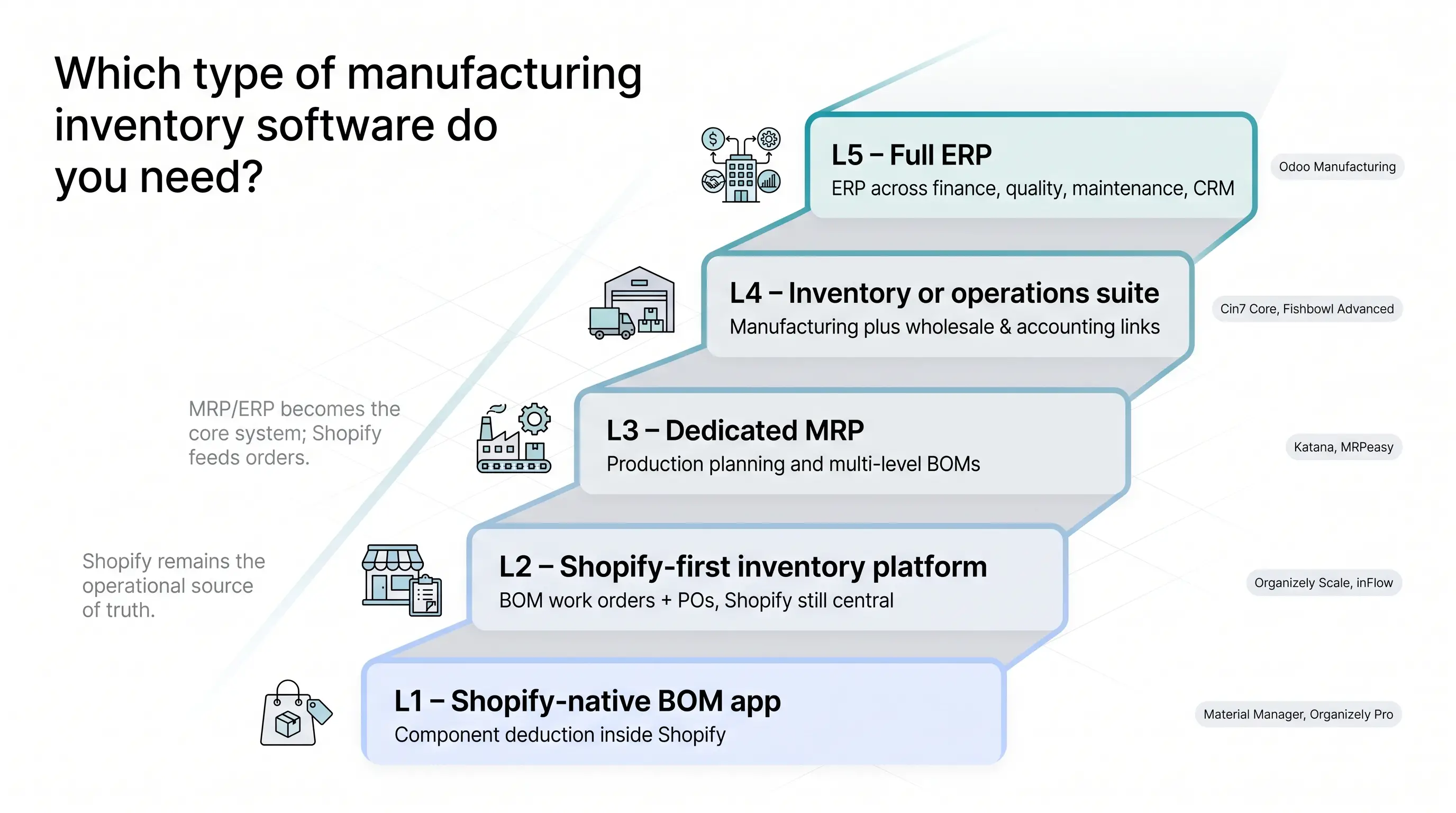
L1, Shopify-native BOM app.
Stay inside Shopify Admin and link components to finished SKUs. Ideal when you count ingredients in tens, not pallets. Examples: Material Manager, Organizely Pro.
L2, Shopify-first inventory platform.
Shopify remains the commercial heart, but you gain purchase orders, forecasting, and L2 BOM work orders in a separate dashboard. Examples: Organizely Scale, inFlow.
L3, Dedicated MRP.
Production becomes the core system; Shopify orders feed the MRP. Unlock finite-capacity scheduling, multi-level BOMs, and lot genealogy. Examples: Katana, MRPeasy.
L4, Inventory or operations suite.
Blend manufacturing with wholesale, accounting links, and warehouse scans. Best when you ship pallets to distributors and sync finance to QuickBooks. Examples: Cin7 Core, Fishbowl Advanced.
L5, Full ERP.
Add quality, maintenance, HR, and CRM on one database. Heavy to configure but unifies every department. Example: Odoo Manufacturing.
Ask yourself:
Match your answers to the rung. Test one product from that bracket, run a real build-and-ship week, and you’ll know within days whether the software fits.
Recommended reading: How Invoice Reporting and Analytics Improve Manufacturing
A vendor’s “yes, we have BOMs” can hide wide variation. Use this ladder to pin down real capability.
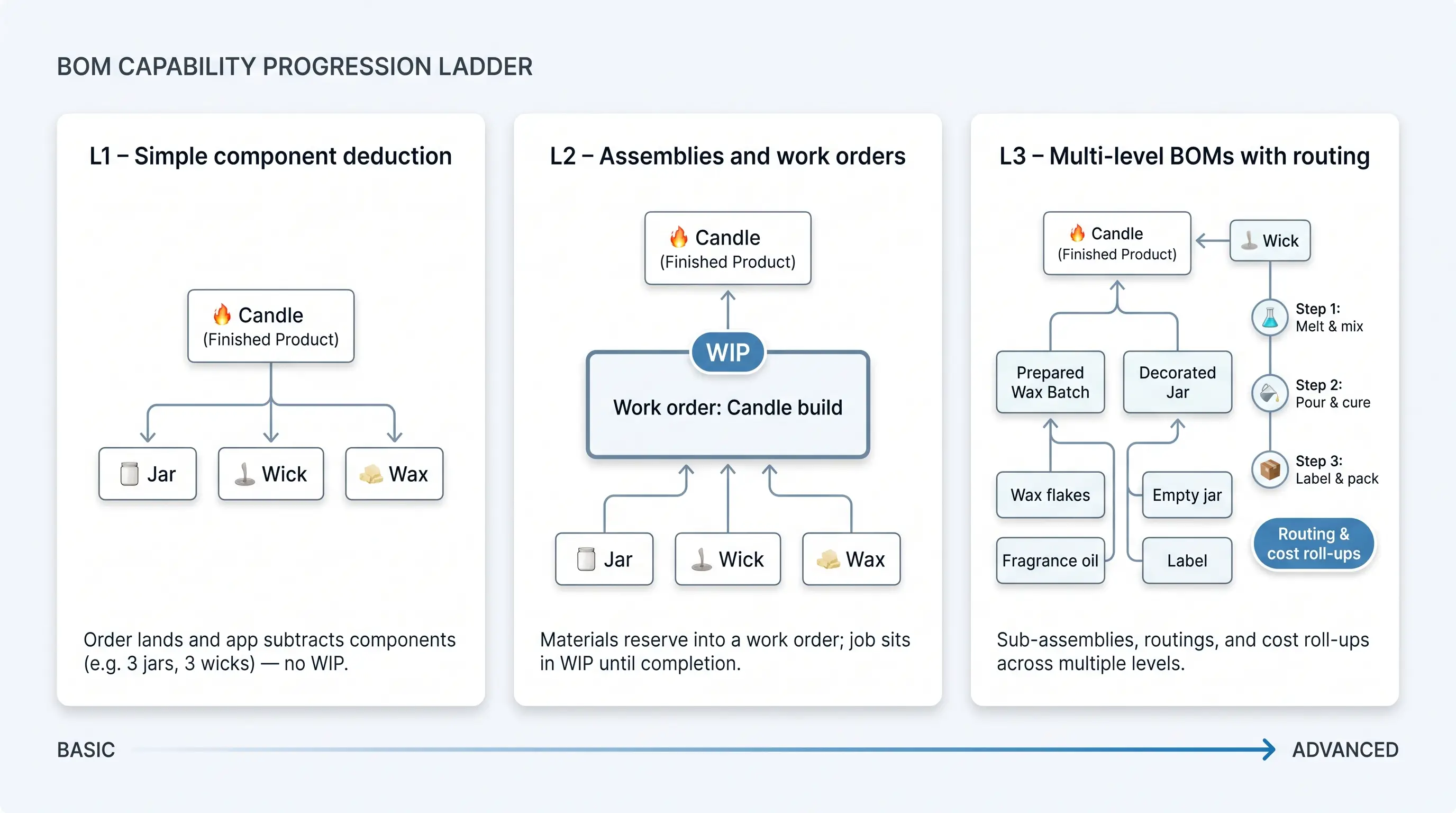
L1, simple component deduction.
A Shopify order lands, and the app subtracts three jars and three wicks, done. Fast but fragile when orders change or returns hit.
L2, assemblies and work orders.
You raise a build ticket, materials reserve immediately, and the job sits in WIP until completion. No double-selling; clearer shop-floor priorities. Tools: Organizely, inFlow, Katana Core.
L3, multi-level BOMs with routing.
Sub-assemblies roll into parent builds; routings break work into laser cutting, coating, final assembly, and cost roll-ups. Tools: MRPeasy, Cin7 Advanced Manufacturing, Odoo.
Beyond L3, look for: revision control, variable yield, co-products, disassembly, and substitutions.
When evaluating, ask every rep:
A good platform can show these answers live. A great one lets you run the scenario yourself before you swipe the card.
InvoiceAction automates invoice capture and PO-based matching, helping manufacturing teams identify discrepancies between supplier invoices, purchase orders, and receipts before payment.
Resolve exceptions faster, strengthen AP controls, and improve visibility into the true cost of purchased inventory.
Checkout looks simple, yet behind the buy button sits a maze that can derail even good inventory software. Stress-test these six edges before you sign.
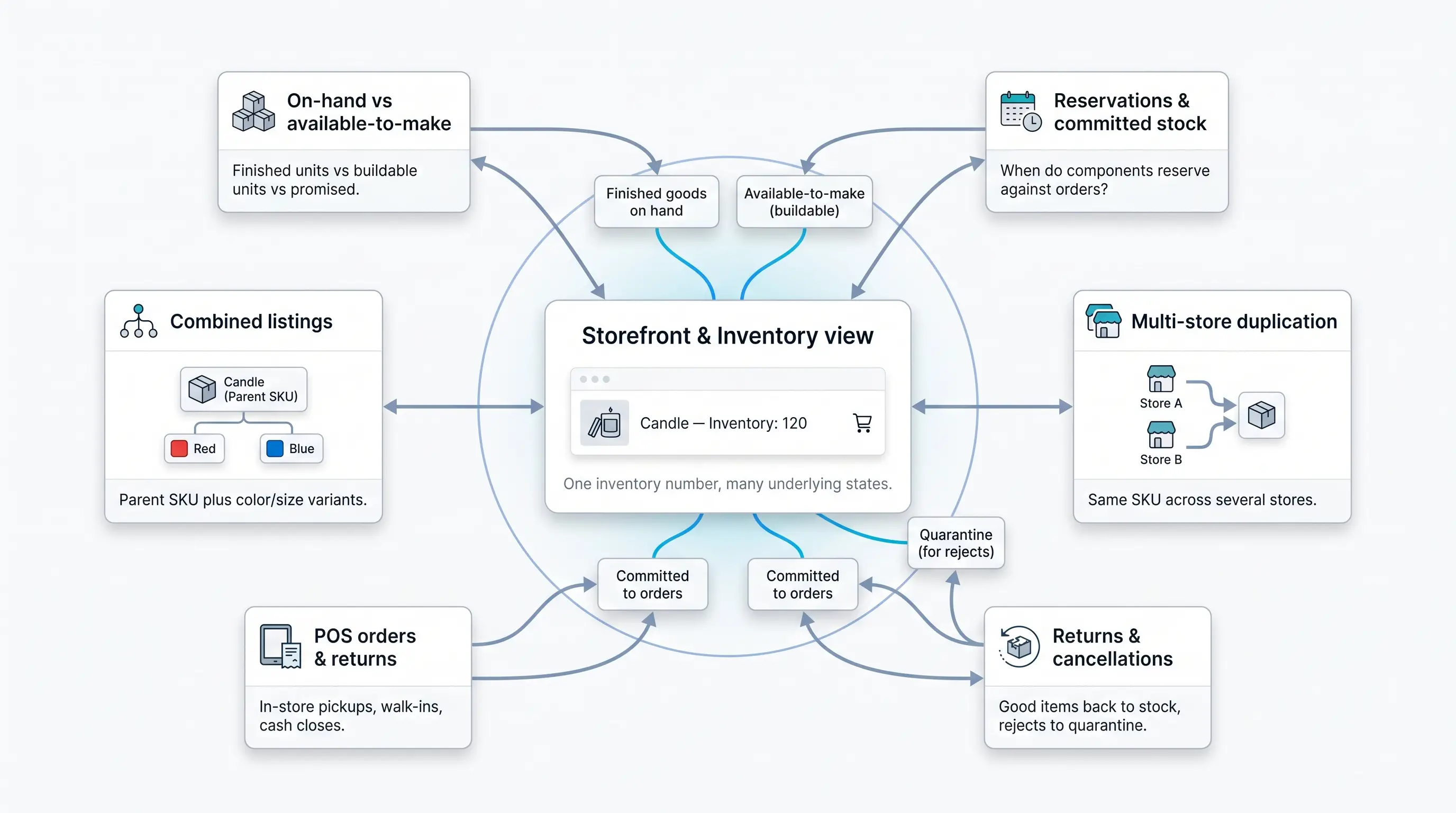
Shopify shows one number. Ask the vendor to break it into finished goods, available-to-make units, and already-promised quantities, then prove the connector can push available-to-make stock back without custom code.
Confirm whether components reserve the moment a customer pays or only when a work order launches. Two SKUs sharing one lid will expose any delay.
Run a live test with partial refunds to see whether good parts return to stock and rejects move to quarantine.
Check that in-store pickups, walk-in returns, and nightly cash closes adjust both finished items and components at the register.
Upload a sandbox product that merges colour variants. Many connectors update only the parent SKU, breaking inventory maths.
If you run several Shopify stores, test duplicate SKUs and cross-store reservations. Some apps de-duplicate automatically; others treat each store as a silo.
Run these dry runs now to avoid a holiday-rush meltdown later.
Even perfect inventory maths collapse if purchase orders sit in spreadsheets and supplier invoices linger unapproved. Your inventory platform should knit replenishment, receiving, and accounting into one traceable loop.
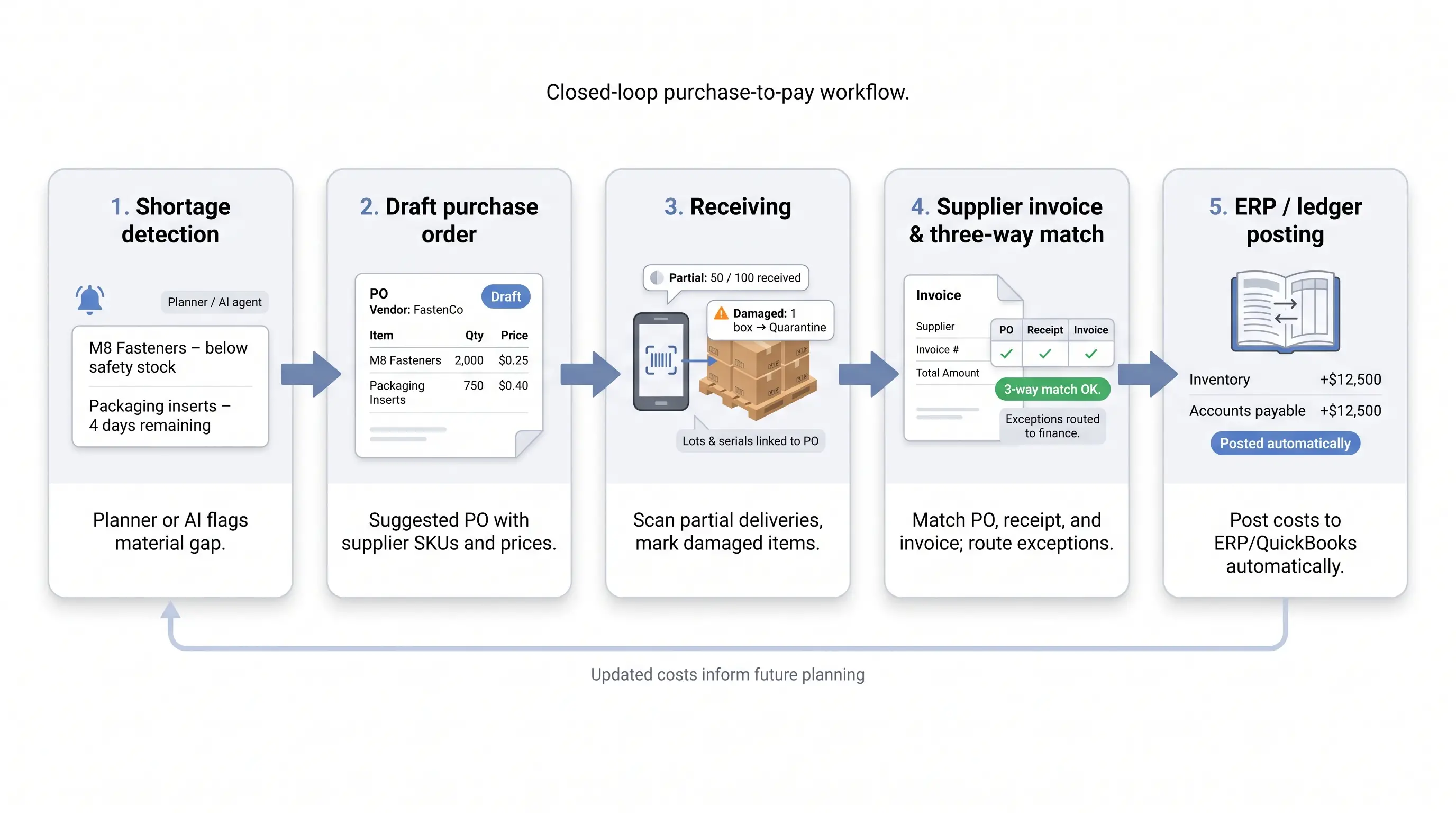
Ask every vendor to show, live:
If a platform nails these five checkpoints, you gain more than tidy stock, you lock in a closed cash loop that frees the team from reconciliations and last-minute write-offs.

OrderAction combines intelligent document processing, AI-driven data capture, validation, and ERP integration to automate sales orders before they reach inventory and fulfillment workflows.
Improve order accuracy, reduce processing time, and give operations teams cleaner data for downstream execution.
Four forces are reshaping how small manufacturers shop for inventory software. Treat each one as a demo question, not a headline.
In 2025 only 7 percent of supply-chain leaders said they captured real value from agentic AI, yet tools like Katana’s July 2026 release now draft purchase and manufacturing orders for single-click approval. Judge AI by how safely it shortens decision loops, not by shiny slide decks.
Classic models treat lost sales as zero demand. Modern systems adjust for censored demand so popular SKUs are not under-forecasted. Ask vendors how they correct for out-of-stock periods before they brag about accuracy.
What was once an enterprise warehouse feature, multi-bin locations, landed in Katana and several rivals in summer 2026. Bin-level reservations stop web orders from stealing stock the retail counter just scanned.
Vendors lead with a base fee, then charge extra for manufacturing, traceability, or warehouse packs. Build a bill of software materials, users, warehouses, serial tracking, API access, onboarding, before comparing a “$299” deal with “$49 per user.”
Track these trends now, and you will avoid migrating again in two years.
Recommended reading: ERP or Manufacturing Execution System: Which Is Better?
A free trial only pays off when you treat it like go-live, not a dashboard tour. Follow this repeatable script.
Work through this script and you will leave the trial with proof of fit, effort, and cost. Anything less is just a tour.
Percent claims like “30 percent fewer stockouts” sound good, but finance wants numbers tied to your own books. Use this four-step model.
Add subscription, users, extra locations, serial tracking, integrations, onboarding, and internal labour (data cleanup, training). Example: $24 000 software plus $6 000 internal labour.
Faster audits, happier operators, clearer demand signals, track them, but keep them in a separate column so finance can zero them if needed.
Annual net benefit = 14 000 + 4 000 + 6 000 + 2 000 to 24 000 to 6 000 =, 4 000
Here, payback misses the 18 to 24-month target, so adjust assumptions or negotiate price. If your numbers turn positive within two years, boards usually approve.
Show a best-case, conservative, and break-even view, and you will turn a tech wish list into a balance-sheet decision.
Nine platforms, and the real split is not how well any of them calculates a bill of materials. It is how much of your business you have to move to get it.
Odoo and Cin7 Core will run your manufacturing properly, and they expect to become the system of record while they do it. Orders, customers and stock move with them. For a shop already running on Shopify, that is a migration wearing the costume of a software purchase. At the other end, Material Manager stays inside Shopify and syncs components, and it stops where real work orders begin. Katana, MRPeasy, Fishbowl, inFlow and SOS Inventory each sit somewhere between those two, usually according to whether your accounting lives in QuickBooks and whether anyone on your floor scans a barcode.
The Stocky shutdown on 31 August 2026 forces the question sooner than most teams would choose, and it is worth separating the deadline from the decision. Picking the wrong platform in a hurry costs more than a few weeks without a stock app.
Two checks are worth more than any feature grid. Build one of your own products in a trial, with your real components and your real supplier lead times, and watch what the finished goods count does when you sell one. Then ask where the master record lives afterwards. If the answer is anywhere other than where you already run your business, price the migration honestly before you sign anything.
 What is Manufacturing ERP Software? All You Need to Know
 Manufacturing Execution Systems vs. ERP: Which One Is Right for You?
 Three-Way Match in Invoice Processing
 Inventory Tracking: AI-Powered Inventory Control
 How IoT and AI Are Revolutionizing Inventory Tracking Systems
 ERP Sales Order Automation for Streamlined Manufacturing
